
GPT-5-Codex gives you a special AI tool for coding. It can change the way you write code. If you make software, learn programming, or lead projects, this tool is important for you. New studies show that developers using AI coding helpers finish more work. They add code more often and run code more times. You get results faster, and your code stays good. You may see more changes or copied code, but you still get more done. AI tools like GPT-5-Codex help you work better and make coding easier.
Key Takeaways
GPT-5-Codex helps people code faster. It does things like making code, fixing mistakes, and checking code. This lets developers spend more time on creative ideas.
The tool works with many coding languages. It can manage big sets of code. This makes it good for new and skilled developers.
GPT-5-Codex changes how much work it does for each task. It works harder on tough jobs. This means you get better results and fewer mistakes.
Safety steps like sandboxing and automatic checks keep your coding safe. These features protect your work when you use the tool.
You can use GPT-5-Codex with GitHub and cloud services. This helps teams work together better and finish projects faster.
What is GPT-5-Codex?
AI Coding Tool
You use GPT-5-Codex as an advanced AI coding tool. This tool helps you with many programming tasks. You can ask it to write code, fix bugs, and review your work. GPT-5-Codex supports several languages, including Python, Go, and OCaml. You get help with building projects, adding new features, and testing your code. The AI understands your requests and gives you clear answers.
Here is a table that shows the main coding tasks GPT-5-Codex can do:
Task | Description |
|---|---|
Code Generation | Builds full projects from scratch and adds features and tests. |
Debugging | Finds and fixes bugs in your code. |
Code Review | Spots critical flaws, checks correctness by running code and tests, and reasons through dependencies. |
You see that GPT-5-Codex covers all the important steps in coding. You can rely on it for both simple and complex tasks.
Specialized for Developers
GPT-5-Codex is made for developers like you. It does more than just write code. You get support for agentic coding, which means the AI can handle long, multi-step tasks by itself. You do not need to guide it at every step. The tool can balance quick feedback with deep testing. You can send images or screenshots, and Codex will help with UI design or bug fixing.
GPT-5-Codex can work on long, complex tasks without stopping.
You get both fast answers and careful testing.
You can use images to show problems, and Codex will help you solve them.
Codex takes care of repetitive work, so you can focus on design and big decisions.
You see how GPT-5-Codex makes your workflow smoother. You spend less time on boring tasks and more time on creative work.
GPT-5-Codex also handles large codebases. You do not need to split your code into small pieces. The model has a 1 million token context window, so it can read and analyze big projects. For example, a fintech company used GPT-5 to find a race condition in five microservices. Human reviewers missed this problem for months, but Codex found it by tracing data flow and timing.
Here is a table that shows how GPT-5-Codex performs on coding benchmarks:
Benchmark | GPT-5 Performance | Previous Best | Improvement |
|---|---|---|---|
SWE-bench Verified | 74.9% | 54.6% (GPT-4) | +20.3% |
Aider Polyglot | 88% | 82% (o3) | -33% error rate |
You get better results and fewer errors when you use GPT-5-Codex.
Difference from GPT-5
You may wonder how GPT-5-Codex is different from GPT-5. Both use AI, but Codex is built for coding. GPT-5 is a general model for text, while Codex focuses on software engineering. You get special features with Codex, like agentic coding and dynamic thinking time. Codex can plan, test, and refine your code. It works on long workflows without your constant help. You get more autonomy and better results.
Here is a table that compares GPT-5-Codex and GPT-5:
Feature | GPT-5-Codex | Standard GPT-5 |
|---|---|---|
Focus | Engineering-focused, tuned for software workflows | General-purpose model |
Coding Capabilities | Optimized for agentic coding, can plan, execute, test, and refine | Mainly text generation |
Dynamic Thinking Time | Scales reasoning time from seconds to hours | Fixed short inference |
Autonomy | Handles long workflows without constant guidance | Limited autonomy |
Agentic Behavior | Runs tests, iterates on failures, prepares PRs | No specific engineering tasks |
You see that GPT-5-Codex gives you more power for coding. You get a tool that understands your needs as a developer. Codex helps you build, test, and improve your code faster and with fewer mistakes.
Key Features for Coding
Code Generation
You use codex to make code for many jobs. This ai tool can write hard scripts and set up databases with safe settings. You get answers fast, so you have more time for creative thinking. Codex changes how it works to fit your coding task. For easy jobs, it uses less power. For tough problems, it spends more time thinking and checking. You see codex working on long tasks for hours without stopping. Developers say codex gets things right the first time more often and handles big codebases better than older tools.
Tip: Codex lets you spend time on design and new ideas while it does the boring coding work.
Debugging Support
Codex helps you find and fix mistakes in your code. You can ask it to read real GitHub projects and give ideas for fixes. The ai makes debugging better by solving problems step by step. Codex solves about 74.9% of tasks on the SWE-bench Verified test, which is better than many other coding tools. You still need to check its work, but codex makes fixing bugs faster and easier.
Codex reads your code and spots mistakes.
It gives ideas for changes and explains them.
You get help with easy and hard bugs.
Code Review
The code review part in codex checks your code for mistakes, safety risks, and speed problems. Codex looks at how your code works and finds tricky cases. You get tips for making your code easier to read and fix. Codex knows common code problems in many languages. It gives clear reasons and suggests ways to make your code better. Codex can even write review notes and give new ways to solve problems. You should still use people to check important systems, but codex makes code review much quicker.
Feature | Codex | Other AI Coding Tools |
|---|---|---|
Code Review Accuracy | Fewer wrong ideas | Less useful feedback |
Responsiveness | Follows instructions well | Needs more help |
Token Efficiency | Uses fewer tokens for easy jobs | Uses more tokens |
Long Context Handling
Codex can work with very big codebases. You do not need to break your code into small pieces. The biggest context for codex is 400,000 tokens. You can handle large projects in one go. This feature saves you time and means you do not have to manage context in many steps. Codex looks through whole codebases and checks how they work by testing. It finds many problems every day before you even check the code.
Codex reads and checks big projects.
You get faster answers with less work.
Codex helps you keep your coding smooth.
Why Use This Tool?
For Beginners
You are new to programming and need help. Codex gives you simple answers and shows you each step. You can ask questions and get code examples for Python, Go, or other languages. Codex explains mistakes and helps you fix them. You do not have to worry about missing anything important. The ai makes learning easier and less stressful. You see yourself getting better and feel more confident as you solve problems with codex.
For Professionals
You work on hard coding projects and want a tool you can trust. Codex changes how much effort it uses for each job. You get quick answers for easy tasks and deeper checks for tough ones. The ai helps you review code and find mistakes that others might miss. You save time and make your work better. Codex uses dynamic resource allocation, so it spends more time on hard problems when needed. You get better feedback and fewer useless tips during code reviews.
Reason for Choosing GPT-5-Codex | Description |
|---|---|
Flexibility | GPT-5-Codex can change how much effort it uses, so it works well for both easy and hard coding jobs. |
Improved Code Review | Developers say Codex gives more helpful comments and fewer useless tips during code reviews. |
Dynamic Resource Allocation | Codex does not have a set effort limit, so it can spend more time on tough tasks when needed. |
For Teams
You work with other developers and want to work together easily. Codex helps teamwork by doing coding tasks and supporting real-time work. You can use codex in local terminals or cloud tools. The ai remembers your coding context, so you do not lose important details. Codex checks pull requests and finds big problems. Your team finds bugs faster and works better together. You see more work done and fewer problems in your workflow.
Note: OpenAI uses safety steps to keep your code safe. Codex runs automatic checks in secure containers and uses sandboxing to protect your work. You control network access and stop harmful tasks.
OpenAI has strong safety steps to lower risks from automatic code generation.
Model-level defenses stop harmful tasks and block prompt injections.
Sandboxing keeps code separate, lowering the chance of misuse.
You can set network access to control how the AI works, making things safer.
Automatic code checks run in temporary containers to boost safety and accuracy.
Productivity Boost
You want to finish more work in less time. Codex helps you complete coding tasks faster and with fewer mistakes. You spend less time making prompts and fixing bugs. Codex makes your work better and more accurate for different types of tasks. You see more success on the first try for code generation and better results for writing. Your team spends less time checking code and more time making new features.
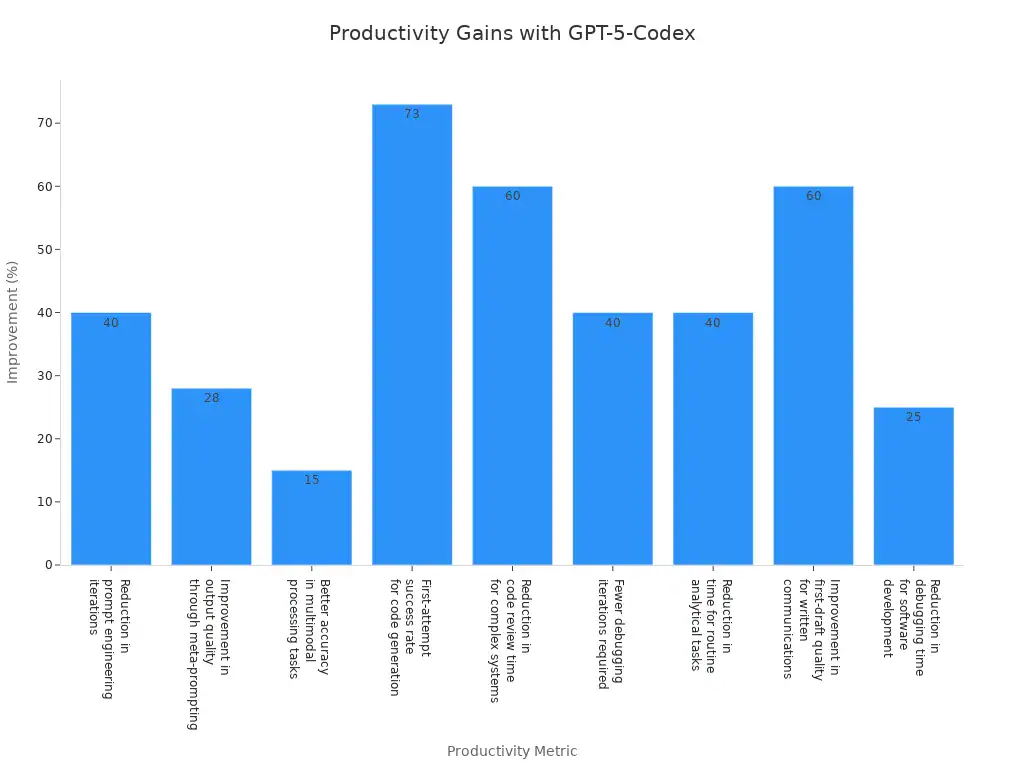
Metric | Improvement Percentage |
|---|---|
Reduction in prompt engineering iterations | 40% |
Improvement in output quality through meta-prompting | 28% |
Better accuracy in multimodal processing tasks | 15% |
First-attempt success rate for code generation | 73% |
Reduction in code review time for complex systems | 60% |
Fewer debugging iterations required | 40% |
Reduction in time for routine analytical tasks | 40% |
Improvement in first-draft quality for written communications | 60% |
Reduction in debugging time for software development | 25% |
You see codex helping you reach your goals faster. You get better at coding and your team works more efficiently with this ai tool.
Real-World Coding Scenarios
Automating Tasks
You can use ai-assisted programming to do many coding jobs. With gpt-5, you watch the tool work on hard projects by itself. It can write code, test it, and fix problems without your help. For example, you give one prompt, and the ai makes a full demo app. This can be a website, a game, or an interactive user interface. You see the ai build these projects fast and with few errors.
Example Description | Key Features |
|---|---|
Autonomous Engineering | Handles tough projects alone, keeps fixing bugs, and gives complete solutions over time. |
Demo Applications | Made from just one prompt, showing how fast it can build websites, front-end apps, games, and interactive UIs. |
You can look at a special group of demo apps made from one prompt.
The ai shows its skill by making websites, front-end apps, and games.
This way saves you time and helps you get more done. You spend less energy on boring coding and more on new ideas.
Reviewing Code
You can use ai to check your code and find problems quickly. The tool looks at your code and gives clear, helpful tips. Unlike regular reviews, gpt-5 codex changes how long it works on each job. It can change its steps to fit what you need. You get fewer wrong tips and more good advice. The ai also finds missing things, like Firestore indexes, and tells you how to fix them.
Feature | GPT-5 Codex | Traditional Code Review |
|---|---|---|
Feedback Type | Short and useful | Long and less focused |
Processing Time | Changes as needed | Set time for each review |
Quality of Comments | Fewer wrong tips, more helpful | More repeated comments |
Efficiency | Makes review much faster | Often takes a lot of time |
Adaptability | Fits your coding needs | Not easy to change for each user |
The ai changes to match your coding style.
You get quick answers for easy jobs and strong help for hard ones.
Cloud and GitHub Integration
You can link this ai tool with cloud platforms and GitHub. This helps you handle coding projects in different places. You get a smooth experience wherever you work. The tool helps with API lifecycle management, so you can design, fix, and test APIs with less work.
Integration Type | Description | Benefits to Developer Workflows |
|---|---|---|
Cloud Environments | Works with many cloud platforms. | Gives you the same experience in every setup. |
GitHub Workflows | Connects with GitHub for easy code management and teamwork. | Helps teams work together and deploy code faster. |
API Lifecycle Management | Works with Apidog for API design, fixing, and testing. | Cuts down on manual work and makes checking easier. |
You see better teamwork and faster code releases. The ai helps you keep your coding smooth and easy.
Getting Started with GPT-5-Codex
Accessing the Tool
You can use GPT-5-Codex in easy ways. The tool gives you choices for how to use it. You pick what works best for you. If you want simple features, sign up for a free OpenAI account. Log in to ChatGPT and pick GPT-5 from the list. If you need to use it more often, try ChatGPT Plus. This plan lets you use the tool more and get answers faster. For big projects or special features, ChatGPT Pro is best. It gives you unlimited use and lets you talk to the tool in real time.
Access Type | Features |
|---|---|
Free Access | Basic GPT-5, fewer messages each day, normal speed. |
ChatGPT Plus ($20) | More messages, faster answers, better access when busy. |
ChatGPT Pro ($200) | No limits, smarter answers, talk to the tool anytime. |
Pick the plan that fits how you work. Most developers start free and upgrade later.
Tip: You can add GPT-5-Codex to your browser. This helps you use it fast while coding online.
First Steps
Setting up GPT-5-Codex is quick and easy. Here are the steps:
Go to Settings and open Profiles.
Make a new profile and pick OpenAI.
Put in your API key and choose GPT-5.
Change how much detail you want in answers.
You finish setup in just a few minutes. You can change settings later if you want longer or shorter answers. The tool works with many coding platforms, so you can use it where you like.
Note: Keep your API key safe. Do not share it with anyone.
Now you are ready to start coding with GPT-5-Codex. Try out the features, make some code, and see how it helps you work better.
GPT-5-Codex is a tool that helps you code better and faster. You get more work done and learn new things easily. Your code looks good and works well. Many developers like using it and say good things about it. It works with tools like Visual Studio Code and GitHub.
Key Takeaway | Description |
|---|---|
Enhanced Coding Capabilities | Does easy and hard coding jobs for you |
Safety Measures | Uses strong safety steps to give good results |
Positive Community Reaction | Developers think GPT-5-Codex is a big improvement |
Workflow Integration | Works well with popular coding tools |
Keep exploring and try GPT-5-Codex. New features help you code with AI, find bugs faster, and learn more.
FAQ
What can GPT-5-Codex do for you?
GPT-5-Codex helps you write code, fix bugs, and review your work. You get support for many programming languages. The tool makes coding faster and easier for you.
Tip: Try using GPT-5-Codex for both small scripts and big projects.
What makes GPT-5-Codex different from other coding tools?
You get agentic coding, long context handling, and dynamic thinking time. GPT-5-Codex works on tough problems and large codebases. Other tools often miss these features.
Feature | GPT-5-Codex | Other Tools |
|---|---|---|
Agentic Coding | ✅ | ❌ |
Long Context | ✅ | ❌ |
What do you need to start using GPT-5-Codex?
You need an OpenAI account. You pick a plan that fits your needs. You set up your profile and enter your API key. You start coding right away.
Note: Keep your API key safe and private.
What safety steps does GPT-5-Codex use?
You get automatic code checks, sandboxing, and strong model defenses. These steps protect your code and lower risks. You control network access for extra safety.
What coding platforms work with GPT-5-Codex?
You use GPT-5-Codex with Visual Studio Code, GitHub, and cloud platforms. The tool fits into your workflow and helps you code anywhere.