You’ve probably noticed how computers keep getting smaller yet more powerful. The latest mini PCs of 2025 pack impressive technology into spaces smaller than a lunch box. Whether you’re setting up a home office, creating a gaming station, or just need a reliable computer that won’t clutter your desk, these tiny machines deliver surprising performance. From Intel’s Core i9 processors to AMD’s Ryzen 7 chips, these compact devices handle tasks that once required bulky towers. What makes these particular models stand out from all the rest?
KAMRUI GK3Plus Mini PC with 16GB RAM 512GB SSD (12th Gen N95)


The KAMRUI GK3Plus Mini PC is the perfect companion for space-conscious users who don’t want to sacrifice power for size. With its 12th Gen N95 processor that delivers 35% better CPU performance than previous models, you’ll breeze through daily tasks with ease.
You’ll appreciate the compact 5.1 x 5.1-inch footprint that fits almost anywhere, while still packing 16GB RAM and a 512GB SSD. The dual HDMI ports let you connect multiple displays at 4K resolution, making this tiny powerhouse ideal for work setups or entertainment centers. Plus, you can expand storage up to 2TB when you need more space for your growing digital collection.
Best For: Home office workers, students, and multimedia enthusiasts who need a compact yet powerful computer with multiple display support and expandable storage options.
Pros:
- Powerful 12th Gen N95 processor offers 35% better CPU performance than previous models, making it suitable for multitasking and moderate workloads
- Compact 5.1 x 5.1 x 1.96 inch design with VESA mount capability saves valuable desk space while allowing flexible installation options
- Extensive connectivity with dual HDMI ports (supporting 4K@60Hz), four USB ports, and multiple networking options (Gigabit Ethernet, dual-band WiFi, Bluetooth)
Cons:
- Limited to 16GB RAM with no apparent upgrade path for users who might need more memory for heavy workloads
- Bluetooth 4.2 is somewhat outdated compared to the current Bluetooth 5.2/5.3 standards found in newer devices
- No USB-C ports, which limits connectivity with modern peripherals and reduces future-proofing
GEEKOM Mini PC AX8 Max (AMD Ryzen 7 8745HS)

Power users seeking versatility without sacrificing performance will find their match in GEEKOM’s Mini PC AX8 Max. This powerhouse packs an AMD Ryzen 7 processor with 32GB of expandable RAM, delivering impressive speed for everything from office work to AAA gaming.
You’ll appreciate the innovative IceBlast 2.0 cooling system that keeps things quiet while you work. With three performance modes, you can switch between quiet operation for light tasks or release full power for demanding applications. The aircraft-grade aluminum build guarantees durability, while dual 2.5G LAN ports and the ability to connect four 8K displays make this mini marvel perfect for both home setups and professional workspaces.
Best For: Power users, content creators, and gamers seeking a compact yet powerful desktop solution that can handle everything from office productivity to video editing and AAA gaming.
Pros:
- Exceptional performance with AMD Ryzen 7 8745HS processor, 32GB DDR5 RAM, and advanced cooling system that maintains peak efficiency while reducing noise
- Impressive connectivity with dual 2.5G LAN ports, USB4, and support for up to four 8K displays makes it ideal for multi-monitor professional setups
- Highly versatile with three performance modes, expandable storage/memory, and aircraft-grade aluminum construction that ensures durability and longevity
Cons:
- At 5.21 pounds, it’s relatively heavy for a mini PC, which may limit portability options
- Premium features come at a higher price point compared to basic mini PCs with fewer capabilities
- May require BIOS adjustments to optimize performance modes and cooling settings for specific use cases
GMKtec Mini PC Gaming K6 AMD Ryzen 7 (32GB DDR5, 1TB SSD)

Gaming enthusiasts seeking desktop-level performance in a compact package will find their match in the GMKtec Mini PC Gaming K6. At just 4 x 4 x 2 inches, this tiny powerhouse packs an AMD Ryzen 7 processor with speeds up to 5.1GHz and integrated Radeon 780M graphics that rivals a GTX 1650 Ti.
You’ll love the 32GB of blazing-fast DDR5 memory and generous 1TB SSD that loads games in seconds. The K6 shines with its connectivity options too—featuring USB 4.0, triple 4K display support, and WiFi 6E. Whether you’re gaming, editing photos, or coding, this mini marvel handles it all while taking up minimal space on your desk.
Best For: Gamers, content creators, and power users who need desktop-level performance in a space-saving form factor with high-speed connectivity and multi-display support.
Pros:
- Powerful AMD Ryzen 7 7840HS processor and Radeon 780M graphics provide excellent performance for gaming and demanding applications
- Extensive connectivity with USB 4.0, triple 4K display support, dual 2.5Gbps LAN, and WiFi 6E
- Impressive 32GB DDR5 RAM and 1TB PCIe 4.0 SSD with expansion options for both memory and storage
Cons:
- At 3.48 pounds, it’s relatively heavy compared to other mini PCs, reducing portability
- Integrated graphics, while comparable to GTX 1650 Ti, may not satisfy hardcore gamers wanting to play the latest AAA titles at maximum settings
- Limited 1-year warranty might be concerning for a premium device in this price range
KAMRUI Essenx E1 Mini PC Computer with 16GB RAM, 256GB SSD

Compact yet powerful, the KAMRUI Essenx E1 offers everyday users a streamlined computing solution that won’t clutter your workspace. At just under 4 inches square, this mini marvel packs the Intel N97 processor that delivers 40% better responsiveness than earlier models.
You’ll appreciate the dual-monitor support through HDMI and DisplayPort connections, perfect for expanding your digital canvas. The 16GB RAM handles multitasking effortlessly, while the 256GB SSD provides quick access to your files. For those tight on space, the VESA mount option lets you attach it directly to your monitor, creating a cleaner, more efficient setup.
Best For: Individuals and businesses seeking a compact, space-efficient computing solution for everyday tasks, light multitasking, and dual-monitor setups in small workspaces.
Pros:
- Ultra-compact size (under 4 inches square) with VESA mount capability makes it perfect for clutter-free desk setups
- Versatile connectivity with dual display support, multiple USB ports, and reliable wireless capabilities
- Improved Intel N97 processor with 16GB RAM provides sufficient power for everyday computing tasks and smooth multitasking
Cons:
- 256GB storage capacity may be limiting for users with large media libraries or extensive software needs
- Not powerful enough for resource-intensive tasks like video editing or high-end gaming
- No USB-C ports which limits compatibility with newer peripherals and reduces future-proofing
GMKtec Mini PC Workstation with Intel Core i9 13900HK

The GMKtec K10 Mini PC Workstation stands out as a professional’s dream machine, packing the incredible processing power of Intel’s 13th generation Core i9 into a surprisingly small footprint. With 14 cores and 20 threads, you’ll breeze through demanding tasks that would make regular computers struggle.
You’ll appreciate the 32GB of speedy DDR5 RAM and the roomy 1TB SSD that loads programs in a flash. Connection options are plentiful too, with support for up to four displays—including an impressive 8K resolution option through the DisplayPort. The dual network options, including 2.5G Ethernet and WiFi 6, guarantee you’re always connected at top speeds.
Best For: Professionals who need workstation-level performance for demanding applications like video editing, 3D rendering, or software development but want a compact form factor that saves desk space.
Pros:
- Exceptional processing power with the Intel Core i9-13900HK (14C/20T) and 32GB DDR5 RAM capable of handling resource-intensive workflows with ease
- Impressive connectivity with quad-display support up to 8K resolution, perfect for professional multi-monitor setups
- Compact size combined with extensive expansion options (up to 12TB storage) and versatile ports including COM port for industrial applications
Cons:
- Integrated Intel Iris Xe graphics may not satisfy users needing dedicated GPU power for intensive 3D work or gaming
- Premium price point compared to regular mini PCs with less powerful specifications
- Fan noise might be noticeable under heavy workloads due to cooling requirements for the high-performance processor in a compact case
GEEKOM A9 Max AI Mini PC with AMD Ryzen AI 9 HX 370

Powerhouse performance comes in surprisingly small packages with the GEEKOM A9 Max AI Mini PC. This tiny marvel packs AMD’s Ryzen AI 9 HX 370 processor with 80 TOPS of AI power, making it perfect for both schoolwork and gaming. You’ll love how it handles popular games like Fortnite and Valorant at 1080p without breaking a sweat.
The IceBlast 2.0 cooling system keeps everything running seamlessly, while the impressive connectivity options, including USB4 and Wi-Fi 7, guarantee you’re ready for whatever the future brings. With support for up to 128GB RAM and 8TB storage, you won’t outgrow this mini PC anytime soon.
Best For: Students, gamers, and content creators who need powerful AI capabilities and multitasking performance in a compact desktop solution that doesn’t compromise on connectivity or expandability.
Pros:
- Exceptional AI performance with 80 TOPS and dedicated 50 TOPS NPU makes it future-proof for emerging AI applications and creative workflows
- Impressive cooling system with IceBlast 2.0 technology prevents thermal throttling during intensive tasks like gaming or rendering
- Extensive connectivity options including USB4, dual HDMI 2.1, and Wi-Fi 7 paired with massive expandability (up to 128GB RAM and 8TB storage)
Cons:
- Premium price point may be prohibitive for budget-conscious consumers seeking a basic desktop solution
- Despite advanced cooling, the compact form factor may still limit sustained performance compared to full-sized desktops for extremely demanding tasks
- Integrated Radeon 890M graphics, while capable for 1080p gaming, cannot match the performance of systems with dedicated high-end GPUs for AAA gaming at higher resolutions
GEEKOM IT13 Mini PC with 13th Gen Intel i9 (32GB RAM, 2TB SSD)

Professional creators and high-performance enthusiasts will find their perfect match in GEEKOM’s IT13 Mini PC, which packs desktop-level power into a frame smaller than a lunch box. The 13th Gen Intel Core i9 processor, with 14 cores and 20 threads, easily handles demanding tasks like video editing and gaming.
You’ll appreciate the generous 32GB of RAM and 2TB SSD, both upgradeable if you need more. Connectivity is impressive with WiFi 6E, Bluetooth 5.2, and six USB ports including dual USB4.0 that support 8K displays. The durable design withstands up to 440 pounds of pressure, and you’re covered by a solid 3-year warranty with responsive US-based support.
Best For: Professional content creators, high-performance computing enthusiasts, and multitaskers who need desktop-level power in an ultra-compact form factor.
Pros:
- Exceptional processing power with the 13th Gen Intel i9-13900HK (14 cores/20 threads) and 32GB RAM, making it capable of handling demanding tasks like video editing and gaming
- Impressive connectivity options including WiFi 6E, Bluetooth 5.2, and dual USB4.0 ports with support for multiple high-resolution displays up to 8K
- Highly upgradeable with expandable RAM (up to 64GB) and additional storage options, plus a robust 3-year warranty with responsive US-based support
Cons:
- Relatively high price point compared to larger desktop systems with similar specifications
- Integrated Intel Iris Xe graphics may not satisfy serious gamers who need dedicated GPU performance for the latest AAA titles
- At 3.47 pounds, it’s heavier than some competing mini PCs, which may affect portability for those frequently moving their setup
GMKtec Mini PC Computer with Ryzen 5 3500U, 16GB RAM 512GB SSD

Compact powerhouses like the GMKtec Nucbox G10 deliver impressive performance for budget-conscious users who don’t want to sacrifice computing power. With its AMD Ryzen 5 3500U processor, you’ll enjoy speeds up to 3.7 GHz—perfect for everyday tasks and light gaming.
You’ll appreciate the flexibility of 16GB RAM and 512GB SSD storage, both expandable for future needs. The Radeon Vega 8 graphics let you connect three displays simultaneously through HDMI, DisplayPort, and USB-C connections. Best of all, its 2.5GbE Ethernet delivers blazing-fast internet speeds, while the compact design allows you to power it with standard USB-C chargers or even power banks.
Best For: Home office workers, students, or casual gamers needing a space-saving PC with sufficient power for multitasking, content consumption, and light creative work.
Pros:
- Powerful AMD Ryzen 5 3500U processor with Radeon Vega 8 graphics handles everyday computing, video editing, and casual gaming efficiently
- Expandable RAM (up to 64GB) and storage (up to 16TB) provides future-proofing for growing computing needs
- Triple display support and 2.5GbE Ethernet offer excellent connectivity options for productivity setups
Cons:
- 12nm manufacturing process is older technology compared to newer mini PCs featuring more efficient 7nm or 5nm processors
- WiFi 5 rather than WiFi 6/6E means slightly slower wireless performance than cutting-edge alternatives
- Default 512GB SSD may fill quickly for users with large media collections or game libraries
GMKtec Mini PC Gaming with AMD Ryzen 7 PRO 6850H (M7)

Gamers who’ve been searching for a compact yet powerful solution will find the GMKtec M7 Mini PC hits the sweet spot between performance and size. The AMD Ryzen 7 PRO 6850H processor, coupled with Radeon 680M graphics (similar to a GTX 1050 Ti), delivers impressive gaming capability in an incredibly small package.
You’ll love the flexibility of the three performance modes, letting you choose between quiet operation or full power when you need it. With 32GB of DDR5 RAM and the ability to connect four screens simultaneously, you’re not sacrificing functionality for size. The Hyper Ice Chamber cooling system keeps everything running effortlessly without sounding like a jet engine, even during intense gaming sessions.
Best For: Gamers and professionals seeking a compact yet powerful PC with excellent multi-monitor support and the flexibility to balance between quiet operation and high performance.
Pros:
- Impressive integrated graphics (Radeon 680M) comparable to a GTX 1050 Ti, making it capable for moderate gaming without a dedicated GPU
- Excellent connectivity with four display outputs, dual 2.5G LAN, and an Oculink port for eGPU expansion
- Advanced cooling system with three performance modes allows users to prioritize quiet operation or maximum performance based on needs
Cons:
- 512GB base storage is relatively small for gaming and may require immediate expansion for users with large game libraries
- Limited upgradeability compared to full-sized desktops, particularly for graphics-intensive AAA gaming
- Single-year warranty is shorter than some competitors in the premium mini PC market segment
GMKtec M3 Plus Mini PC with Intel Core i9 12900HK
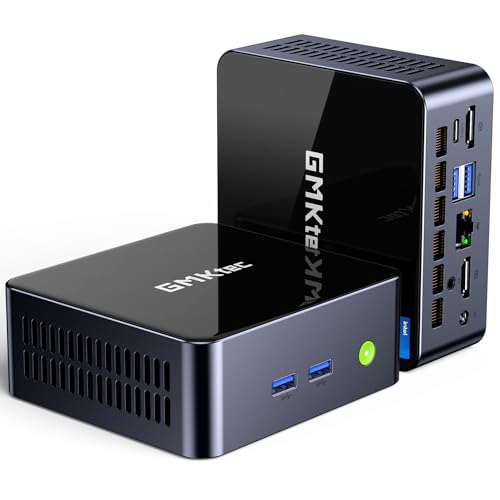
Power users seeking a compact workstation will find their perfect match in the GMKtec M3 Plus Mini PC. Its Intel Core i9 12900HK processor delivers impressive performance with 14 cores and speeds up to 5.0 GHz, outpacing both the 12900H and Ryzen 7 7840HS chips.
You’ll appreciate the 32GB RAM (expandable to 64GB) and 1TB SSD that can handle your most demanding applications. The triple 4K display support through dual HDMI and Type-C ports transforms your workflow, while Intel’s 2.5 Gbit/s Ethernet and WiFi 6 keep you connected at lightning speeds. The 1-year warranty gives you peace of mind for your investment.
Best For: Power users who need a compact yet powerful workstation for intensive multitasking, content creation, or programming with triple-monitor support.
Pros:
- Exceptional performance with Intel Core i9 12900HK (14C/20T) processor that reaches 5.0 GHz turbo speeds
- Extensive connectivity with triple 4K display support, 2.5 Gbit/s Ethernet, and WiFi 6
- Highly upgradeable with expandable RAM (up to 64GB) and storage options (up to 4TB plus additional drive support)
Cons:
- Intel Iris Xe Graphics may not satisfy serious gamers or those needing dedicated GPU power
- 1-year warranty is shorter than some competitors’ offerings
- 45W TDP processor may generate heat in the compact form factor during intensive tasks
Factors to Consider When Choosing a Mini PC
When you’re on the hunt for your perfect mini PC, you’ll want to weigh several key factors that affect your daily computing experience. Your processing power needs, memory requirements, and graphics capabilities will determine whether your mini PC breezes through tasks or struggles with demanding applications. The right connectivity options, combined with a size that fits your workspace, will guarantee your new compact computer serves you well for years to come.
Processing Power Needs
Selecting the right processing power for your mini PC in 2025 depends largely on how you’ll use it day-to-day. For basic tasks like web browsing and document editing, an Intel Alder Lake N95 running at 1.7GHz will serve you well. However, if you’re tackling demanding projects, you’ll want to take into account AMD Ryzen 9 HX chips that reach impressive 5.1GHz speeds.
Multi-core processors make a world of difference! An 8-core or 14-core CPU with up to 20 threads will handle multitasking beautifully. For gaming or creative work, look for integrated graphics comparable to NVIDIA GTX 1650 Ti or better. Don’t overlook RAM—16GB works for everyday use, while content creators might need up to 128GB. Also check the CPU’s TDP rating, as higher numbers usually mean better performance under pressure.
RAM and Storage Requirements
As your mini PC becomes the hub of your digital life, choosing the right memory and storage options will greatly influence your daily experience. For most users, 16GB of RAM handles everyday multitasking effortlessly, while creative professionals should aim for 32GB or more when editing videos or gaming.
Storage needs vary, but you’ll find most mini PCs offer SSDs ranging from 256GB to 2TB. When possible, select models with NVMe drives instead of SATA SSDs—they’re considerably faster and make your system more responsive. You’ll appreciate the difference when launching programs or transferring large files!
Look for mini PCs with upgradeable components. The ability to expand your RAM or add another storage drive later means your tiny computer can grow alongside your needs, saving you money in the long run.
Graphics Performance Capability
The powerhouse behind your mini PC’s visual prowess lies in its graphics processing capabilities. Whether you’re gaming, editing videos, or just working with multiple screens, your GPU makes all the difference.
Integrated graphics like AMD Radeon or Intel Iris Xe will handle everyday tasks and casual gaming just fine. However, if you’re tackling more demanding projects, you’ll want a mini PC with a dedicated GPU like NVIDIA GTX or AMD Radeon RX.
Most modern mini PCs support crisp 4K resolution, with many driving multiple displays simultaneously—perfect for spreading out your work. Don’t overlook cooling solutions, though! Effective thermal management keeps your graphics performing at their best when you’re pushing the system hard. Without proper cooling, even the most powerful GPU will slow down to prevent overheating.
Connectivity and Ports
Your mini PC’s connectivity options serve as its gateway to the digital world, determining how effectively you’ll interact with peripherals and networks. When selecting your compact powerhouse, examine both the quantity and variety of ports available. The best models offer multiple USB options—including USB 2.0, 3.0, and USB-C—giving you flexibility for all your devices.
For visual setups, look for mini PCs with HDMI, DisplayPort, or USB-C outputs that support dual or triple monitors. This capability transforms your tiny computer into a productivity hub! Don’t overlook networking features like dual Gigabit Ethernet ports for lightning-fast internet connections, or the latest Wi-Fi 6E and Bluetooth 5.3 for wireless freedom. Audio jacks and card readers round out the fundamental connectivity package, guaranteeing you’ll connect everything from headphones to memory cards without frustrating adapters.
Size and Form Factor
Three key dimensions define the mini PC environment: size, weight, and mounting options. You’ll find most mini PCs range from ultra-compact 4 x 4 inch designs to slightly larger 5.4 x 5.1 inch models. This tiny footprint makes them perfect for crowded desks or hidden setups.
Weight matters more than you might think! Mini PCs vary dramatically from lightweight 1-pound units to heftier 5-pound systems. If you’re planning to move your computer between locations, those extra pounds make a difference.
The VESA mount compatibility is truly a game-changer. You can attach your mini PC directly to your monitor’s back, completely freeing up desk space. When shopping, don’t forget to take into account cooling design—these small machines need effective thermal management to perform their best during intensive tasks.
Operating System Compatibility
Although many buyers focus primarily on hardware specs, operating system compatibility should be at the top of your checklist when selecting a mini PC. The OS you choose will determine which software you can run and how effortlessly your mini PC will perform day-to-day tasks.
Many 2025 models come with Windows 11 Pro pre-installed, offering improved features for both work and play. You’ll want to check if your mini PC supports multiple operating systems, as a dual-boot setup with Windows and Linux can give you incredible flexibility. Don’t forget to investigate driver availability too—some mini PCs might have limited support for certain hardware components. The best options provide the freedom to customize your operating system based on your needs, whether you’re coding, gaming, or simply browsing the web.
Cooling System Efficiency
While compact dimensions make mini PCs attractive for many setups, their small size creates considerable cooling challenges that shouldn’t be overlooked. When processors with high TDP ratings (45W or above) are squeezed into tiny cases, effective heat management becomes crucial for your system’s performance and longevity.
Look for mini PCs featuring advanced cooling technologies like heat pipes and multiple fans that optimize airflow. The best systems offer adjustable fan speeds, letting you enjoy quiet operation during web browsing or email, then ramp up cooling during intense gaming sessions. These cooling innovations aren’t just about preventing overheating—they’re what allows your mini PC to maintain peak performance during demanding tasks and even support overclocking for those extra frames in your favorite games.
Upgradeability Options
Most mini PCs offer surprising upgrade potential that you’ll appreciate as your computing needs evolve. Look for models with accessible internals that let you boost performance without buying an entirely new system. Many current mini PCs support RAM expansions up to 64GB or even 128GB, giving you plenty of headroom for future applications.
When examining storage options, check if the device allows for adding extra drives. The best models provide slots for additional M.2 or SATA SSDs, dramatically increasing your storage capacity. Some mini PCs even feature socketed processors that might support future CPU upgrades.
Don’t forget about external upgradeability too! Models with Thunderbolt ports can connect to expansion docks, adding extra USB ports, display outputs, and even external graphics cards for improved performance.
Final Thoughts
You’ve seen the incredible mini PCs that await in 2025! They’re not only small in size but mighty in performance. Whether you’re working from home, gaming, or just need a reliable computer that doesn’t take up space, there’s a perfect mini PC for you. With powerful processors, generous storage, and impressive RAM, these tiny powerhouses prove that great things really do come in small packages. Your next tech upgrade is calling!