Creating a coloring book for Amazon KDP is much faster than it used to be. With Book Masher, you can go from idea to formatted paperback files, cover assets, listing copy, and final KDP upload in a relatively short workflow.
This guide explains how to create an AI-assisted coloring book, prepare it correctly for Amazon KDP, and avoid the common mistakes that can slow down approval or reduce sales potential.
What Book Masher does for KDP coloring books
Book Masher is a book creation tool that can generate low-content and illustrated book assets, including coloring books. In this workflow, it handles much of the heavy lifting:
Theme-based book generation
Interior page creation
Front and back cover files
Text sections and copyright page
Amazon listing description and keywords
Paperback-ready export files
That makes it especially useful for self-publishers who want to focus on concept, positioning, and quality control rather than manual formatting.
Before you generate anything, choose a strong book concept
The most important creative decision is the theme. A generic coloring book is harder to position than one with a clear angle.
In the example workflow, the concept was built around hamsters in dreamlike scenes. That is a useful model because it combines:
A recognizable niche
A consistent visual subject
Room for many unique pages
A title and subtitle that can be marketed easily
How to brainstorm a marketable theme
Use a theme that has both visual variety and buyer appeal. Good prompts usually combine:
Main subject, such as hamsters, cats, unicorns, or vehicles
Setting or motif, such as dreams, travel, fantasy, seasons, or holidays
Tone, such as cozy, playful, cute, or whimsical
If you need help generating ideas, AI chat tools can be useful for brainstorming themes, title angles, and niche variations.
Set up the project in Book Masher
Once the concept is clear, create a new coloring book project and enter the main details.
The setup includes:
Book theme or prompt
Title, if you already have one
Subtitle, if needed
Author or pen name
Tone
Language
Page count
Book Masher can propose a title if you do not have one yet, and you can change it later.
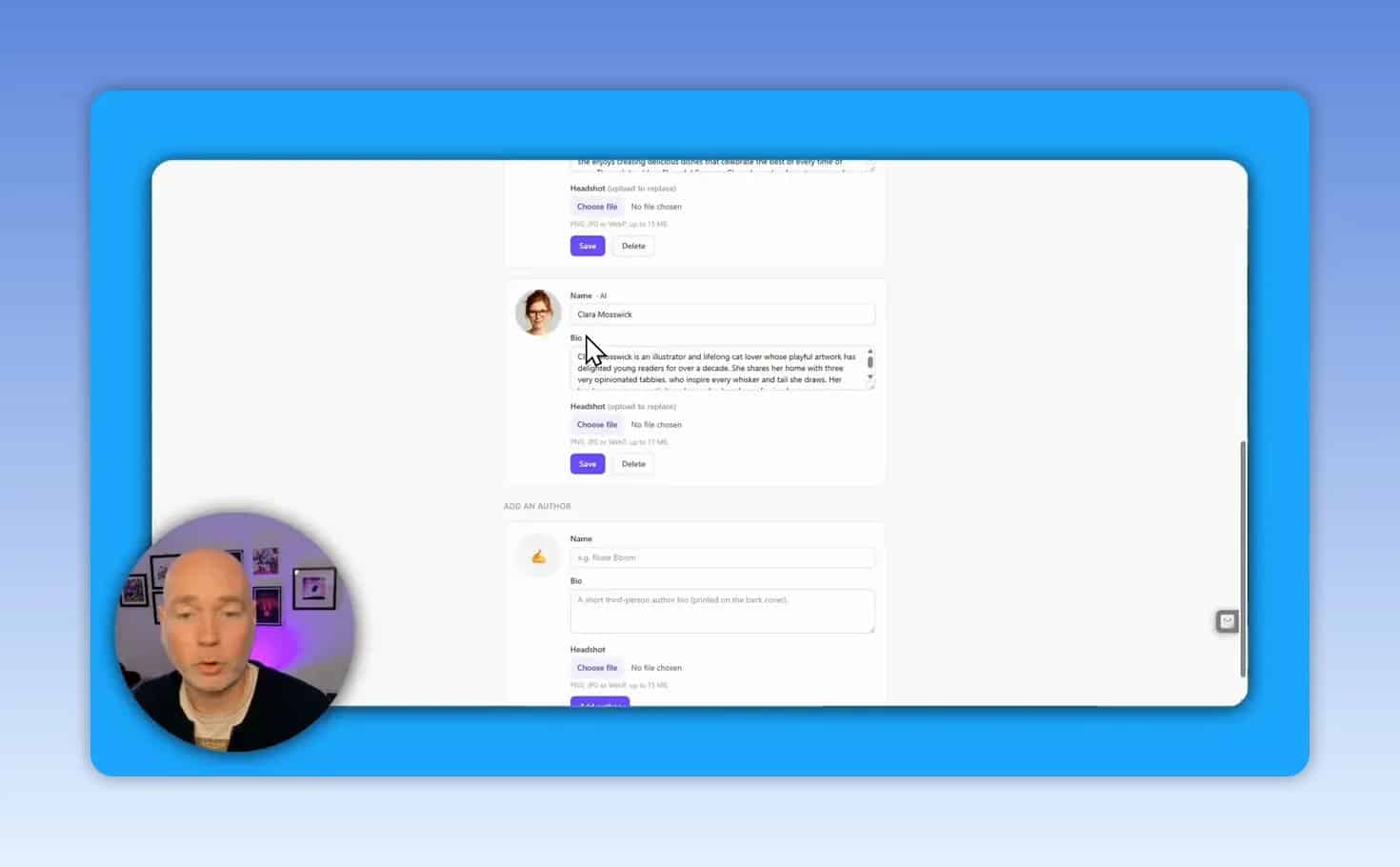
Author setup and pen names
If you are new to the platform, one of the first useful steps is creating an author profile or pen name. That helps keep your books organized and gives you a consistent byline for your KDP catalog.
Page count matters more than many beginners think
In the demonstrated workflow, 12 pages felt too thin for a paid coloring book. A higher page count made more sense for perceived value, and the project was expanded to 40 pages.
That is an important takeaway. A coloring book should feel substantial enough to justify its selling price.
Generate the book and expect a wait
After setup, Book Masher generates the book assets. This may take time, especially when many interior images are being created. In the example process, generating a 40-page book took roughly 40 minutes.
That generation time is not wasted time if you use it well. While the book is building, you can:
Set up or review your Amazon KDP account
Check competing coloring books in your niche
Think through categories and keywords
Prepare a title and subtitle refinement
Review the coloring pages carefully
When the project is finished, do not rush to export. Review the interior first.
The key checks are:
Are the images visually appealing?
Do the pages look unique rather than repetitive?
Is the main character or theme consistent?
Is there a good mix of simpler and more detailed designs?
Are there any weak pages worth replacing?
In the example project, the pages appeared unique and maintained a consistent hamster character throughout the book, which is a strong sign for a themed coloring title.
Can you regenerate individual images?
Yes. If a page is not good enough, Book Masher lets you redo individual images for a small credit cost. You can also upload your own image if you want more control over the result.
This is one of the most useful quality-control features because it helps you fix weak pages without restarting the entire project.
Edit the supporting text, blurb, and copyright page
Even a simple coloring book may include short descriptive text sections, a back cover blurb, and copyright information. These parts matter because they affect the final KDP upload and how professional the finished book looks.
Book Masher includes editable sections for:
Page text or section text
Back cover copy
Copyright page
Make sure the copyright page reflects your preferred details before exporting. If you want to include a note that the book was produced with Book Masher, you can leave that in place. If not, edit it.
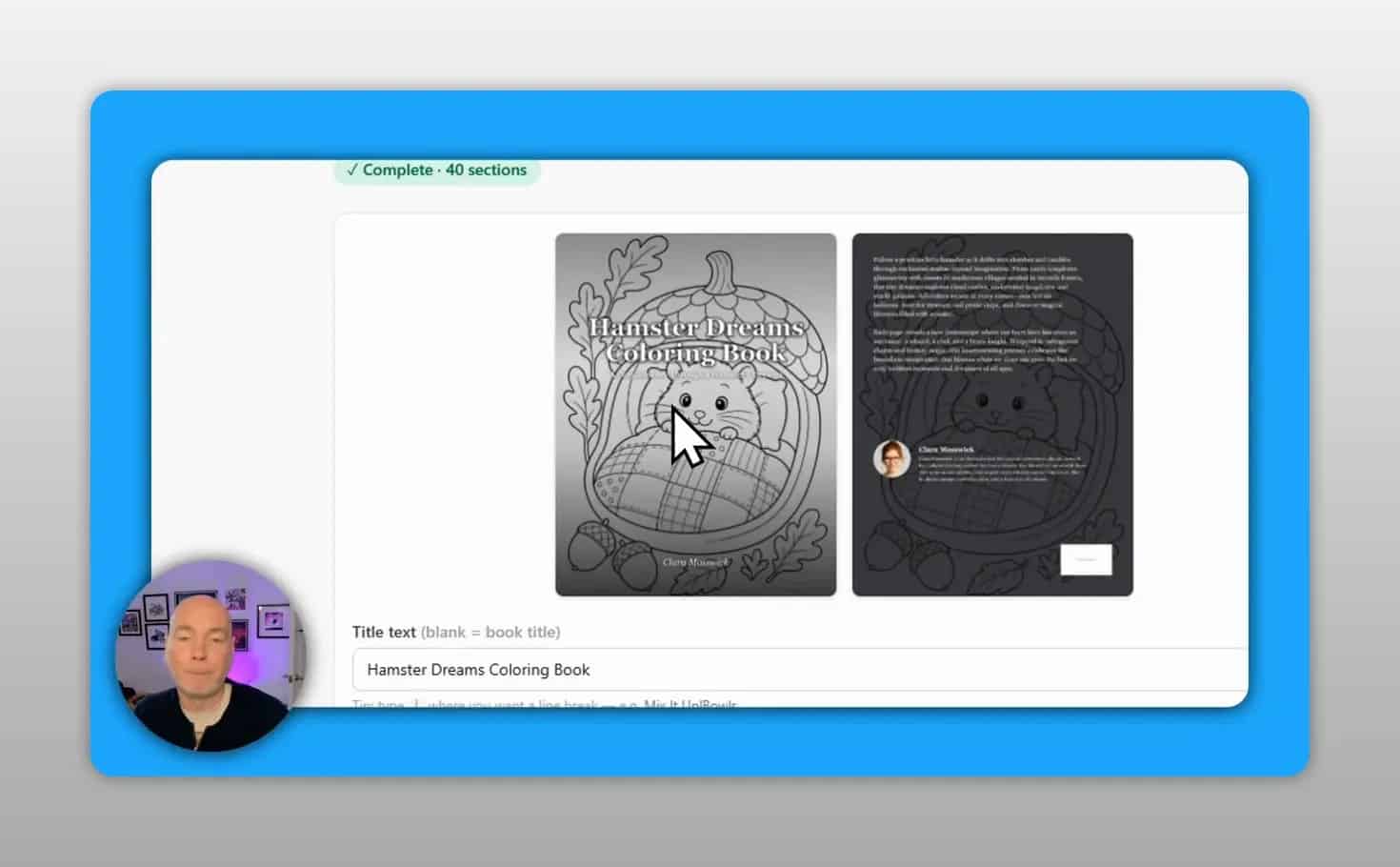
Customize the title and cover before export
A generated book is rarely at its best without at least a few cover adjustments. Book Masher allows edits such as:
Title text
Subtitle
Series text
Title position
Title size
Outline styling
Small changes can make a large difference in readability. In the example, the title was refined to clearly signal that it was a coloring book, and the title styling was adjusted for a stronger look.
What files to download
Before going to KDP, export the assets you need:
Interior PDF without covers
Full wrap cover PDF
Optional separate front cover and back cover files for review
For paperback on Amazon, the interior and the full wrap cover are the important files.
Use Book Masher to generate KDP listing copy and keywords
One of the most practical updates in the workflow is the ability to generate Amazon listing information directly inside the platform.
This includes:
Book description
Keywords
You could create these manually or with a separate AI tool, but using the built-in option keeps everything in one place and bases the copy on the actual project.
What to look for in generated keywords
Keywords should match the actual book. For a hamster-themed coloring book, relevant phrases would naturally center on the subject, format, and tone rather than broad unrelated terms.
If the generated keyword list looks too vague, revise it before using it in KDP.
How to upload the coloring book to Amazon KDP
Once your files are ready, create a new paperback project in KDP and work through the listing setup.
1. Enter title and subtitle
Copy the finalized title and subtitle into the paperback details page. If the book is not part of a series and has no edition number, those fields can be left blank.
2. Add author and contributor details
Select your author or pen name. If you want, you can also add yourself in another contributor role such as editor.
3. Paste the description
Use the description generated in Book Masher, then review it for clarity. Make sure it reads naturally and accurately describes the coloring experience.
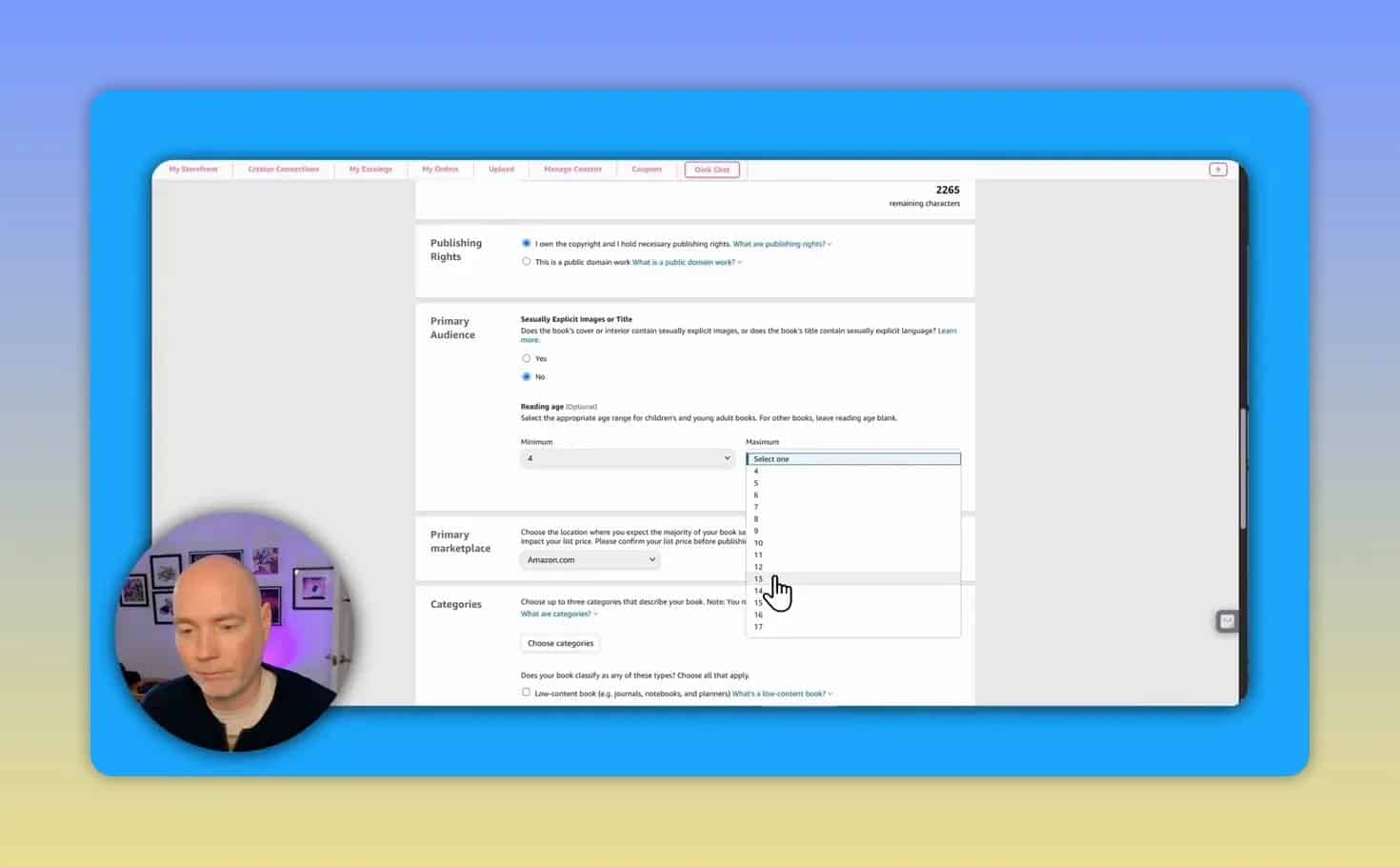
4. Answer publishing details
Complete the basic KDP setup such as publication status and audience guidance. Reading age can be optional, but if you use it, keep it realistic.
5. Choose categories
Category selection can take some searching. In the demonstrated process, three categories were selected, including one tied to hamsters, one related to activities, and one specifically related to coloring books.
This is a smart approach. Try to balance:
Topic relevance
Format relevance
Buyer search behavior
6. Add your seven KDP keyword fields
Paste the keyword suggestions into KDP. Make sure each field is relevant and not repetitive.
Paperback settings to use for a basic coloring book
For the sample workflow, the paperback production choices were:
Free KDP ISBN
Black and white interior
White paper
Trim size 8.5 x 11
Matte cover finish
These are common choices for a straightforward coloring book format.
Why 8.5 x 11 is a popular trim size
It gives plenty of room for coloring pages and matches buyer expectations for many activity and coloring books.
AI-generated content disclosure
KDP asks whether the book includes AI-generated content. In this workflow, the correct answer was yes, with AI used for images and some text sections.
Answer this honestly. Do not skip the disclosure.
Run the KDP previewer and check bleed safety
After uploading the manuscript and cover, launch the KDP preview. This is one of the most important steps in the whole process.
You should check:
The front cover and back cover display correctly
The barcode area is placed properly
Interior pages are in the right order
No page is cut off near the trim or bleed lines
The extra pages, such as contents or author pages, look intentional
In the preview, a bleed boundary line shows the safe printable area. If key artwork crosses too far into risky space, it may be trimmed in print.
Why the total page count may be higher than expected
If you generated 40 coloring pages, the final book can still have more than 40 pages once front matter or back matter is added. That is normal.
Should you order a proof copy?
KDP gives you the option to request a proof. If you want to physically inspect print quality, margins, and overall presentation, it can be worth doing.
If the digital preview looks clean and the project is simple, some publishers may choose to proceed without ordering a proof first. That decision depends on your risk tolerance.
How to price a KDP coloring book
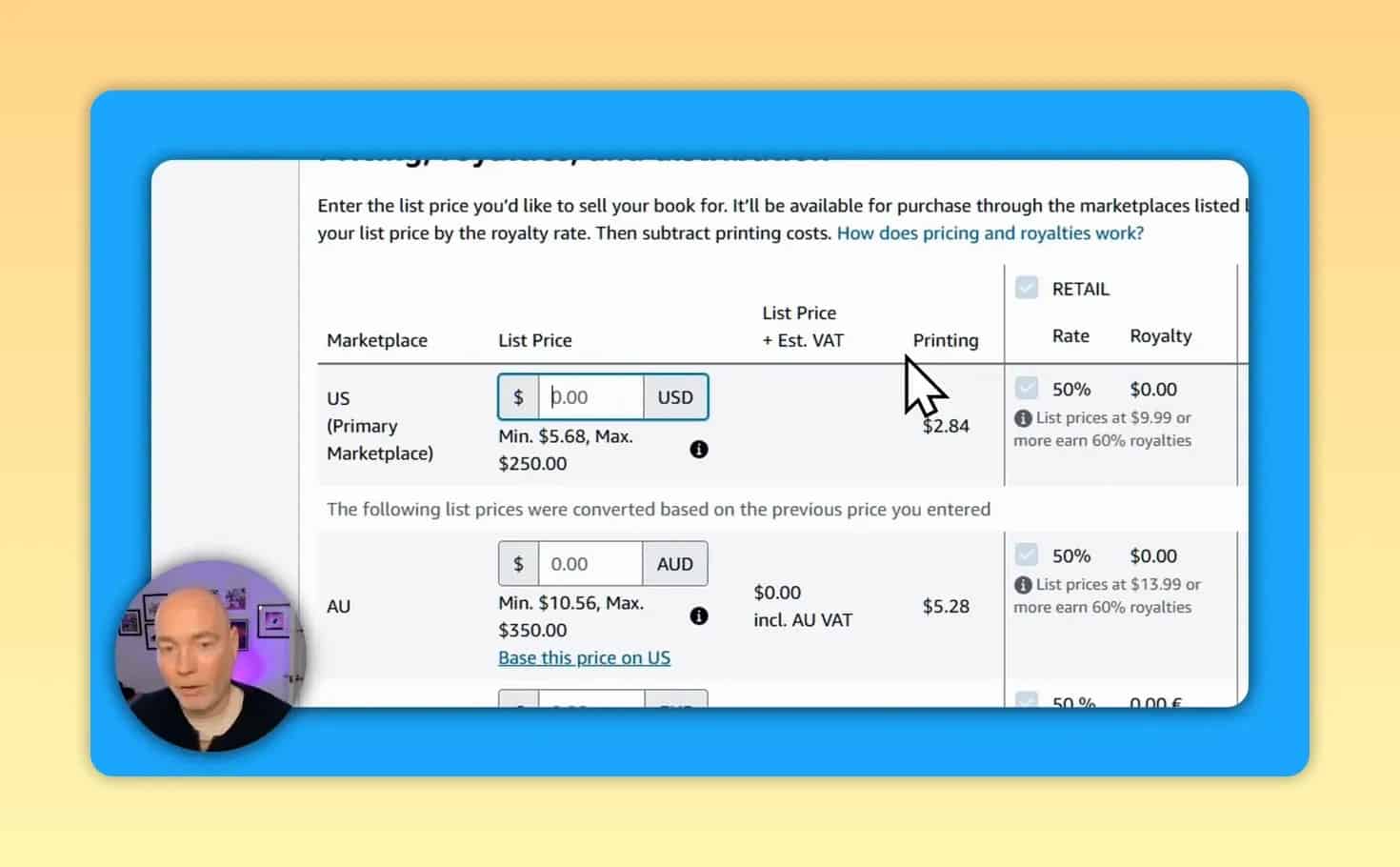
Pricing is a balancing act between market expectations, printing costs, and royalties.
In the example process:
The minimum price on KDP was above the lowest target price because of production economics
A test around $7.99 showed about $1 royalty per sale
Market research suggested many similar coloring books sit between $7 and $8
Books above $9 to $10 were less common in the niche being checked
Expanded distribution changes the minimum price
If you enable expanded distribution, the minimum price can increase. That is important because it may push your book above the price range that feels competitive for a coloring book.
So before you enable it, ask:
Will the higher minimum price hurt conversions?
Does the niche support a higher price point?
Is broader distribution worth the tradeoff?
A simple pricing framework
Check the usual price range in your niche.
Enter a price that stays competitive but leaves a reasonable royalty.
Review the printing cost impact.
Adjust later if sales are weak or the price feels too low.
How long does the whole process take?
A realistic estimate for this workflow is about 1 to 1.5 hours, but a big part of that can be generation time rather than active work.
The active tasks include:
Researching the niche
Choosing the theme
Reviewing and editing outputs
Uploading to KDP
Previewing and pricing
Common mistakes to avoid
1. Choosing a weak or vague theme
A broad idea without a distinct angle makes the book harder to market and more likely to feel generic.
2. Using too few pages
A very short coloring book may feel poor value at common KDP price points.
3. Skipping image review
Even if the output looks good overall, inspect for weak pages, repetition, or odd details.
4. Uploading without checking the previewer
The KDP previewer helps catch layout and trim issues before publication.
5. Picking categories too casually
Relevant categories can improve discoverability. Poor category choices can bury the book.
6. Pricing without market research
If your book is priced above what similar books usually sell for, conversions may suffer.
7. Ignoring AI disclosure requirements
If AI was used for images or text, disclose it correctly in KDP.
Is Book Masher worth using for low-content publishing?
For creators who want a faster way to build KDP coloring books, Book Masher can streamline several steps that otherwise require multiple tools. The biggest benefits shown in this workflow were:
Fast concept-to-book production
Consistent themed page generation
Editable text and blurb sections
Downloadable paperback-ready files
Built-in listing metadata generation
If you want to explore the tool itself, you can check Book Masher here.
Example of a finished hamster-themed coloring book
If you want to see what this kind of concept can look like as a live Amazon listing, here is the published hamster coloring book example.
Extra resources for KDP publishers
For official guidance on publishing requirements and paperback setup, Amazon’s own KDP Help pages are worth bookmarking.
Final takeaway
If you already have a niche idea, Book Masher can shorten the path from concept to published KDP coloring book. The real advantage is not just speed. It is having generation, editing, export, and listing support in one workflow.
The best results still depend on good research, a clear theme, careful page review, smart category selection, and sensible pricing. Use the tool to save time, but treat quality control as your job.