PandaStudio is a desktop app designed to bring screen recording, camera recording, video editing, podcast recording, captions, graphics, and AI-assisted production into one workflow. It is aimed at creators who want to produce software demos, talking-head content, short clips, and podcasts without constantly moving files between separate tools.
Its strongest appeal is convenience. You can record content, trim it on a timeline, edit through synchronized text, clean up audio, add captions and branded graphics, then export from the same workspace. It is still an evolving product, so there are important limitations to understand before relying on it for more advanced editing work.
What Is PandaStudio?
PandaStudio is an all-in-one desktop video production platform. It combines several tools that creators often use separately:
- Camera and screen recording for tutorials, demos, and presentations
- Timeline editing for splits, cuts, overlays, and clip arrangement
- Text-based editing for removing unwanted spoken sections through editable text
- Automatic captions with selectable caption styles
- Built-in graphics including title cards, lower thirds, transitions, and effects
- Audio cleanup and AI voiceovers
- Background removal and picture-in-picture layouts
- Podcast recording with a guest-link workflow
- AI integrations for optional generation and automation tasks
That combination makes PandaStudio particularly relevant for solo creators, product marketers, educators, and teams making recurring content. Instead of treating recording, editing, graphics, and clip production as separate jobs, the app is built around a single project workspace.
Who PandaStudio Is Best For
PandaStudio is a promising fit for people who need polished, practical content without requiring a deeply technical editing suite.
Software demo and tutorial creators
Screen-recorded walkthroughs often require cursor emphasis, zooms, captions, simple graphics, and cuts to remove mistakes. PandaStudio supports this kind of workflow with screen content, a timeline, text-based editing, and visual tools such as spotlight and blur.
Talking-head creators
For straightforward camera recordings, PandaStudio can add title cards, lower-thirds, captions, background treatments, and audio cleanup without needing separate motion graphics software.
Podcasters who also publish clips
The podcast area works as a recording hub. A host can share a guest link, record the session within PandaStudio, and move directly into editing afterward. This can be useful when a podcast episode also needs captions, branded clips, or shorter social-ready edits.
Creators replacing a patchwork of tools
The product is most compelling when the alternative is paying for separate recording, basic editing, captioning, graphics, and podcast tools. Its purpose is not simply to be another timeline editor. It is to centralize a broad creator workflow.
How Text-Based Editing Works
One of PandaStudio’s most practical features is the ability to edit a recording through its synchronized text. Rather than hunting through a long timeline for every false start, repeated phrase, or unwanted section, you can identify the relevant text, select it, and remove it.
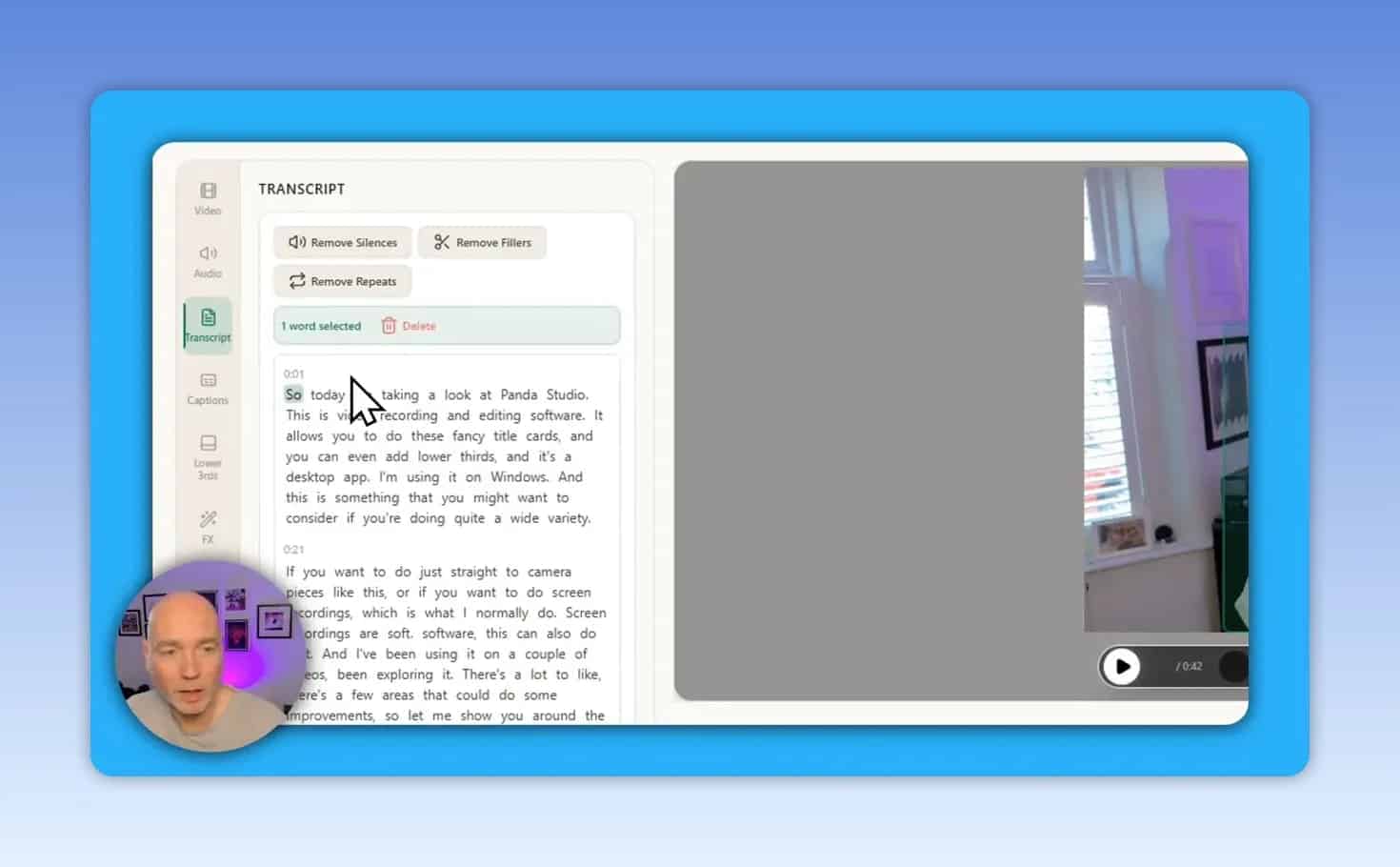
This approach is especially helpful for content with lots of spoken explanation, including tutorials, product walkthroughs, lessons, and interviews.
A practical editing workflow
- Record or import the footage. Start with a camera recording, screen recording, or podcast session.
- Review the synchronized text. Locate filler, mistakes, repeated statements, or sections that no longer belong.
- Delete unwanted sections. Remove the selected text to cut its matching portion of the recording.
- Make visual refinements on the timeline. Split clips, adjust the cut points, and arrange added assets.
- Add captions and graphics. Use captions, title cards, lower thirds, and other visual elements after the main cut is clean.
PandaStudio also includes options to remove silences and repeats. These can speed up a first pass, but every automated cut should be checked for pacing, clarity, and natural transitions.
One limitation to know before editing
The timeline does not currently provide a conventional audio waveform visualization. For many editors, waveforms are a fast way to spot pauses, speech, and silent gaps before playing the clip. PandaStudio’s text editing can compensate for some of that, but editors who rely heavily on waveform-based precision may find the timeline less efficient.
Captions, Title Cards, and Lower Thirds
PandaStudio includes a caption generator and a library of built-in visual elements. These are useful when the goal is to produce a professional-looking recording without designing every asset from scratch.
Automatic captions
Captions can be generated and displayed in different visual styles. They are useful for making spoken content easier to follow, especially in short-form clips and tutorial content. Check the timing and wording before export, as automated captions may still require a final correction pass.
Title cards and overlays
The graphics library includes title-card templates that can be used as overlays or as standalone intro elements. Color settings can be adjusted, allowing a template to fit more closely with an existing brand style.
Lower thirds
Lower thirds provide a simple way to introduce a person, identify a topic, or add context during a recording. PandaStudio includes multiple lower-third options, and their appearance can be adjusted within the editor.
When combining captions with large title cards or lower thirds, review the composition carefully. A graphic can overlap captions if both are placed in the same area of the frame.
Background Removal and Picture-in-Picture Layouts
Background removal lets you isolate a person from the original camera background and place them over a different color, image, or video. This can be useful for tutorials that need a presenter visible over screen footage.
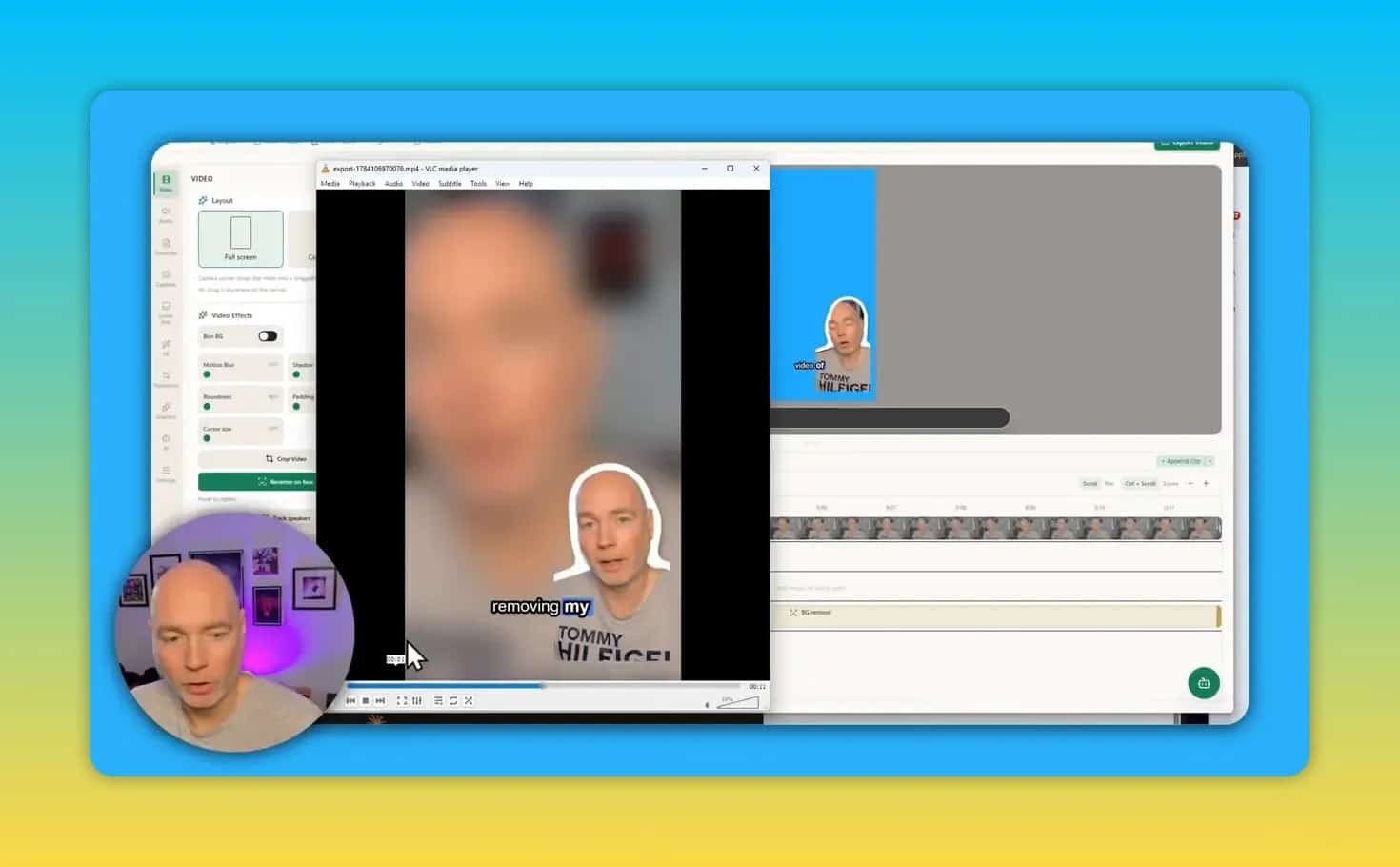
After removing the background, a creator can use a corner-camera layout and place screen content or another media asset behind the subject. PandaStudio can also accept an externally created video asset and add it to the project timeline.
The editing preview may look rougher than the finished output during background masking. The rendered result is cleaner than the real-time preview, so export quality should be evaluated before judging the final effect.
Current layout choices
The available layout options include:
- Picture-in-picture
- Side-by-side
- Podcast layouts for two people
These presets cover common use cases, but the current camera layout controls are more limited than those in dedicated screen-recording and presentation editors. If precise camera positioning, extensive framing styles, or highly customizable layouts are essential, test the available options first.
Screen Recording Tools: Zoom, Spotlight, and Blur
For software demonstrations, drawing attention to the right part of the screen is often as important as the recording itself. PandaStudio includes spotlight and blur effects for emphasizing or obscuring areas on screen.
These tools are useful in principle, particularly for highlighting a button, field, or menu. Blur is also important when sensitive information needs to be concealed.
However, there is a significant workflow consideration: spotlight and blur effects do not currently follow screen zooms and movement. If a recording zooms into a different area, an effect may remain in its original position rather than tracking the intended target.
Best practice: If you need to hide confidential information, avoid relying on a static blur while using zoom or pan effects. Review every moment where the screen framing changes, and consider breaking the clip into separate sections if necessary.
Audio, Music, and AI Voice Features
PandaStudio includes built-in audio cleanup, background music, and AI voiceover capabilities. Audio cleanup is a valuable inclusion for creators who need to improve spoken recordings without opening a separate audio editor.
As with any automated audio treatment, use the result as a starting point. Listen for unwanted artifacts, over-processing, or changes to voice clarity before publishing.
The platform also supports sound effects for graphics and other on-screen elements. Adjust effect volume carefully, since a pop or transition sound that seems acceptable in isolation can become distracting against speech.
AI Integrations and Generation Features
PandaStudio supports integrations with several AI providers and tools, including Claude, Codex, OpenClaw, and Hermes. These integrations are intended to make automation and AI-assisted production possible within the app.
Potential uses include creating motion graphics, assisting with editing tasks, generating short-form content from a longer clip, and producing thumbnails or graphics. The platform can also download and use a local AI model for certain graphics elements, such as animated cards and lower-thirds.
What may cost extra
Not every AI-related feature has the same cost model. Core functions that run locally can avoid separate per-use charges, but generating thumbnails or custom graphics through integrated AI API calls can require additional payment. Confirm the cost of any connected AI service before building it into a regular production workflow.
Use AI as assistance, not automatic approval
AI-assisted editing can reduce repetitive work, but it should not replace editorial judgment. Review generated clips, visuals, captions, and automated edits for accuracy, brand fit, timing, and context before exporting.
Podcast Recording in PandaStudio
PandaStudio includes a dedicated podcast recording area. The basic process is simple:
- Create or open a podcast session.
- Copy the guest link.
- Send the link to the guest.
- Join the session and record within PandaStudio.
- Open the finished recording in the editor for cleanup, captions, graphics, and export.
This is useful for creators who want recording and post-production in the same environment. It may reduce the manual handoff that typically happens between a meeting platform, recording service, editor, and caption generator.
PandaStudio Pros and Limitations
Key strengths
- Combines recording, editing, podcasting, captions, graphics, and AI tools in one desktop app
- Text-based editing makes it easier to remove spoken mistakes and unnecessary passages
- Includes built-in title cards, lower thirds, transitions, and effects
- Provides built-in audio cleanup, background music, and AI voiceover options
- Supports background removal and common picture-in-picture layouts
- Includes a podcast guest-link workflow that leads directly into editing
- Offers local AI model support for certain in-app graphic elements
Current limitations
- No visible audio waveform on the editing timeline
- Spotlight and blur do not currently track screen zooms or movement
- Camera layout options are relatively limited
- Some AI generation features can require paid API usage
- Preview quality for background removal can look rough before final rendering
Is PandaStudio a Good Alternative to Separate Creator Tools?
PandaStudio can be a strong all-in-one option for creators starting without dedicated editing software or for anyone trying to simplify a scattered content stack. Its combination of recording, text-based editing, captions, graphics, audio tools, podcast recording, and AI integrations covers a substantial portion of a typical content workflow.
It is less likely to replace a specialized tool for every advanced workflow today. In particular, editors who need highly refined screen-recording effects, complex camera placement, or effects that reliably track zoomed screen movement should evaluate those requirements closely.
The platform is actively evolving, with updates and feature additions already addressing feedback. That makes PandaStudio especially interesting for creators who value an integrated workflow and are comfortable using a product that is still expanding its capabilities.
Bottom Line
PandaStudio is best understood as a creator workspace rather than just a video editor. It offers a practical route from recording to finished content, with text-driven cuts, captions, graphics, audio cleanup, background removal, podcast recording, and optional AI assistance in one desktop application.
If your priority is reducing the number of tools involved in making tutorials, camera recordings, podcasts, and short clips, PandaStudio is worth considering. If you need advanced timeline precision and sophisticated screen-following effects, test those specific features before making it your primary production tool.