
Quick Answer
Squarespace overhauled its entire plan lineup in 2025, retiring the old Personal, Business, Commerce Basic and Commerce Advanced plans in favour of a new Basic, Core, Plus and Advanced structure with higher prices, especially on the Plus and Advanced tiers. Because Squarespace bills most customers annually, plenty of people who signed up just before or during that rollout are only hitting their first renewal at the new rates now, in 2026 — which is why “why did my Squarespace bill go up” is still a live question this year, even though the change itself dates back to 2025.
As of 2026, current annual pricing runs from $16/month for Basic up to $99/month for Advanced (roughly £12 to £79 for UK customers). Your renewal may look higher than that if your introductory discount expired, you’re on monthly rather than annual billing, or you’ve added domain and email services that bill separately from your plan.
Key Takeaways
- Squarespace replaced its old plan names and pricing with a new Basic, Core, Plus, Advanced structure in 2025 — independent pricing trackers put the increase at roughly 28-33% on the entry tiers and up to 90% on the Advanced tier versus the plans they replaced
- As of 2026, current annual pricing is Basic $16/mo, Core $23/mo, Plus $39/mo, Advanced $99/mo (roughly £12/£17/£29/£79 for UK accounts)
- Monthly billing costs noticeably more than annual billing across every tier — expect to pay 25-40% extra over a year if you’re not on an annual plan
- Introductory pricing often expires after the first billing cycle, causing sticker shock at renewal time
- Domain registration, Google Workspace email, and payment processing fees add to your base plan cost and bill as separate line items
- You can downgrade your plan before renewal if you’re not using advanced features like ecommerce or scheduling
- Annual billing locks in your rate for 12 months and is the single biggest lever most people have to reduce their Squarespace cost
- Alternatives like WordPress, Wix, and Shopify may cost less but require more hands-on management
- Checking your billing dashboard now helps you avoid surprises when your renewal date arrives
- Some legacy customers still have access to older pricing until they change plans or let their subscription lapse, but Squarespace doesn’t guarantee this indefinitely
Why Your Squarespace Renewal Costs More Than You Expected
Your Squarespace renewal probably costs more because the platform restructured its pricing in 2025, your promotional rate ended, or you’re comparing an old monthly bill to a new annual charge. Most users see the jump when their current term ends and the current rate kicks in for the first time.
Squarespace doesn’t always make pricing changes obvious. You might have signed up during a promotion, started on a monthly plan, or added services like a custom domain or business email without realising they bill separately. When renewal time comes around, the total can feel like a surprise.
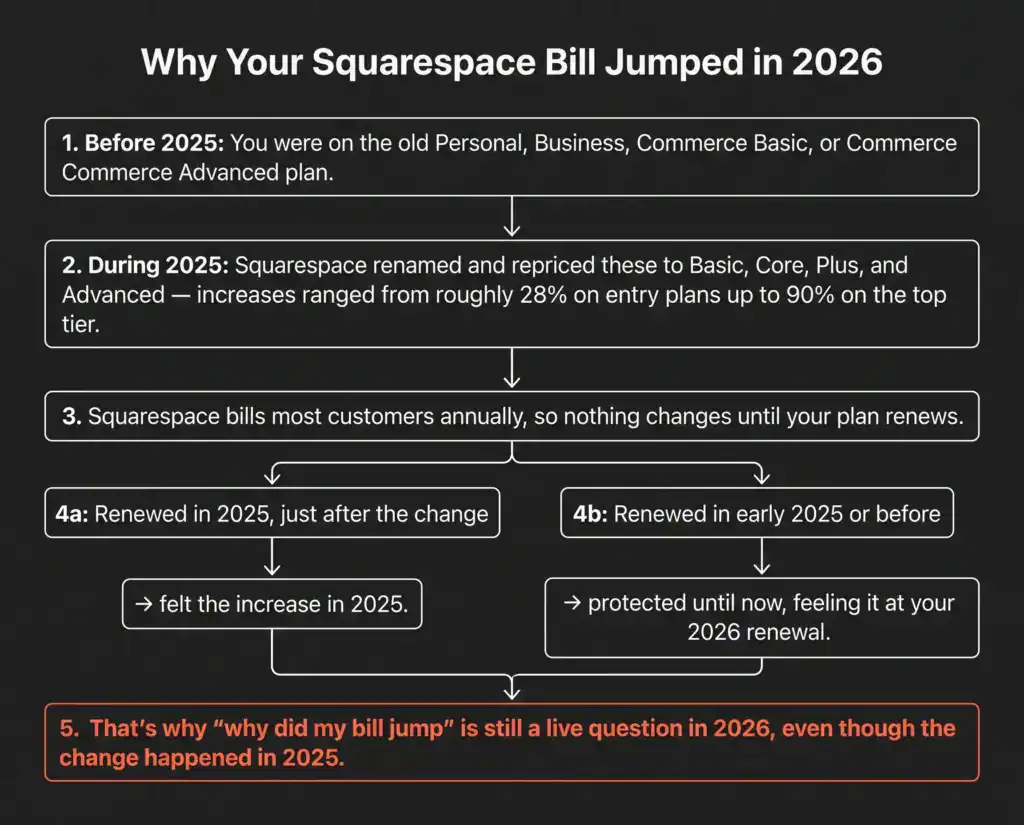
Here’s what typically drives the increase. First, Squarespace moved away from its old Personal, Business, Commerce Basic and Commerce Advanced tiers to the current Basic, Core, Plus and Advanced lineup, with materially higher prices on most tiers. Second, introductory offers expire after your first term. Third, monthly plans cost noticeably more than annual plans once you add up 12 months of payments. Fourth, add-ons like domain registration and Google Workspace email appear as separate line items on your bill rather than being folded into the headline plan price.
If you’re a small business owner running a shop, blog, portfolio, or service site on Squarespace, you need to know exactly what you’re paying for and whether the platform still makes sense at current prices. Let’s break down what changed, who it affects, and how to verify your actual costs before you commit to another year.
How Much Have Squarespace Prices Gone Up Since the 2025 Overhaul?
Squarespace retired its old Personal, Business, Commerce Basic and Commerce Advanced plans in 2025 and replaced them with the current Basic, Core, Plus and Advanced lineup. Independent pricing trackers estimate the increase at roughly 28-33% on the entry-level tiers, around 50% on the mid tier, and close to 90% on the top Advanced tier compared with the plans they replaced.
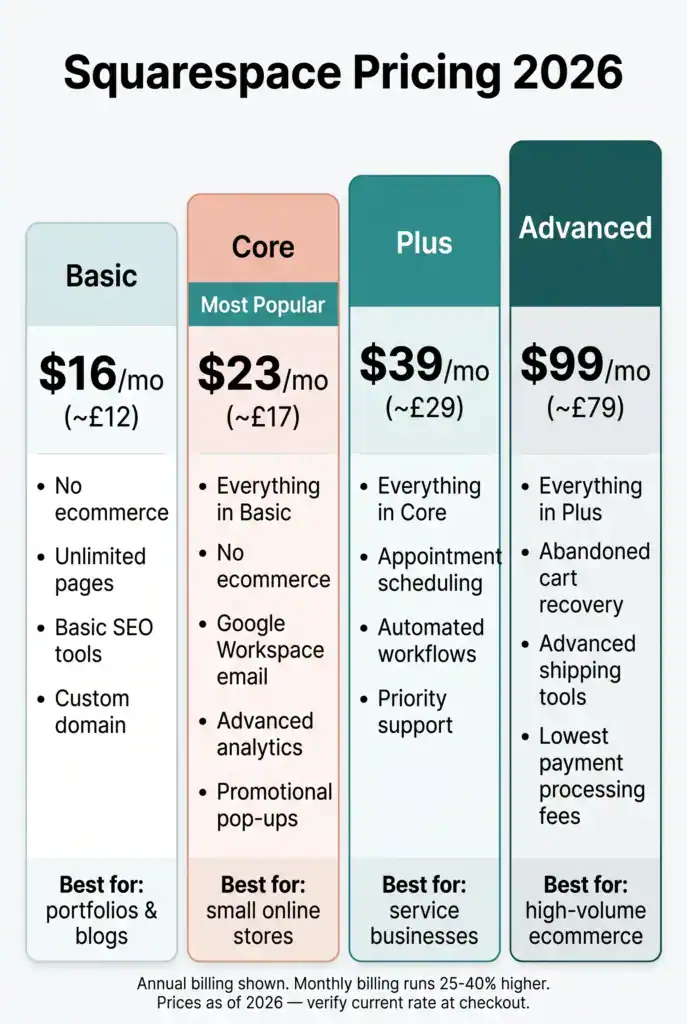
The change wasn’t just a price bump — Squarespace restructured its entire plan lineup, renaming tiers and redistributing features at the same time. That makes direct before-and-after comparisons messy, since the “new” Core plan isn’t a like-for-like swap with the old Business plan; it includes different features at a different price. Here’s the current 2026 line-up (all figures billed annually):
- Basic plan: $16/month annual (roughly £12/month for UK accounts) — replaced the old Personal plan
- Core plan: $23/month annual (roughly £17/month) — replaced the old Business plan, now the most popular tier since it includes ecommerce
- Plus plan: $39/month annual (roughly £29/month) — replaced the old Commerce Basic plan, aimed at service businesses with scheduling needs
- Advanced plan: $99/month annual (roughly £79/month) — replaced the old Commerce Advanced plan, designed for high-volume ecommerce sites
Because the rollout happened in phases through 2025 rather than on a single date, and because Squarespace bills most customers annually, the timing of when any individual account actually sees the new rate depends on when that account last renewed. Someone who renewed an annual plan in early 2025, just before the change, might not see the new pricing until their 2026 renewal — which is a big part of why this is still such an active topic this year rather than something that faded after 2025.
Annual billing still offers meaningful savings compared to monthly payments — expect to pay roughly 25-40% more over a year if you stay on monthly billing instead of switching to annual.
What Squarespace Plans Are Affected by the Price Increase?
All Squarespace plans carry higher prices than their pre-2025 predecessors, but the impact varies depending on which tier you use and when you signed up. Basic, Core, Plus, and Advanced plans all cost more than the plans they replaced, with the steepest percentage jump hitting the Advanced tier.
Basic plan users (formerly on the old Personal plan) saw a real but comparatively modest increase. This tier still limits you to basic website features without ecommerce, making it suitable only for simple portfolio, blog, or informational sites.
Core plan users (formerly Business plan subscribers) now pay more for what’s become the most popular tier, since it includes ecommerce, professional email via Google Workspace, and advanced website analytics. If you run a small online shop or an affiliate content site, this is likely your plan.
Plus plan users saw one of the biggest jumps. This tier targets service businesses that need Squarespace Scheduling, automated workflows, and priority support. If you don’t run a service business with appointments, you probably don’t need this plan.
Advanced plan users absorbed the steepest increase of all, roughly double the old Commerce Advanced rate. This tier makes sense only for high-volume ecommerce businesses processing significant monthly revenue, as it includes abandoned cart recovery, advanced shipping, and lower transaction fees.
The pricing change also affected add-ons. Domain registration still costs around $20-$70 per year depending on the domain extension, and Google Workspace email starts at roughly $6 per user per month. These fees stack on top of your base plan cost, so a Core plan with a domain and one email account can run noticeably higher than the headline plan price suggests.
When Does the Squarespace Price Increase Take Effect for Existing Customers?
The Squarespace price increase takes effect at your next renewal date, not immediately when the company changes its pricing. If you’re on an annual plan, you keep your current rate until your 12-month term ends. Monthly subscribers see the change within one billing cycle.
Squarespace typically notifies users about pricing changes ahead of renewal, though some users report shorter notice periods than they’d like. The notification arrives via email to the address on your account, so check your spam folder if you haven’t seen it. You can also log into your account dashboard and navigate to the billing section to see your upcoming renewal amount directly.
Here’s how the timing works in practice. If you signed up for an annual plan before the 2025 restructuring and haven’t changed anything since, you may still be paying your old rate right up until your current term ends — at which point your renewal invoice will reflect current 2026 pricing. If you renewed partway through 2025, after the new pricing rolled out, you’re likely already on the new rate and your 2026 renewal simply continues it (plus any further adjustment Squarespace has made in the meantime).
Monthly plans don’t offer the same buffer. If you’re paying month to month, Squarespace can adjust your rate with as little as one billing cycle’s notice.
The key date to watch is your renewal date, not the date Squarespace announces or rolls out a pricing change. You can find your renewal date by logging into your account, clicking Settings, then Billing, and looking for the “Next billing date” field. This tells you exactly when the current rate will apply to you.
Should I Renew My Squarespace Subscription Early to Avoid the Price Hike?
Renewing early only helps if Squarespace allows you to extend your current plan at your existing rate before a further increase takes effect. In most cases, you can’t prepay to lock in pricing beyond your current term, so early renewal won’t protect you from future increases indefinitely.
Squarespace doesn’t typically let you stack multiple years of service at your current rate. When you renew, you’re committing to one more annual cycle at whatever the current pricing is at that moment. If a price increase hasn’t hit your account yet, renewing now locks in your existing rate for one more year. If the increase already applies to your renewal, paying early just means you’re paying sooner, not less.
Here’s the decision tree. If your renewal date is coming up and current pricing hasn’t appeared in your billing dashboard yet, renewing immediately might save you money for the next 12 months. Log in, check your billing section, and look at the renewal amount. If it still shows your old rate, you can renew now and push any increase out by a year.
If the current rate already appears in your billing dashboard, early renewal doesn’t help. You’ll pay that amount whether you renew today or wait until your renewal date. In that case, use the time to evaluate whether Squarespace still fits your needs or whether you should explore alternatives.
One exception: if you’re on a monthly plan and considering switching to annual billing, do it sooner rather than later. Annual plans cost less per month than monthly plans, so locking in annual billing now gives you the best available price for the next year, regardless of what happens to headline pricing later.
How to Check My Current Squarespace Renewal Rate
Log into your Squarespace account, click Settings, then Billing, and look for the “Next billing date” and renewal amount. This shows exactly what you’ll pay and when, including your base plan, domain fees, email services, and any other add-ons.
Here’s the step-by-step process to verify your renewal cost:
- Log into your Squarespace account at squarespace.com and enter your credentials
- Navigate to Settings by clicking the gear icon in the left sidebar
- Select Billing from the settings menu
- Review your current plan listed at the top of the billing page, which shows your plan name and monthly or annual billing cycle
- Check the “Next billing date” field, which tells you when your renewal charge will process
- Look at the renewal amount displayed near the billing date, showing the total you’ll pay including all services
- Expand the billing details to see line items for your base plan, domain registration, Google Workspace email, and any other add-ons
- Compare the renewal amount to what you paid last time by scrolling down to your billing history
If the renewal amount looks higher than expected, check whether you added services during your current billing period. A custom domain costs $20-$70 per year depending on the extension, and Google Workspace email adds roughly $6-$18 per month depending on how many users you have. These charges appear as separate line items but bill together with your plan renewal.
You can also see whether you’re on a monthly or annual plan by looking at the billing frequency. Annual plans show a single charge once per year, while monthly plans bill every 30 days. If you’re on a monthly plan, multiply your monthly rate by 12 and compare it to the annual plan cost to see how much you could save by switching.
If your billing dashboard shows a higher rate than you remember, and you didn’t add any services, the 2025 pricing change has caught up with your account. You’re now paying the current rate, and your next renewal will continue at that level unless you downgrade or cancel.
Can I Switch to a Cheaper Squarespace Plan Before Renewal?
Yes, you can downgrade to a cheaper Squarespace plan at any time before your renewal date, and you’ll typically receive a prorated credit for the unused portion of your current plan. The credit applies to your next billing cycle, reducing what you owe when the new plan starts.
Downgrading makes sense if you’re not using the features that justify your current tier. For example, if you’re on the Core plan but don’t sell products or need ecommerce tools, dropping to the Basic plan saves you roughly $7/month (around $84/year at current 2026 rates). If you’re on the Plus plan but don’t use Squarespace Scheduling or need priority support, moving to Core cuts your cost by around $16/month (roughly $192/year).
Here’s how to downgrade:
- Log into your Squarespace account and go to Settings
- Click Billing and find your current plan details
- Select “Change Plan” or “Switch Plan” depending on your account interface
- Choose a lower-tier plan from the available options
- Review the prorated credit that will apply to your next bill
- Confirm the change and your new plan takes effect immediately
When you downgrade, you lose access to features exclusive to your old plan right away. If you’re moving from Core to Basic, you’ll lose ecommerce functionality, Google Workspace email integration, and advanced analytics. Make sure you’re not relying on any of these features before you switch.
The prorated credit works like this: if you paid for a full year of the Core plan and downgrade halfway through the term, Squarespace calculates the unused value of your current plan and applies it to the cost of your new plan. You won’t get a cash refund, but the credit reduces your next bill.
One common mistake is downgrading too late. If you wait until your renewal date to switch plans, you might get charged for the higher tier before the downgrade processes. Change your plan at least a few days before renewal to avoid paying for a full cycle of the more expensive plan.
Are There Any Squarespace Grandfathered Pricing Options?
Some Squarespace users on legacy plans still have access to older pricing, but only if they signed up before the 2025 restructuring and haven’t changed plans or let their subscription lapse since. Grandfathered pricing isn’t guaranteed and typically ends the moment you modify your account.
Grandfathered pricing works like this: if you subscribed to an old-style plan and kept your subscription active without switching tiers, you might still be paying that legacy rate. However, Squarespace reserves the right to move accounts to current pricing at renewal, and most legacy users saw the increase hit their accounts in 2025 or are seeing it now at their 2026 renewal.
The safest assumption is that grandfathered pricing is temporary. Even if you’re still on an old rate, your next renewal will likely reflect current pricing. Squarespace doesn’t publicly commit to maintaining legacy rates indefinitely, and the company’s terms of service allow for price changes with notice.
If you’re on a grandfathered plan and want to keep your rate as long as possible, avoid making any changes to your account. Don’t upgrade, don’t downgrade, and don’t switch between monthly and annual billing. Any modification can trigger a move to current pricing.
That said, clinging to an old rate might not be worth it if the current plans offer better features for your needs. The Core plan, despite costing more than the old Business plan, includes ecommerce and better SEO tools. If those features help you get more enquiries or sales, the extra cost can pay for itself.
What Happens If I Cancel Squarespace and Rejoin Later?
If you cancel Squarespace and rejoin later, you’ll pay whatever the current pricing is at the time you resubscribe, not the rate you had before. You’ll also lose your site content unless you export it before cancelling, and your custom domain may expire if you don’t transfer it to another registrar.
Cancelling to avoid a price increase rarely works out. Here’s what you lose when you cancel:
- Your website goes offline immediately if you’re on a monthly plan, or at the end of your billing period if you’re on an annual plan
- Your content stays in your account for a limited time but becomes inaccessible once your subscription fully lapses
- Your custom domain registration remains active until its expiration date, but you’ll need to transfer it to another registrar or let it expire
- Your email through Google Workspace stops working, and you’ll lose access to your inbox unless you migrate to a standalone Google Workspace account
- Any ecommerce data, customer lists, and order history become inaccessible, though you can export this data before cancelling
If you rejoin Squarespace after cancelling, you’ll start fresh at current pricing. There’s no way to reactivate an old account at a legacy rate. You’ll also need to rebuild your site from scratch unless you exported your content before cancelling and can reimport it.
A better approach than cancelling is to downgrade to the Basic plan if you want to keep your site live while minimising cost. At $16/month (roughly £12/month), it’s cheaper than most alternatives and keeps your content, domain, and SEO intact. You can always upgrade later if your business grows.
If you’re seriously considering leaving Squarespace, explore alternatives before you cancel. Moving to WordPress, Wix, or Shopify takes time, and you’ll want to have your new site ready before you pull the plug on your current one.
Squarespace Alternatives Cheaper Than Current Pricing
WordPress with managed hosting, Wix, Webflow, and Shopify all offer plans that can cost less than Squarespace’s current pricing on the mid-to-upper tiers, though each requires more hands-on management or technical skill. If price is your main concern, these platforms can sometimes save you $10-$30 per month depending on which Squarespace tier you’re comparing against.
WordPress with managed hosting costs roughly $15-$35/month through providers like Bluehost, SiteGround, or WP Engine. You get more flexibility and control than Squarespace, but you’ll need to manage plugins, updates, and security yourself. WordPress makes sense if you’re comfortable with a bit of technical work or if you want to hire someone to manage it for you — it also tends to offer more customisation and a wider range of SEO plugins than Squarespace.
Wix currently starts at $17/month for the Light plan and $29/month for the Core plan, which includes ecommerce. Wix is easier to use than WordPress but less polished than Squarespace. The drag-and-drop editor gives you more design freedom, but the platform can feel cluttered. Wix works well for small businesses that want a simple site without paying Squarespace’s premium.
Webflow costs from around $14/month for a basic site, with CMS plans running higher. It’s more powerful than Squarespace for custom design but has a steeper learning curve. Webflow appeals to designers and developers who want pixel-perfect control without writing code. If you’re not design-focused, the extra complexity isn’t worth it.
Shopify starts at around $39/month for ecommerce, which is roughly in line with Squarespace’s Plus plan. Shopify is purpose-built for online stores and offers stronger inventory management, shipping tools, and payment processing than Squarespace for anyone running ecommerce as their primary business.
Clixoni offers a done-for-you alternative that costs less than managing Squarespace yourself. You get a website, local SEO, email follow-up, and ongoing management without the hassle of learning a platform or paying for multiple tools. If you’re a small business owner who wants more enquiries without the headache, Clixoni handles everything from day one.
The trade-off with cheaper alternatives is that you’ll spend more time managing your site or pay someone else to do it. Squarespace’s higher price includes support, automatic updates, and a polished user experience. If you value your time and want a platform that just works, Squarespace might still be worth the cost. If you’re willing to learn a new tool or hire help, you can save money by switching.
Squarespace vs Wix Pricing Comparison in 2026
At current 2026 pricing, Squarespace costs slightly less than Wix at the entry tier but roughly the same at the mid tier, with Squarespace’s Core plan at $23/month versus Wix’s Core plan at $29/month. Both platforms include ecommerce, custom domains, and email marketing at their equivalent tiers.
Here’s how the two platforms compare across key tiers (annual billing):
| Feature | Squarespace Basic | Wix Light | Squarespace Core | Wix Core |
|---|---|---|---|---|
| Price (annual) | $16/month | $17/month | $23/month | $29/month |
| Ecommerce | No | No | Yes | Yes |
| Custom domain | Yes | Yes | Yes | Yes |
| Email marketing | Limited | Limited | Yes | Yes |
Squarespace tends to win on template polish and out-of-the-box design quality, while Wix’s editor gives you more granular control over layout and positioning — though that flexibility can feel overwhelming if you’re not design-savvy. For ecommerce, the two platforms are broadly comparable at the mid tier: both let you sell products, accept payments, and manage inventory, with similar transaction fee structures once you factor in payment processing.
Support is another difference. Squarespace offers 24/7 email support and live chat during business hours, while Wix provides similar coverage but with longer typical response times. Both platforms have help centres and community forums.
If you’re choosing between the two, pick Wix if price and layout control matter most to you and you’re comfortable with a more complex editor. Pick Squarespace if you want a polished, professional-looking site with less effort and don’t mind paying a small premium for the convenience.
Common Mistakes When Trying to Lock in Old Squarespace Pricing
The most common mistake is assuming you can prepay multiple years to lock in your current rate. Squarespace only allows one renewal cycle at a time, so you can’t pay for three years upfront to avoid future price increases.
Here are the other mistakes users make when trying to preserve their old pricing:
Switching from annual to monthly billing. If you’re on an annual plan at an old rate, switching to monthly billing moves you to current pricing immediately. Monthly plans don’t lock in rates, so you’ll pay the current price every month. Stick with annual billing if you want to delay any increase as long as possible.
Downgrading and then upgrading. Some users think they can downgrade to a cheaper plan, wait out a price increase, and then upgrade back to their original plan at the old rate. This doesn’t work. When you change plans in either direction, Squarespace applies current pricing to your account. You lose any grandfathered rate the moment you modify your subscription.
Letting your subscription lapse. If you cancel or let your subscription expire, you can’t reactivate at your old rate. When you rejoin, you’ll pay current pricing. Even if you reactivate within a few days, Squarespace treats it as a new subscription.
Ignoring renewal notifications. Squarespace sends email notifications about pricing changes and upcoming renewals, but many users miss them because the emails go to spam or an old address. Check your billing dashboard directly instead of relying on email. Log in at least a few weeks before your renewal date to see the exact amount you’ll be charged.
Assuming grandfathered pricing lasts forever. Even if you’re still on an old rate, Squarespace can move you to current pricing at any renewal. The company’s terms of service allow for price changes with notice, and most legacy users eventually see the increase. Don’t build your budget around keeping an old rate indefinitely.
Cancelling to avoid the increase without a backup plan. Some users cancel Squarespace in frustration when they see current pricing, only to realise they need to rebuild their site on a new platform. Cancelling without exporting your content, transferring your domain, and setting up a new site first means you’ll lose traffic, SEO, and customer trust. If you’re going to leave, do it strategically.
Is Squarespace Still Worth It in 2026?
Squarespace is still worth it if you value ease of use, professional design, and all-in-one convenience, but it’s no longer the obvious budget choice it once was. The platform works well for small businesses that want a polished website without hiring a developer, but cheaper alternatives now offer similar features on the mid-to-upper tiers.
Here’s when Squarespace makes sense at current pricing:
- You want a professional site fast. Squarespace templates look good out of the box, and you can launch a site in a few hours without design skills. If you need a website that builds trust quickly, Squarespace delivers.
- You don’t want to manage technical details. Squarespace handles hosting, security, updates, and backups automatically. You won’t deal with plugins, server issues, or SSL certificates. If you’d rather focus on your business than learn web development, the price buys you peace of mind.
- You need ecommerce and scheduling in one platform. The Core and Plus plans include online store features, appointment booking, and email marketing. Having everything in one place saves time and reduces the number of tools you pay for.
- You value support and reliability. Squarespace offers 24/7 email support, live chat during business hours, and a detailed help centre. The platform rarely goes down, and when issues arise, support responds quickly.
Here’s when Squarespace isn’t worth it:
- Price is your top priority. Wix, WordPress, and other platforms can offer similar features for less per month on certain tiers. If you’re on a tight budget and willing to learn a new tool, switching can save real money over a year.
- You need advanced customisation. Squarespace’s templates are polished but rigid. If you want pixel-perfect control over layout, fonts, and spacing, WordPress or Webflow give you more flexibility. Squarespace works best when you’re happy with its design constraints.
- You’re running a high-volume ecommerce business. Shopify offers stronger inventory management, shipping tools, and payment processing than Squarespace for dedicated online stores. If you’re processing hundreds of orders per month, it’s worth comparing Shopify’s plans directly against Squarespace’s Plus tier.
- You want a done-for-you solution. If you’d rather hand off your entire web presence to someone who manages it for you, Clixoni offers a better option. You get a website, local SEO, email follow-up, and ongoing optimisation without learning a platform or paying for tools you don’t use. It’s built for small business owners who want more enquiries without the hassle.
The bottom line: Squarespace is a good platform that got more expensive in 2025. It’s still worth it if convenience and design matter more to you than price. If you’re budget-conscious or need more control, explore alternatives before you renew.
How to Negotiate or Get a Discount on Squarespace Renewal
Squarespace rarely offers individual discounts or negotiates renewal pricing, but you can save money by switching to annual billing, using promo codes during signup, or taking advantage of seasonal sales. The platform doesn’t run a retention team that cuts deals for users threatening to cancel.
Here’s what actually works to reduce your Squarespace cost:
Switch to annual billing. If you’re on a monthly plan, switching to annual billing saves roughly 25-40% over the course of a year on most tiers. Check the exact monthly-vs-annual difference for your plan in your billing dashboard before committing, since it varies slightly by tier.
Use promo codes during signup or renewal. Squarespace occasionally offers promo codes through podcasts, YouTube channels, and affiliate partners. These codes typically give you 10-20% off your first year. Search for “Squarespace promo code 2026” before you renew to see if any active codes exist. Note that promo codes usually apply only to new signups, not renewals, but it’s worth checking.
Watch for seasonal sales. Squarespace runs sales around Black Friday, Cyber Monday, and other holidays, offering discounts on annual plans. If your renewal date falls near a major shopping holiday, wait a few days to see if a sale starts. You can let your subscription lapse briefly and reactivate during the sale, though this risks losing any grandfathered pricing if you have it.
Downgrade to a cheaper plan. If you’re not using the features that justify your current tier, downgrade before renewal. Moving from Core to Basic saves roughly $84/year at current 2026 rates. This isn’t a discount, but it reduces your cost without leaving the platform.
Contact support and ask. It rarely works, but some users report getting small discounts or free months by contacting Squarespace support and explaining their situation. The company doesn’t have a formal retention program, but support agents occasionally have discretion to offer credits. Be polite, explain your situation, and ask if any options exist to reduce your cost. Don’t expect much, but it’s worth a try.
Look for student or nonprofit discounts. Squarespace offers discounts for students and nonprofits, though the savings are modest (usually 10-20%). If you qualify, visit the Squarespace website and search for “student discount” or “nonprofit discount” to see current offers.
What doesn’t work: threatening to cancel, demanding a price match with competitors, or asking for a refund after renewal. Squarespace’s pricing is firm, and the company doesn’t negotiate like a cable provider. If you’re unhappy with the cost, your best option is to explore alternatives and switch platforms.
Overview of Squarespace Pricing Plans in 2026 (USD)
Squarespace offers four main pricing plans in 2026: Basic at $16/month, Core at $23/month, Plus at $39/month, and Advanced at $99/month (all annual rates). Each plan includes hosting, SSL security, and access to Squarespace templates, with higher tiers adding ecommerce, scheduling, and priority support. Monthly billing runs roughly 25-40% higher across the board — check the exact monthly figure for your plan at checkout, since it can vary slightly by region and promotion.
Here’s a quick breakdown of what each plan includes:
Basic plan ($16/month annual): Best for simple websites without ecommerce. You get unlimited pages, basic SEO tools, and a custom domain. This plan works for portfolio sites, blogs, or informational pages but doesn’t support online sales or advanced features.
Core plan ($23/month annual): The most popular tier, Core includes everything in Basic plus ecommerce, Google Workspace email integration, advanced analytics, and promotional pop-ups. You can sell products, accept payments, and manage inventory. This plan suits small businesses that need an online store or want professional email addresses.
Plus plan ($39/month annual): Designed for service businesses, Plus adds Squarespace Scheduling, automated workflows, and priority support. If you need clients to book appointments or consultations online, this plan includes the tools you need. It’s overkill if you don’t offer appointments or services.
Advanced plan ($99/month annual): Built for high-volume ecommerce, Advanced includes everything in Plus plus abandoned cart recovery, advanced shipping, and lower transaction fees. This plan makes sense only if you’re processing significant monthly revenue and need enterprise-level ecommerce features.
All plans include unlimited bandwidth, free SSL certificates, and access to Squarespace’s help centre and support. Annual billing saves you roughly a quarter to a third compared to monthly billing across all tiers.
Add-ons like domain registration ($20-$70/year) and Google Workspace email ($6-$18/month per user) cost extra and appear as separate line items on your bill. If you’re comparing Squarespace to alternatives, factor in these add-on costs to get an accurate total.
Squarespace Pricing in the UK (GBP) in 2026
UK customers are billed in GBP, and the headline monthly-equivalent rates are lower in pound terms than the US dollar figures you’ll see quoted on most American review sites. At last check, UK annual pricing runs roughly £12/month for Basic, £17/month for Core, £29/month for Plus, and £79/month for Advanced, with monthly billing running higher across every tier, in the region of £16-£89 depending on plan.
Treat these as indicative rather than exact — Squarespace adjusts regional pricing periodically and third-party trackers don’t always update in step with the live site. Before you commit, log into your account or visit Squarespace’s UK pricing page directly and check the figure shown at checkout, since VAT treatment and any active promotions can shift the final amount you’re charged.
Everything else in this guide — the plan features, the downgrade process, the renewal timing, the grandfathered pricing rules — works the same way for UK accounts as it does for US accounts. Only the currency and the exact numbers differ.
Free Trial and Promotional Offers in 2026
Squarespace offers a 14-day free trial that lets you build and preview your site before you pay. The trial includes access to all features, but you’ll need to choose a paid plan to publish your site and connect a custom domain.
The free trial gives you enough time to explore templates, add content, and test features like ecommerce and scheduling. You don’t need a credit card to start the trial, so there’s no risk of accidental charges. If you decide Squarespace isn’t for you, simply let the trial expire and your site won’t go live.
During the trial, you can build your entire site, upload images, write copy, and configure settings. The only thing you can’t do is publish the site to a public URL or connect a custom domain. Once you choose a paid plan, your site goes live immediately.
Squarespace occasionally offers promotional discounts, typically 10-20% off your first year. These promos run during major shopping holidays like Black Friday and Cyber Monday, and the company also partners with podcasts and YouTube channels to offer exclusive codes. Search for “Squarespace promo code 2026” before you sign up to see if any active offers exist.
Student discounts are available through platforms like UNiDAYS and Student Beans, offering 10-20% off annual plans. If you’re a student, verify your status through one of these services to unlock the discount.
Nonprofits and charities may qualify for discounted pricing, though the savings vary. Visit the Squarespace website and search for “nonprofit discount” to see current offers and eligibility requirements.
There’s no free Squarespace plan. Unlike Wix or WordPress.com, which offer limited free tiers, Squarespace requires a paid subscription to publish your site. The 14-day trial is the only way to use the platform without paying.
Does Squarespace Include a Free Domain?
Squarespace includes a free custom domain for the first year when you sign up for an annual plan. After the first year, domain renewal costs $20-$70 per year depending on the domain extension, and the fee appears as a separate charge on your bill.
The free domain offer applies only to new annual subscriptions. If you’re on a monthly plan, you’ll pay for your domain from the start. Common domain extensions like .com, .net, and .org are included in the free offer, while premium extensions like .io or country-specific domains may cost extra even in the first year.
When your first year ends, Squarespace automatically renews your domain and charges your payment method. The renewal fee depends on the domain extension: .com domains typically cost around $20/year, while less common extensions can run $40-$70/year. You’ll see the domain charge as a separate line item on your billing statement, distinct from your plan cost.
If you already own a domain through another registrar like GoDaddy or Namecheap, you can connect it to your Squarespace site without transferring it. You’ll keep paying your current registrar for domain renewal, and Squarespace won’t charge you for a domain. Connecting an external domain requires updating DNS settings, which Squarespace’s help centre walks you through.
You can also transfer an existing domain to Squarespace if you prefer to manage everything in one place. Domain transfers typically cost the same as a one-year renewal ($20-$70 depending on the extension), and the transfer process takes 5-7 days. Once the transfer completes, Squarespace handles all future renewals.
If you don’t want a custom domain, you can use a free Squarespace subdomain like yoursite.squarespace.com. This option is free but looks unprofessional and hurts your SEO. For a business site, a custom domain is worth the modest annual cost.
Is Hosting Included with Squarespace Plans?
Yes, hosting is included with all Squarespace plans, along with unlimited bandwidth, SSL security, and automatic backups. You don’t pay extra for hosting, and you don’t need to manage servers or technical infrastructure.
Squarespace’s hosting is fully managed, which means the platform handles server maintenance, security updates, and performance optimisation. Your site loads quickly, stays online, and remains secure without any effort on your part. This is one of Squarespace’s main advantages over WordPress, which requires you to choose and pay for a separate hosting provider.
The hosting infrastructure is reliable, with uptime consistently above 99.9%. Squarespace uses a content delivery network (CDN) to serve your site from multiple locations worldwide, ensuring fast load times for visitors regardless of where they’re located.
SSL certificates are included and enabled by default, encrypting data between your site and your visitors. This is essential for SEO, as Google prioritises secure sites in search results. SSL also builds trust with visitors, especially if you’re collecting email addresses or processing payments.
Automatic backups run regularly, so you can restore your site if something goes wrong. Squarespace doesn’t give you direct access to backup files, but support can help you recover content if needed. This is less flexible than WordPress, where you control your own backups, but it’s simpler and requires no technical knowledge.
The trade-off with included hosting is that you’re locked into Squarespace’s infrastructure. You can’t move your site to another host without rebuilding it on a new platform. If you ever want to leave Squarespace, you’ll need to export your content and recreate your site elsewhere.
For most small businesses, included hosting is a benefit. You get a fast, secure, reliable site without managing servers or paying for separate hosting.
Which Squarespace Plans Include Ecommerce?
Ecommerce features are included in the Core, Plus, and Advanced plans, starting at $23/month (annual billing). The Basic plan does not support online sales, product listings, or payment processing.
Here’s what you get with ecommerce on each tier:
Core plan ($23/month): Sell unlimited products, accept payments through Squarespace Payments or third-party processors, manage inventory, and offer discount codes. This plan includes basic ecommerce analytics and integrates with email marketing tools. Payment processing fees still apply on top of any platform transaction fee. Core works well for small online stores selling apparel, accessories, or digital products.
Plus plan ($39/month): Everything in Core plus abandoned cart recovery, automated email campaigns, and advanced shipping options. If you’re running a service business with products on the side, Plus gives you the tools to follow up with customers who didn’t complete their purchase. The plan also includes Squarespace Scheduling.
Advanced plan ($99/month): Everything in Plus plus advanced ecommerce analytics, subscription products, and the lowest available transaction fees. This plan is designed for high-volume stores processing significant monthly revenue. Unless you’re selling in real volume, Advanced is overkill.
All ecommerce plans include SSL security, mobile-optimised checkout, and integration with major payment processors. You can accept credit cards, Apple Pay, Google Pay, and other payment methods. Squarespace Payments is the default processor, but you can also connect PayPal, Stripe, or other gateways.
If you’re just starting out with ecommerce, the Core plan gives you everything you need. You can always upgrade to Plus or Advanced later if your business grows and you need more advanced features.
How Much Does It Cost to Process Payments Through Squarespace Payments?
Squarespace Payments charges a standard card processing fee on the Core and Plus plans, with a reduced rate on the Advanced plan. These fees are broadly in line with what you’d pay through Stripe, PayPal, or Shopify — always confirm the exact current rate in your account before budgeting, since processors adjust these periodically.
The transaction fee applies to every sale you process through Squarespace Payments, on top of any platform-level transaction fee that applies to your tier. Squarespace Payments supports major credit cards (Visa, Mastercard, American Express, Discover), Apple Pay, Google Pay, and ACH bank transfers. ACH transfers typically carry lower fees, making them a useful option for high-ticket items if your customers are willing to pay via bank transfer.
If you don’t want to use Squarespace Payments, you can connect a third-party processor like PayPal or Stripe. These processors charge broadly similar card-processing fees, so there’s usually no major cost advantage to switching unless you already have a negotiated rate with a provider.
For high-volume sellers, the Advanced plan’s lower processing fee can add up to real savings over a year. Whether the upgrade pays for itself depends on your monthly sales volume — work out your own break-even point by comparing the Advanced plan’s extra monthly cost against the processing-fee saving on your typical revenue.
Hidden Costs and Fees to Watch For
The main hidden costs in Squarespace are domain renewal fees, Google Workspace email charges, and payment processing fees, all of which appear as separate line items on your bill. These add-ons can increase your total cost by $30-$100 per month depending on what you use.
Domain renewal: After your first free year, domain renewal costs $20-$70 per year depending on the extension. A .com domain typically costs around $20/year, while premium extensions like .io or .design can run $40-$70/year. This fee bills annually and appears separately from your plan cost.
Google Workspace email: If you want professional email addresses like you@yourbusiness.com, Google Workspace costs roughly $6/month per user for the basic plan, rising for higher tiers. If you have several team members who need email, that adds up quickly on top of your Squarespace plan. Google Workspace is optional, but most businesses need professional email, so factor this into your budget.
Payment processing fees: Squarespace Payments charges a standard card processing fee per transaction. If you process meaningful monthly sales volume, these fees are easy to overlook when budgeting for your site — check your actual statement rather than estimating.
Third-party integrations: Some features require third-party tools that cost extra. For example, advanced email marketing beyond Squarespace’s built-in tools might require Mailchimp or Klaviyo, which charge $10-$50/month depending on your subscriber count. If you need advanced analytics, you might pay for additional tools on top.
Premium templates and plugins: Squarespace includes dozens of free templates, but some third-party developers sell premium templates for $50-$200. Most users don’t need premium templates, but if you want a highly customised design, this is an additional cost.
Squarespace Scheduling: Included in the Plus and Advanced plans, but if you’re on Core and want to add scheduling, you’ll need to upgrade to Plus. This isn’t a hidden fee, but it’s easy to miss when comparing plans.
The best way to avoid surprise costs is to review your billing dashboard regularly and understand what’s included in your plan versus what costs extra. Log in at least once per quarter to check for any new charges or services you’re not using.
Frequently Asked Questions
Why is Squarespace so expensive now?
Squarespace restructured its plans in 2025, replacing the old Personal, Business, Commerce Basic and Commerce Advanced tiers with the current Basic, Core, Plus and Advanced lineup at higher prices — most steeply on the Plus and Advanced tiers. The change reflects Squarespace’s positioning as a premium, all-in-one website builder, though competitors like Wix and WordPress now offer comparable functionality at similar or lower prices on several tiers.
How to get 50% off Squarespace?
Squarespace rarely offers 50% discounts, but you can save by using promo codes during seasonal sales like Black Friday or Cyber Monday, which typically offer 10-30% off annual plans. Some podcast and YouTube sponsorships include exclusive promo codes for 10-20% off. The most reliable saving is switching from monthly to annual billing. Student discounts through UNiDAYS or Student Beans also offer 10-20% off.
Why did Squarespace charge me an unexpected amount?
Squarespace likely charged you more than expected because your annual plan renewed, or you were billed for multiple services at once, such as your plan, domain renewal, and Google Workspace email. Annual plans bill the full year upfront, so the total can look large compared to what you remember paying monthly. Check your billing dashboard under Settings > Billing to see a breakdown of charges and confirm what services renewed.
How to remove pricing from a Squarespace store page?
To remove pricing from product pages or hide prices temporarily, go to your Squarespace editor, select the product, and delete or hide the price field in the product settings. If you want to stop displaying prices across your entire store, you can use custom CSS to hide price elements, though this requires some technical knowledge. If you’re asking how to avoid paying Squarespace altogether, the only option is to cancel your subscription, which takes your site offline.
Conclusion
Squarespace’s 2025 plan overhaul left most users paying more at renewal, driven by plan restructuring and the end of legacy pricing. If your 2026 renewal looks higher than expected, it’s most likely because your account has finally caught up with that change, or because add-ons like domain registration and Google Workspace email are stacking on top of your base plan.
Before you renew, log into your billing dashboard and verify exactly what you’re paying for. Check whether you’re on monthly or annual billing, review your add-ons, and confirm whether any promotional pricing has expired. If you’re not using ecommerce, scheduling, or advanced features, downgrade to a cheaper plan. If price is your main concern, compare alternatives like Wix, WordPress, or Shopify, which can offer similar features for less on certain tiers.
Squarespace is still a solid platform if you value ease of use and professional design, but it’s no longer the automatic budget choice for small businesses it once was. The current price buys you convenience, reliability, and support, but you’ll pay a premium for it.
If you’re tired of managing your website, dealing with renewals, and figuring out which plan you need, Clixoni offers a better option. You get a website that works, local SEO that gets you found online, and email follow-up that turns visitors into enquiries. It’s all done for you, managed from day one, with no platform fees to worry about. Visit clixoni.com to book a free discovery call and find out what’s possible for your business.