If e-readers and digital notepads had a single recurring complaint over the past few years, it would be this: great for reading and writing, not so great for the work that follows. Capturing notes is easy. Turning them into action often is not. At IFA 2026 in Berlin, iFLYTEK is trying to solve that gap with the AINOTE 2, an AI-forward E Ink tablet that blends paper-like handwriting with real-time transcription, translation, and automated summaries. It also targets another lingering frustration for many Kindle Scribe users: clunky workflows for getting files in, getting insights out, and connecting to the tools people actually use.
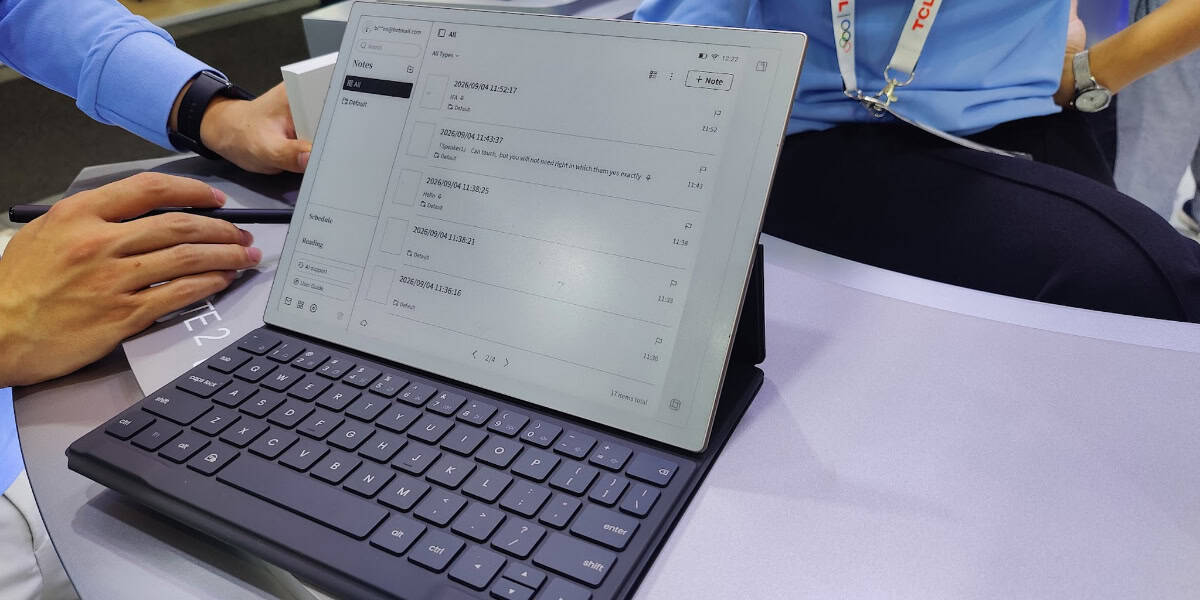
On paper, AINOTE 2 is an attention grabber. It is only around 4.2 mm thick and weighs roughly 295 g, a figure good enough to earn design accolades and a Guinness World Record recognition for thinness in its class. The device uses a 10.65-inch glare-free E Ink display designed for extended reading and writing sessions without eye strain. But the real story sits behind the screen. iFLYTEK’s hallmark is speech AI. That heritage shows up front and center in the way AINOTE 2 records, transcribes, translates, and organizes information in the background, so you can stay in the conversation rather than juggling buttons and apps during meetings.
This is not just another e-ink slab. It is a notebook that tries to be your post-meeting assistant as well.
What sets AINOTE 2 apart
- Ultra-thin and light: At approximately 4.2 mm and 295 g, AINOTE 2 is among the most portable 10-inch-plus e-ink devices on the market. The thickness figure alone makes it stand out in a crowded field where comfort, portability, and durability compete.
- Paper-like handwriting: The writing surface is tuned to feel closer to paper than glass. That matters for long planning sessions, brainstorming, and note-taking where texture and stroke control reduce fatigue.
- AI meeting support: The device can record audio, transcribe conversations in multiple languages, identify who said what, and provide live translation. Afterward it generates structured summaries, converts handwriting to text, and indexes everything for search.
- Android and Google Play: Unlike many e-ink devices with closed ecosystems, AINOTE 2 runs Android 14 with Google Play access. That means direct installation of productivity apps, task managers, calendars, and collaboration tools, reducing workarounds and email-yourself workflows.
- Natural language search and calendar integration: Search across notes with everyday language. Sync deadlines and follow-ups to Google Calendar and tie notes to events without leaving the device.
- Privacy by design: Handwriting capture, audio recording, and OCR are designed to work offline. When users enable cloud features in Europe, data routes through AWS Frankfurt with GDPR compliance and explicit permissions required for audio uploads.
These capabilities address the friction many Scribe users report: getting documents onto the device, navigating limited format support, and the absence of built-in audio tools for capturing and summarizing meetings. With AINOTE 2, iFLYTEK has tried to turn those gaps into strengths.
Why Kindle Scribe owners might notice
Amazon’s Kindle Scribe is a solid reading-first, writing-second device. It shines when you want long battery life, Kindle’s library, and a clean note-taking interface. It is less compelling when you need to import PDFs from varied sources, collaborate, or capture and summarize meetings. Users often lean on email-to-Kindle or limited file pathways to move content around. Advanced search, real-time collaboration, and audio transcription are not native parts of the Scribe experience.
AINOTE 2 flips that script by making import, organization, and follow-up core features. Because it runs Android and supports Google Play, you can use your preferred cloud storage app, your project management tools, and your note manager instead of being constrained to a single vendor’s pipeline. The device’s AI stack converts handwriting to text on the fly, indexes it for natural language search, and creates structured summaries that make handoffs to colleagues or future you significantly easier.
In other words, instead of asking you to bend your workflow to fit the device, AINOTE 2 aims to fit into the workflow you already have.
AINOTE 2 in context: the E Ink productivity race
IFA 2026 marks a notable moment for e-ink devices. Vendors like Onyx, Kobo, and reMarkable have pushed the category forward with color panels, faster refresh rates, and better pens. But the market is clearly splitting into two camps:
- Reading and note-taking first: Devices that prioritize long battery life, clean reading interfaces, and a calm note-taking environment, often with limited integration beyond a house ecosystem.
- Productivity and workflow first: Devices that try to span reading, writing, and real work, integrating with calendars, task apps, and communication tools while adding AI to connect the dots.
AINOTE 2 is firmly in the second camp. It adds meaningful intelligence to the transcription and summarization process while staying on E Ink to preserve the eye comfort and focus that paper-like devices are loved for.
The hardware suite also indicates an ecosystem play. iFLYTEK is showing AINOTE Air 2, a compact 8.2-inch variant for travel, and a pair of featherweight AI Glasses that support real-time translation and lip reading. Whether or not you buy into that full lineup, it signals that AINOTE is not meant to be a single-purpose gadget. It is meant to be the center of a capture-to-action workflow.
How the AI features work in practical terms
- During meetings: Start a recording. The AINOTE 2 transcribes in real time, translates if needed, and tags speakers. You can jot handwritten notes on the side without worrying that you will miss critical points.
- After meetings: The device produces a structured summary that extracts decisions, tasks, and key discussions. Handwritten notes convert to digital text automatically. Everything becomes searchable.
- In the flow of work: Use natural language search to find action items or references later. Push deadlines to Google Calendar. Open your favorite task or notes app for deeper collaboration. Because you are on Android, those apps are just an install away.
This is precisely the kind of loop that has been missing from many E Ink devices. The result is less time spent transferring files, rewriting notes, and catching up on what was said, and more time spent acting on what matters.
Privacy and compliance for European users
AI meeting support implies sensitive audio and text. iFLYTEK spells out a two-tier approach:
- Core capture features work offline on the device. That includes handwriting recognition and OCR, as well as local audio recording.
- When you opt into cloud-based features like transcription sync or translation enhancements in Europe, data routes through AWS servers located in Frankfurt with GDPR compliance, and uploads require explicit permission.
For organizations that have been hesitant to allow cloud-connected recorders and notebooks, this kind of configuration may make risk assessments easier, though each security team will still need to evaluate data handling in detail.
How it stacks up against popular alternatives
- Kindle Scribe: Best for readers and minimalists who want a no-fuss Kindle-first device. Strong battery life and a clean interface, but limited format flexibility and collaboration. No built-in audio transcription or AI summaries. AINOTE 2 offers broader workflows and AI features that Scribe lacks.
- reMarkable: Beloved for its near-paper writing feel and focus. It intentionally keeps the experience uncluttered. If you value deep integration with Android apps or live AI transcription, AINOTE 2 holds the advantage, but reMarkable remains a gold standard for the writing experience.
- Onyx Boox Note Air series: Powerful and flexible Android-based e-ink devices with extensive app compatibility and, in some models, color E Ink. AINOTE 2’s differentiator is the deeper, integrated AI meeting tooling and a remarkably thin chassis. Boox may still appeal if you prioritize color or a more open tablet-like approach.
The reality is that no device fits everyone. If your day is filled with meetings, cross-language conversations, and handoffs, the AINOTE 2’s integrated AI may save hours each week. If you want long reading sessions and occasional annotations with minimal distraction, a simpler device might be enough.
Where AINOTE 2 might still face questions
- E Ink limitations: Monochrome E Ink remains slower than LCD or OLED and is not ideal for media or complex visuals. If you do heavy diagram editing, photo work, or need fluid scrolling and animations, you will prefer a standard tablet.
- Ecosystem maturity: Android plus Google Play is a strength, but the device-specific templates, note layouts, and community resources around more established brands can sometimes be deeper. Expect some growing pains while the platform matures.
- Accessories and durability: Ultra-thin designs are excellent for portability but can raise questions about long-term durability and accessory availability. Early buyers may want to ensure cases and screen protectors fit their use.
Even with those questions, AINOTE 2’s approach feels timely. The wave of AI note tools across phones and laptops shows demand for automation at the edges of human conversation. Bringing that natively to an E Ink device closes the loop for those who prefer a calm, paper-like surface for focus-heavy work.
Who should consider AINOTE 2
- Knowledge workers who capture extensive meeting notes and must quickly share decisions and next steps.
- Students managing lectures, seminars, and study groups across languages.
- Consultants and freelancers who need to move from meeting to proposal with minimal friction.
- Multilingual teams that regularly bridge language gaps in real time.
- Anyone frustrated by the friction between handwriting notes and the digital tools that manage tasks, calendars, and collaboration.
For this audience, the promise is straightforward. Capture everything with minimal overhead. Let AI organize it. Push outcomes to the tools your team already uses. Keep your eyes on a restful, paper-like display while your workflow stays fully digital.
The bigger picture
IFA 2026 hints at an E Ink resurgence. New panels with faster refresh rates, color options, and better touch layers are coming, but hardware alone will not define the category. The winners will blend great pen feel with smarter software that respects privacy, integrates with the modern app ecosystem, and reduces the friction between ideas and actions.
AINOTE 2 is a compelling exhibit for that thesis. It does not just promise a better notebook. It promises a smarter notebook that understands the shape of your workday. If it delivers on latency, recognition accuracy, and app compatibility, it could become a favorite among professionals who want the serenity of paper with the reach of the cloud.
Conclusion
iFLYTEK’s AINOTE 2 takes E Ink in a direction that matters. It is ultra-thin, travel friendly, and easy on the eyes. More importantly, it brings integrated AI to the messy middle where most E Ink devices fall short: capturing conversations accurately and turning them into structured outcomes. For Kindle Scribe owners and anyone who has felt the friction of moving notes between devices and apps, the AINOTE 2’s Android base and Google Play access could be a decisive advantage.
This is not a replacement for a full tablet, and it will not suit every workflow. But for people who want the focus of paper and the intelligence of AI in a single, privacy-aware device, the AINOTE 2 is one of the most interesting announcements at IFA 2026. It signals a new phase for digital paper, where the calm of E Ink meets the hustle of modern work.