As I sit down to write this review I do it not at my desk with a computer keyboard, instead I’m handwriting it out on my new Remarkable 2. I must admit, after years of typing I think I’m a much slower writer than typer!
But there is something really special about the tactile nature of writing, of putting pen to paper. ePaper that is, because the Remarkable 2 is an electronic notepad designed to replace pad and pen.
What is the reMarkable 2?
Imagine a Kindle eReader went to a bar one night, got drunk and had a fling with an iPad, the Remarkable 2 would be the outcome.
It’s a very thin tablet with an eink display you can write on. And it’s proven to be VERY popular! It was recently announced that the Norwegian company behind the tablet, who are also called reMarkable, has been valued at over $1 billion with a turnover of $300 million in 2021.
They’ve soled over 1 million paper tablets since the original device back in 2017. So just what is all the fuss about?
Well when you unbox it you find out. It’s a beautifully designed tablet; even the packaging looks great. There is a single power button on the top and a USB-C port on the bottom for charging.
The screen is crisp and clear to read and thanks to it being an e-ink display rather than backlit you can easily view this in direct sunlight.
The aim of the reMarkable 2 is not to replace your mobile/laptop/tablet, but to replace your notepad and paper. While there are advanced features that allow you to send emails, this isn’t the device you turn to when you want to read/reply.
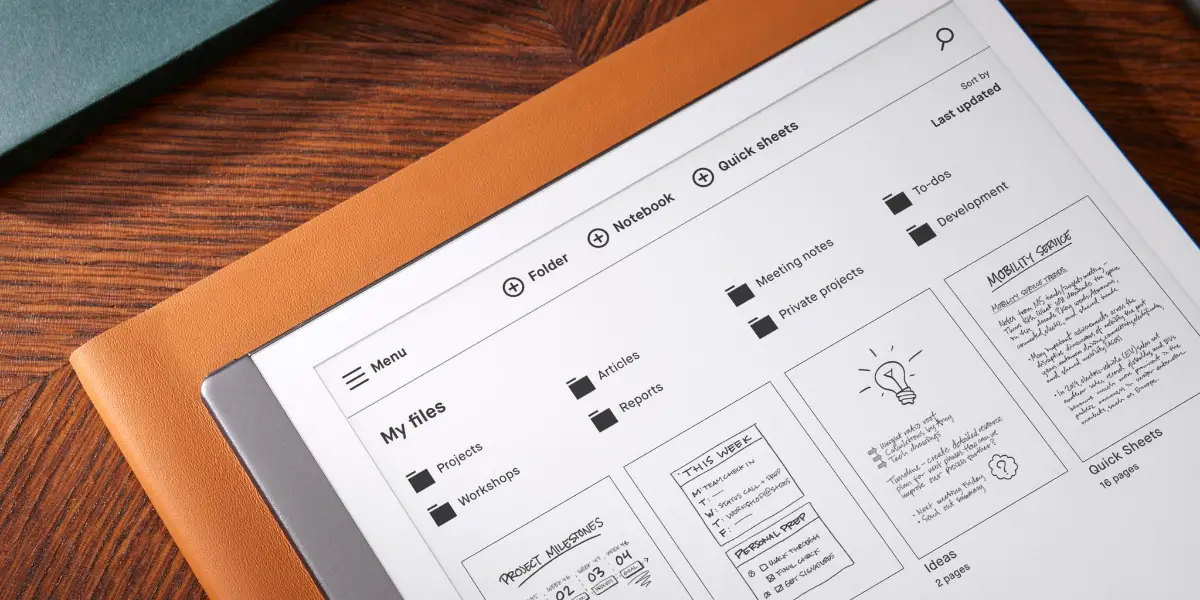
The best description I’ve seen is that it is a digital notebook with digital paper. When you power on the reMarkable 2 you’re presented with your library of notebooks, in my case I have a different notebook for different projects I’m working on.
You’ll also see any PDF files you have synchronised to the device, this feature allows you to review files people send over or just kickback and relax with an ebook.
In time, you could end up with hundreds of notebooks, so it’s good to see you can create folders and conduct searches.
Writing Tools
In order to replace your trusty pen and paper the reMarkable tablet has a stylus and templates.
There are two stylus options available, the Standard Marker and the Marker Plus, the difference being the Plus has a built-in eraser (and almost double the cost).
When you open a notebook each page can have an underlying template, of which there are a lot to choose from, for example:
- Different types of lines (large, small, with margin, for calligraphy etc)
- Different creative layouts (dots, isometric, music, guitar tabs etc)
- Different grid patterns (large, medium, small, hexagonal, half grid etc)
- Planning sheets (to-do list, storyboards, week planner etc)
And of course you can have a blank page as well. I was pleased to find these templates can be changed at any point and that each page can have a different template.

When it comes to putting Marker to reMarkable there are a range of options:
- Ballpoint pen
- Fineliner
- Marker
- Pencil
- Mechanical pencil
- Paintbrush
- Highlighter
- Calligraphy pen
Each has a set of options allowing you to adjust thickness and colour. You won’t see the colour on screen, but you will see it if you view the notebook on a PC or mobile.
Handwritten Notes
I’ve tried out other tablet/pen options before, the Apple Pencil is great if you’re into art on the iPad but I hated the way writing felt using it.
If you also dislike the writing experience on a backlit tablet, then I expect, like me, you will love the feeling of writing on the reMarkable. It really is like writing on paper: the look, the feel, the SOUND. There is no slippery reflective surface; it’s a very paperlike experience.
The reMarkable Marker is comfortable to use and unlike the Apple Pencil it doesn’t need charging.
It also features impressive palm rejection; I’ve never had an issue with my hand brushing the screen while I’m writing.
The impressive refresh rate means your words and drawings appear instantly, and unlike other devices, your handwriting LOOKS like your handwriting.
The big advantage of all this is that it is perfectly suited for fine detailed work, such as drawings or writing sheet music.
My personal favourite is the fine liner, but others I’ve shown it to love the calligraphy pen option. They enjoyed the feeling and look without any of the associated blotches and mess they recalled from being taught how to use a calligraphy pen in school.
Added Digital Features
It not only does a brilliant job replacing your traditional pad and pen, it also throws in some additional digital functions.
For starters, you can easily copy/paste/resize. When you’ve finished writing, you can convert the scribbles to typed text and even email that out. You’ve also the option to download an app for your mobile or computer that syncs your notebooks and allows you to sync files to your reMarkable 2.
Another very cool feature is the screen sharing ability. You share your screen with a computer that has the companion software installed and when you write on the tablet it appears on the screen, which if you connect up to a monitor or projector makes it a really easy way to use it as a group.
While there isn’t a built-in web browser, you do have the option of sending web articles to the tablet via the ‘Read on reMarkable‘ extension for Chrome.
For those with existing cloud storage, you’ll be pleased to know there is Google Drive and Dropbox integration, giving you very easy access to your existing files.
It has 5GHz Wi-Fi built in for these digital features and note that not all are included out of the box, you’ll need a Connect plan, a monthly subscription, of which there are 2 available.
CONNECT PLAN
reMarkable Accessories
In addition to the 2 Markers, the reMarkable 2 has a few extra accessories available Each Marker has refill tips available and to help with transportation there are two folios available, a simple sleeve with a pen holder and a book cover.

The sleeve is best for transportation because it features a physical pen holder. The book folio looks great but relies on the pen being magnetically attached, and because it’s not a super strong connection it’s easy to see this getting knocked loose when in a bag.
Is reMarkable 2 worth gettting?
The answer to this question will largely depend on what you want to use it for and if you’ll be happy to pay for the additional features.
In terms of style, design and usability I absolutly love the reMarkable 2 and if I were still in an office job I’d have ditched all pads and replaced them with this for all meeting note taking.
If you want something that disconnects you from a computer or tablet screen and allows you to focus on writing or drawing without any notification noise or eye strain from back lit screens then this is the device for you.
Just keep in mind the focus is on replacing pad and pen, not laptop and email client.
Is the Remarkable 2 a Sustainable Alternative to Paper for Note-taking and Writing?
The Remarkable 2 offers a sustainable alternative to paper for note-taking and writing. With its paper-like feel and long-lasting battery, it’s a game-changer for those looking to reduce their paper usage. Colonists game review: using the Remarkable 2 for note-taking during gaming sessions can enhance the experience without the need for paper.
How Does the Remarkable 2 Compare to 3D Printing Technology in Terms of Going Paperless?
The Remarkable 2 offers a sleek, paper-like writing experience, making it a strong contender for going paperless. However, 3D printing technology provides a unique way to create physical objects without the need for paper. For a comprehensive comparison, check out the best 3D pen reviews.
Can Remarkable 2 Replace the Gatekeeper 2.0 for Digital Note-Taking and Organization?
The Gatekeeper 2.0 review is in and it’s an impressive tool for digital note-taking and organization. However, the remarkable 2 offers a sleek, paper-like experience that may be an appealing alternative. It ultimately comes down to personal preference and specific needs for the best choice.
reMarkable Company
I’ve already mentioned how successful reMarkable has been. They’ve grown to 300+ employees at the Oslo headquarters and have recently received international investment.
The company was founded in 2013 by CEI Magnus Wanberg. The goal was to combine digital convenience with the best aspects of paper with the intention of helping people ‘think better’.
The financial growth has been steady and impressive.
| ear | 2021 | 2020 | 2019 |
| Revenue* | 303 million USD | 138 million USD | 42 million USD |
| EBITDA* | 31 million USD | 12 million USD | -3 million USD |
| Annual growth | 120% | 229% | 69% |
*Converted from NOK to USD with rate as of 31.12.21 according to The Central Bank of Norway – 8,8194
| Year | 2021 | 2020 | 2019 |
| Revenue | 2 676 MNOK | 1 214 MNOK | 369 MNOK |
| EBITDA | 277 MNOK | 105 MNOK | -23 MNOK |
| Annual growth | 120% | 229% | 69% |
The company claim this is just the start and that they’ve exciting plans for the future.
I’m excited to see what comes next. The reMarkable 2 has already mastered the feeling of writing on paper, it’s the thinnest tablet I’ve ever used and by far the best digital note-taking experience you can get.