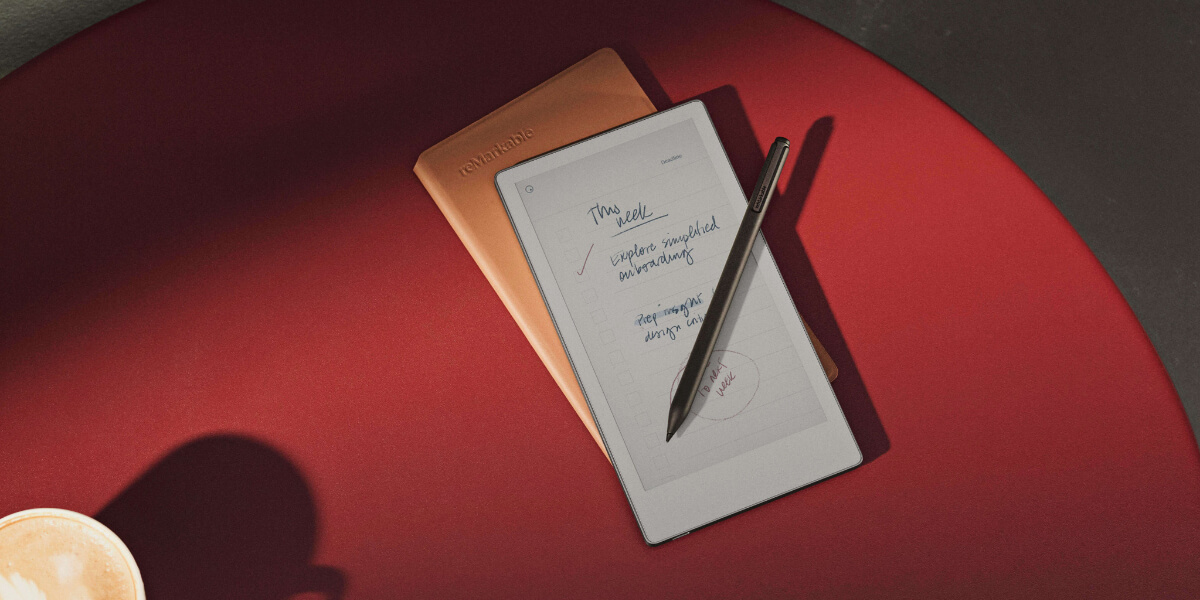
Meet the remarkable paper pro move. This tablet feels like a true notebook you can slip into your pocket. You get a distraction-free space with a color E Ink display that is easy on your eyes. Imagine taking notes on the go, meeting clients, or sketching ideas anywhere. Ask yourself—would a pocket-sized paper pro move help you work better than carrying paper, a laptop, or your phone?
Key Takeaways
The reMarkable Paper Pro Move is very easy to carry. It fits in your pocket or bag. You can take notes anywhere you go.
Its color E Ink display looks bright and clear. You can make notes and sketches that look real and fun.
The battery lasts up to two weeks. You do not need to charge it often. You can pay attention to your work more.
The handwriting search helps you find notes fast. This makes you work better and stay organized.
You can share notes by email or Slack. This helps your team stay together and know what is happening.
Key Features
Portability and Design
You want a digital notebook that fits your busy life. The paper pro move does just that. It feels like a classic reporter’s notepad, but it’s a smart, pocket-friendly device you can take anywhere. You can slip it into your jacket or bag and pull it out with one hand. This e-paper tablet is smaller than most tablets, so you never feel weighed down.
The 7.3-inch display makes it easy to hold and use on the go.
You can write while standing, walking, or even in a crowded café.
The sleek aluminum body and textured glass give it a modern look.
It’s always ready for quick notes, sketches, or ideas.
You get a device that feels natural and looks professional. The paper pro move is perfect for meetings, travel, or any moment when inspiration strikes.
Color E Ink Display
The color e-ink screen on the remarkable paper pro move changes how you see your notes. You get a display that is easy on your eyes and looks great in any light. The Canvas Color technology brings your work to life with up to 20,000 colors. You can highlight, organize, and create with more detail than ever before.
Specification | Details |
|---|---|
Size | 7.3” (4:3 aspect ratio) |
Resolution | 2160 x 1620 (229 pixels per inch) |
Features | Palm rejection, adjustable reading light |
Technology | E Ink Gallery™ 3 display technology |
Color System | Four-particle ink system: cyan, magenta, yellow, and white |
You will notice the difference right away. The display gives you:
A vibrant visual experience for notes and sketches.
Thousands of hues for better organization and creativity.
A paper-like reading experience that feels natural.
Better aesthetics for digital art and note-taking.
You can use the marker plus to draw, write, and highlight with precision. The color e-ink screen makes every page look more real and engaging.
Tip: The handwriting search feature lets you find any note in seconds, even if you have hundreds of pages.
Battery Life and Sustainability
You don’t want to worry about charging your device all the time. The paper pro move gives you up to two weeks of battery life. If you need a quick boost, just ten minutes of charging gives you three days of power. This means you can focus on your work, not your charger.
The remarkable paper pro move also cares about the planet. It uses more than 50% recycled metals in its design. This makes it the most sustainable device from reMarkable so far. You get a digital notebook that is easier to repair and refurbish, so it lasts longer and creates less waste.
You can feel good about using a device that helps you stay organized and helps the environment. The software keeps your notes safe and synced, so you never lose your work.
User Experience
Handwriting and Annotation
You want your notes to feel real, like paper. The remarkable paper pro move gives you that feeling. When you use the marker plus, you notice the screen’s texture. It feels like a notebook, not just a tablet. The pen charges with magnets and is always ready.
Feature | Details |
|---|---|
Pen Type | Active pen, magnetically charged |
Writing Latency | 12 ms (almost no delay) |
Writing Experience | Feels like pen on paper, very responsive |
You can write, draw, or add notes with almost no wait. Writing is smooth and accurate. Your handwriting shows up right away, so you stay focused. This makes writing easy, even in busy places.
The textured screen helps your pen move smoothly.
You can use the marker plus to highlight, underline, or draw.
The device saves every detail of your handwriting, so your notes look just like they do on paper.
If you need to find something fast, the handwriting search helps you look through all your notes in seconds. You don’t have to flip pages or scroll for a long time.
Tip: Architects, journalists, and designers like using the paper pro move for quick sketches and notes during meetings or site visits.
Templates and Software
You get more than blank pages. The digital notebook has templates and software tools to help you stay organized. You can choose daily planners, meeting notes, project planners, and more. Each template helps you focus on what matters.
Daily Planner: Plan your day, week, or month.
Meeting Notes: Write down important points and tasks.
Daily Journal: Reflect and keep track of your thoughts.
Digital Notebook: Jot down ideas or brainstorm.
Project Planner: Keep your projects moving forward.
You can drag files from your desktop app to your device. The software lets you use reusable things like calendars, trackers, and budgets. You can even change your writing space with eTiles—digital stickers that help you make your own layouts.
Use the lasso tool to move notes or drawings across pages.
Make custom pages for any workflow.
Enjoy flexible design that fits your needs.
Note: The software keeps everything synced, so your notes are always safe and easy to find.
Collaboration Tools
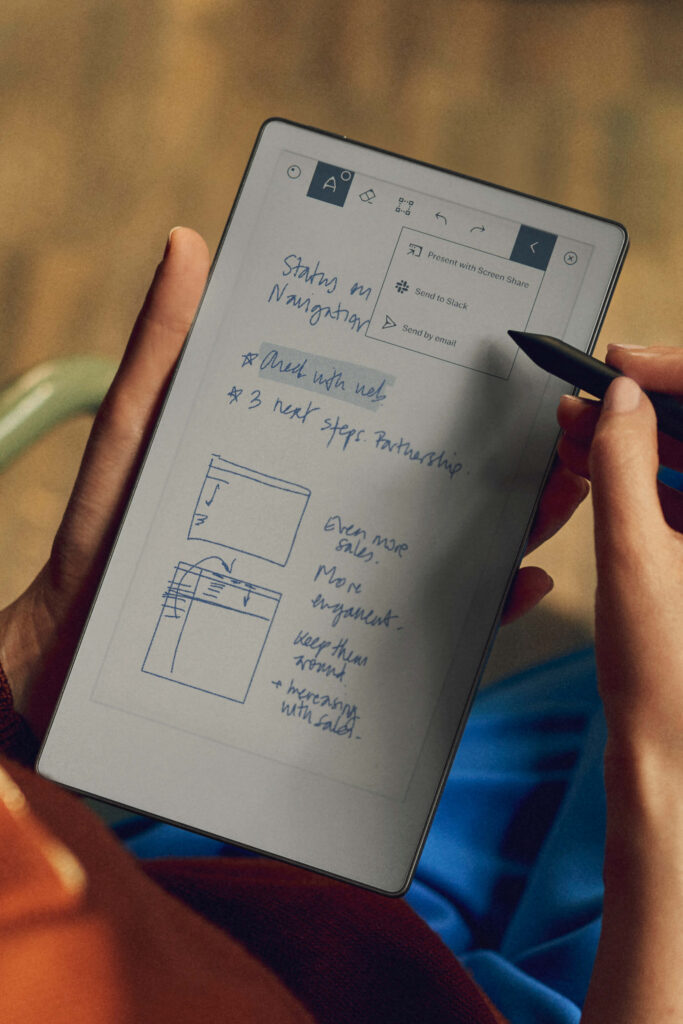
Working with others is simple on the remarkable paper pro move. You can send notes from your device to email, or share them with your team using Slack. This helps everyone stay updated, even if you are far apart.
Sync your files with Google Drive, Dropbox, or OneDrive.
Share notes and documents directly to Slack for quick feedback.
Use AI to turn your handwriting into text before sending.
A Senior Multimedia Designer at E Ink uses the device to share sketches with coworkers in real time. This helps the team work together on design projects, even when they are not in the same room. The digital notebook also helps save paper, which is good for the planet.
Pro Tip: You can start a project at home, add ideas while out, and share updates with your team—all from one device.
The remarkable paper pro move makes teamwork easy, so you can focus on your ideas and not worry about the tools.
Practical Use Cases
On-the-Go Note-Taking
You never know when you will get a new idea. The paper pro move helps you write down thoughts anywhere. Many people like how this small device fits into their day. You can write notes while waiting for a train, sitting in a café, or even lying in bed.
Take notes on planes or in waiting rooms.
Write while your friends use their phones.
Bring it to meetings or use it during quick talks.
It feels like a real notebook but works like a tablet. The marker plus lets you write in a normal way, and your notes show up right away. You can highlight, sort, and even turn your handwriting into text. This e-paper tablet helps you pay attention and not get distracted like with a phone.
Tip: Many people say they write faster and better on the paper pro move than on their phones.
Everyday Carry Tablet
You want something you can bring everywhere. The paper pro move is smaller than a paperback, so it fits in your bag or jacket. It weighs only 525g, so it is easy to carry all day. Even with a leather case, it is still light for most people.
Feature | Description |
|---|---|
Compact Size | Smaller than a paperback, easy to carry daily |
Advanced E Ink Display | 7.3-inch color screen for vivid notes and documents |
Enhanced Writing | Templates and handwriting-to-text for easy sharing |
This digital notebook is great for students, workers, and anyone who needs to stay organized. You can use it for class notes, planning projects, or drawing. The e-paper tablet keeps your work safe and easy to find.
Limitations
You might feel the weight if you use a big case, but most people think it is fine. If you are used to carrying heavy things, the paper pro move will fit in with your other stuff. The device gives you both easy carrying and strong features, so it is a smart pick for anyone who wants a tool for every day.
Pricing and Value
Bundles and Accessories
You have different choices when buying the paper pro move. Some bundles give you more things for less money. These bundles can have the tablet, marker plus, and a folio cover. Some bundles add a leather case or a reading light. If you want to type, you can get a type folio keyboard.
Here’s a quick look at what you can get:
Bundle/Accessory | Features | Functionality Enhancement |
|---|---|---|
Remarkable Paper Pro Notebooks Bundle | Hyperlinked navigation, productivity templates | Fast access to notes, easy project management |
Paper Pro Bundle – Mosaic Weave | Tablet, marker, folio cover | Portability and protection |
Paper Pro Bundle – Premium Leather | Leather folio, reading light | Stylish look, better use in low light |
Paper Pro Type Folio Keyboard | Keyboard for tablet | Makes typing and note-taking easier |
“This hyperlinked notebook system changed my whole workflow! I manage 12 client projects easily now.” – David K., Management Consultant
Buying a bundle saves you money compared to buying items one by one. Bundle prices went up by $50, but single accessories cost the same. You can order the device now.
Subscription and Advanced Features
You can get more features with a subscription. The Connect plan costs $2.99 each month after a 100-day free trial. This plan gives you handwriting conversion, cloud storage, mobile app access, and sharing to Slack. You can search your handwritten notes and edit them on your phone or computer.
Subscription Plan | Price | Features Unlocked |
|---|---|---|
Remarkable Connect | $2.99/mo | Handwriting conversion, cloud storage, mobile app, Slack sharing, note search |
If you want even more, the Flowic subscription costs $49 each month. It gives you faster performance, device swaps, upgrades, and free shipping. Most people think the Connect plan is enough for note-taking and sharing.
Is It Worth It?
You might ask if the paper pro move is a good deal. Let’s compare it to other tablets:
Device | Price | Features |
|---|---|---|
Paper Pro Move | $629 | Color screen, front light, subscription for cloud storage |
Supernote Manta | $577 | Monochrome, no front light, free cloud storage |
Think about what matters most to you. If you want a slim, strong device with a sharp screen and good software, this tablet stands out. Students like the quiet study space. Professionals enjoy easy note-taking and document review. Creatives use the marker plus for drawing and brainstorming.
Here are some things to think about:
Portability makes it easy to carry every day.
Durable build means it lasts longer.
The screen looks sharp and feels like paper.
The software keeps your notes safe and easy to find.
If you want a digital notebook that helps you stay focused and organized, the paper pro move is a smart choice.
If you travel a lot or work in busy places, you will like how simple it is to bring this tablet with you. Journalists and other workers use it to take quick notes anywhere they go. You get a space to work that does not have any distractions. The marker plus lets you write in a way that feels real and helps you come up with new ideas. Look at the table below to see if this device is right for you.
Key Consideration | Description |
|---|---|
Distraction-free environment | Keeps you focused, away from notifications and apps |
Enhanced writing experience | Feels like real paper, boosts creativity and productivity |
Improved features | Larger color display, faster response, built-in front light |
Portability and budget | Compact size, higher price, easy to carry |
You should think about how you work, how much you want to spend, and if you like having a space with no distractions. If you want a smart and easy-to-carry notebook, this device is a good pick for workers, students, and creative people.
FAQ
How long does the battery last?
You can use your reMarkable Paper Pro Move for up to two weeks on a single charge. If you need a quick boost, just ten minutes of charging gives you three days of power. No need to worry about running out of battery.
Can I sync my notes with other devices?
Yes! You can sync your notes to your phone, tablet, or computer using the reMarkable app. Your work stays safe in the cloud, so you can pick up where you left off anytime.
Does it feel like writing on real paper?
Absolutely. The textured screen and special Marker make every pen stroke feel natural. You get just the right amount of friction, so it feels like you’re writing in a real notebook.
Is the reMarkable Paper Pro Move good for students?
Yes, it’s great for students! You can take notes in class, organize your homework, and keep everything in one place. The distraction-free design helps you focus on learning.
What file types can I use or export?
You can import and export PDF, PNG, and EPUB files. This makes it easy to read documents, mark up homework, or share your notes with teachers and friends.