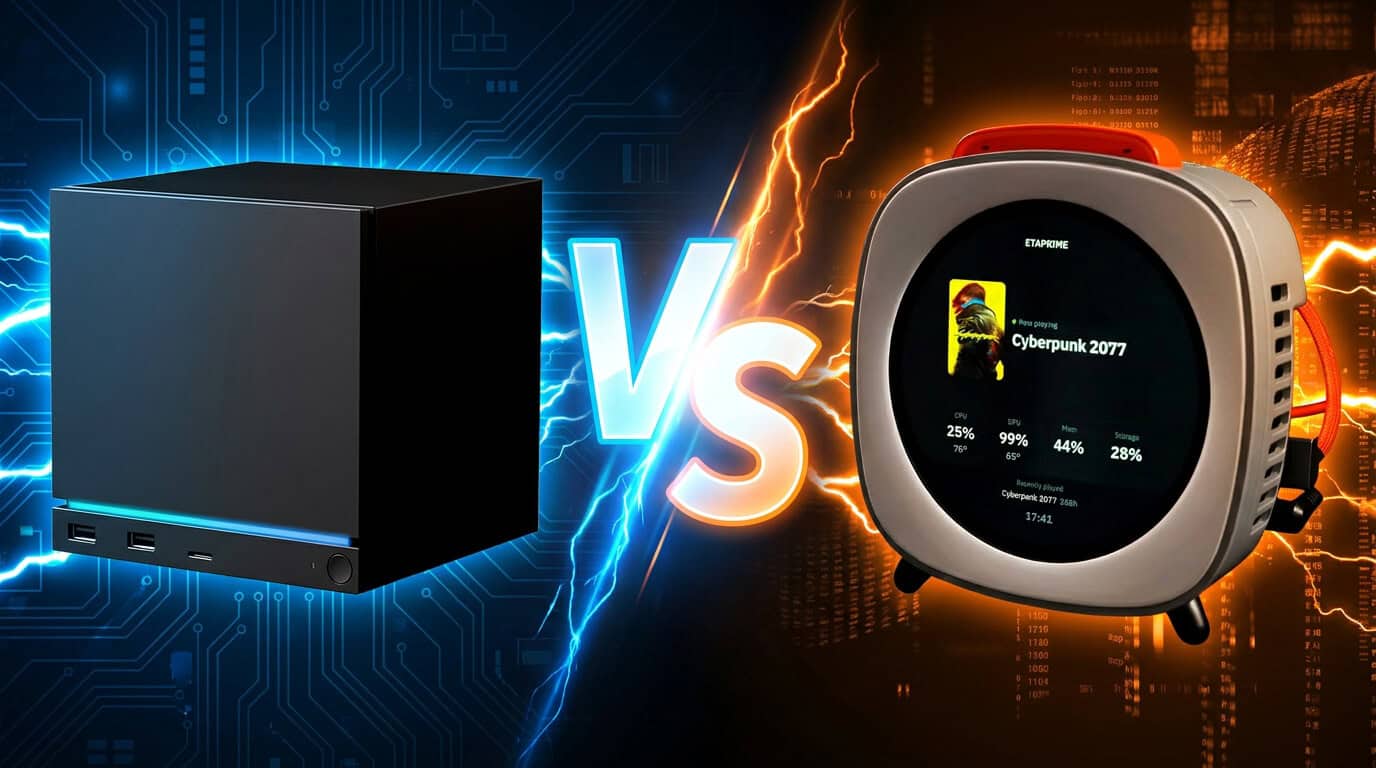
Valve is not the only company making a small gaming PC anymore. The Piston V has entered the picture as a crowdfunded mini PC that runs both SteamOS and Windows, giving you a choice that Valve’s own Steam Machine does not offer.
If you want one device that can boot into SteamOS for console-style gaming or switch to Windows for full software support, the Piston V gives you that flexibility, while the Steam Machine comes with a single operating system. The Piston V also comes with a small touch display, upgradeable parts, and support for an external graphics card, features you will not find on Valve’s machine.
Before you decide which box belongs under your TV or on your desk, you need to know how these two systems actually compare on price, hardware, and long-term use. The next sections break down what each machine offers so you can figure out which one fits your gaming setup.
What Each Gaming System Is Built to Be
The Piston V and the Steam Machine take different paths to reach gamers. One fits in your hand as a compact desktop tool, while the other sits in your living room as a dedicated console-style device.
Piston V as a Portable Mini PC and Console
The Piston V is built as a mini PC with a gadget form factor that stands upright on your desk or shelf. It runs on an AMD Ryzen AI 9 365 processor with up to 64GB of RAM and 4TB of SSD storage.
You get a front-facing touchscreen that shows game art, tracks performance, and lets you switch between SteamOS and Windows without rebooting into a separate setup process. This dual-boot setup means you can play Steam games in a console-like mode, then switch to Windows for work or other apps.
Its small size makes it easy to move between rooms or take with you, unlike a full desktop tower.
Steam Machine as a Living-Room PC Platform
The Steam Machine, built by Valve, targets your TV setup with SteamOS as its core operating system. It ships as a fixed hardware package: a 6-core Zen 4 CPU, a 28-CU RDNA3 GPU, and 8GB of video memory, priced at $1,049.
You won’t find the upgrade options here that come with building your own PC. Valve designed it to work like a console you plug in and use right away, with SteamOS handling the interface, game library, and controller support.
This setup works best if you want a simple, no-fuss box for your TV rather than a machine you can customize later.
Core Hardware, Performance, and Expandability
The Piston V and the Steam Machine take different approaches to power and growth. Your choice depends on whether you want raw processing strength, more memory headroom, or the ability to add extra hardware later.
AMD Ryzen AI 9 365 and 73 TOPS
The Piston V runs on the AMD Ryzen AI 9 365 chip, a modern processor built for both gaming and everyday tasks. This chip includes a dedicated AI engine that delivers up to 73 TOPS of processing power. TOPS stands for trillion operations per second, and this number tells you how fast the chip can handle AI-based tasks.
You get strong performance for gaming, video editing, and multitasking without needing a bulky tower setup. The Steam Machine, by comparison, uses a 6-core Zen 4 CPU paired with a 28-CU RDNA3 GPU, based on details from Valve’s Steam Machine specs. Your decision here comes down to whether you value AI-focused processing or a GPU built purely for gaming output.
Memory and Storage Options
Your storage and memory needs matter just as much as raw chip speed. The Piston V offers up to 64GB DDR5 memory and 4TB SSD storage, giving you room for large game libraries and smooth multitasking.
This setup lets you run demanding games and background apps at the same time without slowdown. The Steam Machine, on the other hand, ships with a fixed hardware configuration that limits how much you can adjust after purchase, according to comparisons with custom PC builds.
If you plan to install many games or work with large files, the Piston V’s higher memory and storage ceiling gives you more flexibility over time.
OCuLink and USB4 Expansion
You get more ways to expand your setup with the Piston V thanks to its OCuLink and USB4 ports. OCuLink lets you connect an external GPU, so you can boost graphics performance without replacing the entire system. This is useful if you want console-level portability now but plan to upgrade graphics power later.
USB4 support gives you fast data transfer speeds and the ability to connect multiple accessories, drives, or displays. As a compact mini PC, the Piston V manages to pack in expansion options that many small-form gaming devices skip. The Steam Machine does not offer the same level of external upgrade support, which limits your options if you want to boost performance down the road.
SteamOS, Windows, and Dual-OS Gaming
The Piston V lets you switch between SteamOS, Bazzite, and Windows 11 without buying separate hardware. Each system has strengths, so your choice depends on which games you play and how much setup time you want to spend.
How Dual-Boot Convenience Affects Daily Use
Switching operating systems on the Piston V takes a few extra steps compared to a single-OS device. You need to pick your OS at startup, which adds a short delay before you start playing.
SteamOS gives you a console-like experience with less clutter. You can boot straight into Big Picture mode and start a game in seconds.
Windows takes longer to load and asks for updates more often. If you want quick access to your Steam library without distractions, SteamOS fits better into a daily gaming routine.
If you also use your Piston V for work or apps that need Windows, dual-booting saves you from buying a second machine. You just have to plan which OS you need before you sit down.
Linux Game Compatibility and Driver Considerations
SteamOS runs on Linux, and Valve has spent years improving compatibility for Windows games through Proton. Most popular titles run well, but some games with strict anti-cheat systems still won’t launch.
Driver support matters too. SteamOS 3.8 now installs on desktops with AMD graphics cards, which simplifies driver setup for AMD-based systems like the Piston V.
Before switching to SteamOS full-time, check if your favorite games work. Some studios haven’t added Linux-friendly anti-cheat yet, so those games may only run on Windows.
Performance between the two systems stays close in most cases. Testing on the Steam Machine showed SteamOS and Windows perform similarly, with SteamOS ahead at 1080p and Windows ahead at 4K in some titles.
When Windows Remains Necessary
Windows still handles some tasks that SteamOS can’t. If you need specific work software, older games, or apps outside of Steam, Windows is the safer choice.
Some benchmarks show Windows pulling ahead in certain scenarios. One report found Windows 11 winning at 4K resolutions, while SteamOS held its own at lower resolutions.
Anti-cheat games are the biggest reason people keep Windows installed. Many competitive multiplayer titles still require it to run at all.
If you rely on peripherals or software that only support Windows, you’ll want it as a backup. The Piston V’s dual-boot setup means you don’t have to give that up to use SteamOS.
Gaming Experience, Display, and Setup Flexibility
The Piston V gives you more ways to play than the Steam Machine. You get a built-in screen, controller support for TV gaming, and options to add more power through external hardware.
Piston V’s Built-In 4-Inch Touch Display
The Piston V has a round, touch-sensitive display built into the front of the device. You can use this screen to switch between operating systems, check system stats, or view game artwork.
This feature sets it apart from the Steam Machine, which does not include a screen at all. The display gives the Piston V a distinct look, similar to a smart thermostat or digital clock.
You can customize the screen to show the information you want to see while gaming. This adds a layer of control that most mini PCs, including the Steam Machine, don’t offer.
TV Gaming and Controller-First Use
You can use the Piston V as a living room gaming system, much like the Steam Machine. Since it runs Bazzite, it can boot directly into a SteamOS-like interface, which is built for use with a controller and a TV screen.
This setup works well if you want a console-style experience without giving up PC flexibility. You get the comfort of couch gaming with the option to switch to a full desktop mode when needed.
The Piston V’s gadget form factor makes it easy to place near your TV without taking up much space.
External GPU and Peripheral Options
You have the option to boost your gaming performance using an external GPU. The Piston V includes OCuLink support, which lets you connect an external graphics card for better frame rates in demanding games.
You also get USB4 ports for fast data transfer and connecting other devices, like monitors or storage drives. This gives you more flexibility than the Steam Machine, which doesn’t offer the same level of expansion.
If you want a system that can grow with your needs, the Piston V’s external GPU and peripheral support make that possible.
Pricing, Availability, and Ownership Risk
Before you decide between these two devices, you need to look at how each one gets to your door. One comes from a company with a track record, and the other comes from a crowdfunding campaign with no confirmed maker.
Kickstarter Funding and Delivery Considerations
The Piston V is currently a Kickstarter project, not a finished retail product. If you back it, you are funding something that has not shipped yet.
Reports note the Piston V has no confirmed maker, price, or warranty at this stage. That means you could face delays, spec changes, or even a canceled campaign.
Crowdfunding always carries risk. You are trusting a small team to deliver hardware on schedule, and that does not always happen.
Support after you get the device is another open question. Without a clear manufacturer, you may not know who to contact if something breaks.
Comparing Upfront Cost With a Ready-Made Steam Machine
Valve’s Steam Machine already ships and has a fixed price. It launched at $1,049 with a 6-core Zen 4 CPU and 28-CU RDNA3 GPU.
You know exactly what you get with the Steam Machine. Valve backs it, sells it directly, and supports it after purchase.
The Piston V has no listed price yet. Until the campaign sets final pricing and a shipping date, you cannot make a direct cost comparison.
Here’s a quick breakdown of what you know today:
| Factor | Steam Machine | Piston V |
|---|---|---|
| Price | $1,049 | Not announced |
| Availability | Shipping now (subject to availability) | Kickstarter, unproven |
| Maker | Valve | Unknown |
| Warranty | Yes | None confirmed |
If you want certainty, the Steam Machine gives you a clear transaction. If you want to gamble on new hardware, the Piston V asks you to accept more risk for a potentially lower cost.
Which Option Fits Different Types of Players
Your choice depends on how you plan to use your gaming setup. Some players want flexibility between operating systems, others want a simple plug-and-play experience, and some want full control over their hardware.
Choose Piston V for Compact Dual-OS Versatility
If you want one small device that can switch between two operating systems, the Piston V mini PC is built for that. It dual-boots Bazzite (a SteamOS-like Linux system) and Windows, so you can pick the OS that fits your task.
This matters if you play games that only run on Windows but also want the console-style feel of SteamOS. The front touchscreen lets you switch between systems, check game art, and monitor performance without needing a monitor.
It also works well if you want a small device for a living room setup. The AMD Ryzen AI 9 365 chip handles gaming and everyday tasks, and you get up to 64GB of RAM and 4TB of storage for a compact build.
Choose a Steam Machine for a Simpler SteamOS Experience
If you prefer a straightforward setup with less to manage, a Steam Machine running SteamOS may fit better. You get one operating system built for gaming, not two systems to switch between.
SteamOS handles game compatibility and updates on its own. This works well if you mainly play Steam library titles and don’t need Windows-only software or programs.
The trade-off is less flexibility. You won’t get the dual-boot option that the Piston V offers, but you also won’t need to manage two systems or decide which one to use for a given game.
Alternatives for DIY and Upgrade-Focused Buyers
If you’d rather build or customize your own system, other options exist outside of prebuilt mini PCs. You can install SteamOS 3.8 on any desktop with an AMD graphics card, based on Valve’s own guidance from June 2026.
This route lets you pick your own parts, control your budget, and upgrade components over time. It also gives you the choice to dual-boot Windows and SteamOS yourself, rather than buying a device that comes with it built in.
Some mini PC alternatives cost less than Valve’s $1,049 Steam Machine while still running the same games. This path suits players who value control and value over convenience.
Frequently Asked Questions
Here are direct answers to common questions about how the Piston V stacks up against the Steam Machine on specs, price, and everyday use.
How does the Piston V Dual-OS Gaming Beast compare with a Steam Machine in gaming performance?
The Piston V uses a Ryzen AI 9 365 chip with 10 cores and 20 threads, plus AMD Radeon 880M graphics with 12 compute units running at 2900 MHz. This setup gives you Steam Machine-like gaming without the high price tag.
The Steam Machine, by contrast, runs a 6-core Zen 4 CPU with a 28-CU RDNA3 GPU and 8GB of video memory. You’ll find that the Steam Machine’s specs and pricing put it in a different performance tier, since it has more GPU compute units but less system memory flexibility than the Piston V’s 32GB DDR5-5600 setup.
Is a Steam Machine or a compact gaming PC better for console-style living-room gaming?
Both devices are built for your TV setup, but they take different approaches. The Steam Machine works like a hybrid between a console and a PC, giving you SteamOS out of the box with a controller-first design.
You get a similar living-room experience with the Piston V, but with more flexibility. Its dual-boot support means you can switch between SteamOS and Windows depending on what you want to play that day.
Can the Piston V run both SteamOS and Windows games effectively?
Yes. Testing has confirmed the Piston V ships with Windows 11, Bazzite, and SteamOS all installed, so you’re not locked into one system.
This gives you access to your full Windows game library alongside SteamOS titles. You can boot into whichever system fits your current game or your mood, without needing a second machine.
What GPU performance level can be expected from a Steam Machine compared with modern gaming PCs?
The Steam Machine’s GPU sits in a similar class to an RTX 4060, based on independent GPU and CPU benchmark testing. That puts it at a solid mid-range level for 1080p and some 1440p gaming.
If you build a PC with the same budget, you can often get more VRAM and better long-term performance. A same-tier gaming PC comparison shows that a custom build can match or exceed the Steam Machine’s GPU output while giving you more memory headroom.
Is the Piston V a better alternative to a PS5 for PC and console gaming?
The Piston V isn’t a direct PS5 competitor, but it covers more ground. Since it dual-boots Windows and SteamOS, you get access to your Steam library, other PC game stores, and Linux-based gaming all on one device.
A PS5 only runs PlayStation exclusives and titles sold through Sony’s store. If you already own PC games or want console-style controller gaming plus full PC flexibility, the Piston V gives you both in a small case.
Which option offers better upgradeability and long-term value: a Steam Machine or a mini gaming PC?
The Piston V has an edge here. Its memory and storage slots are built for easy toolless access, so you can swap RAM or your SSD without much effort.
The Steam Machine has more fixed hardware, similar to a console. If upgrading your system down the road matters to you, a full comparison of build costs and specs shows that a custom PC or a mini PC with open slots, like the Piston V, gives you more room to grow without replacing the whole unit.