Most SaaS founders I talk to have the same relationship with link building: they know it matters, they hate doing it, and they’ve tried at least one tool that promised to fix the problem before quietly letting them down. The tools either do too little, require too much manual work to be worth the subscription, or get abandoned by their developers six months after launch.
So when Respona showed up on AppSumo with a lifetime deal, I spent time going through a full demo to understand what it actually does, where it earns its price, and where you should keep your expectations grounded.
Here’s the honest version.
What Respona Is Trying to Solve
Backlink building is fundamentally a two-part problem. First, you have to find the right people to contact: bloggers writing in your space, podcasters who interview guests like you, sites that already mention your competitors. Second, you have to reach out to them in a way that gets a response, follow up without being annoying, and track all of it without losing your mind.
Most people handle part one with a spreadsheet and a lot of Google searches. Part two gets done through a generic email tool that wasn’t built for outreach. Neither part works well this way, and the whole process collapses under its own friction after a few weeks.
Respona is built to handle both parts inside a single platform. That’s the pitch. Whether it delivers on that pitch depends on how you use it and what you’re comparing it to.
The Campaign Types and Why They Matter
When you start a new campaign in Respona, you’re not staring at a blank slate. The platform gives you a set of pre-built campaign types to choose from: podcast interviews, product reviews, competitor mentions, listicles, and general blogger outreach.
This matters more than it sounds. Each campaign type comes with a different search logic and a different email template structure. If you’re trying to get on podcasts, the system understands you’re looking for shows that interview guests in your category. If you’re going after competitor mentions, it’s looking for pages that already reference a tool like yours, which means those site owners are already writing about this topic and are more likely to be receptive.
The pre-built structure removes one of the biggest friction points in outreach: figuring out what kind of campaign to run and how to frame it. For someone who has never done systematic link building before, this is genuinely useful scaffolding.
For experienced outreach practitioners, it might feel constraining. But even then, the templates are editable, so you’re not locked into anything.
Like the sound of this? Check out the current lifetime deal available on AppSumo
Finding Opportunities: The Search Engine Under the Hood
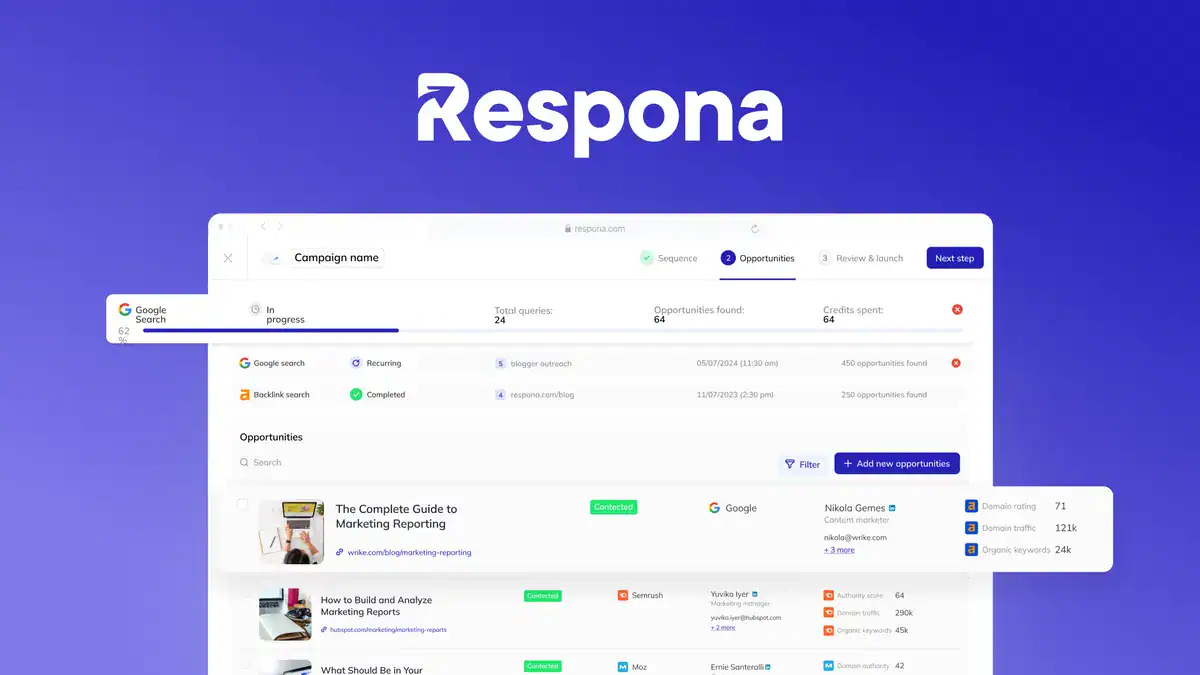
This is where Respona does its most interesting work. Rather than requiring you to manually run searches and copy URLs into a spreadsheet, the platform runs opportunity discovery for you.
It uses Google searches, backlink analysis through Moz, and a few other integrations to surface relevant pages. In the demo, a search built around a SolidWorks competitor turned up 281 opportunities. That number is meaningful because it’s not just a raw list of URLs. Each opportunity comes with domain authority, page authority, and spam score data attached, so you can filter the list before you spend any time on it.
Being able to sort by domain authority alone saves hours. You’re not manually checking each site in Moz or Ahrefs. The filtering happens inside Respona, and you move down the list only touching the opportunities worth your time.
The AI component comes in at the keyword generation stage. You describe your tool or business, and the platform suggests search terms to feed into the opportunity discovery process. This is useful if you’re not sure which keywords your target sites are likely to rank for. It’s not magic, but it reduces the blank-page problem at the start of a campaign.
Email Sequences, Personalization, and Account Setup
Once you have a filtered list of opportunities, Respona moves into the outreach phase. You connect your email account (Google, Microsoft, or another provider), and the platform sends on your behalf through your actual inbox, not a third-party sending domain. That’s an important detail for deliverability.
You can connect multiple email accounts and invite team members to manage campaigns collaboratively. If you’re running outreach across multiple brands or have a VA handling part of the process, this structure makes sense. Campaigns can be assigned, monitored, and tracked without everyone needing to share login credentials.
The email sequence is a two-step structure: an initial outreach email followed by a reminder. This mirrors what most experienced outreach practitioners do manually anyway. One email rarely gets a response. A polite follow-up, sent automatically after a set interval, meaningfully improves reply rates without requiring you to remember to check back.
The AI-assisted personalization is worth discussing separately. Respona can pull information from the target page or site and incorporate it into the email template. The idea is that your outreach email references something specific about the recipient’s content rather than reading like a mass blast. In practice, AI-generated personalization is a starting point, not a finished product. You’ll want to review what it generates, especially for high-value targets, because generic “I loved your post about X” openers are easy to spot and easy to ignore.
The templates themselves are editable. You can write your own, use the AI suggestions as a base, or mix both. The system doesn’t force you into a specific voice, which is good.
Pricing, Tiers, and the AppSumo Structure
The AppSumo deal offers a lifetime license at different tiers, each unlocking additional features and credits. Tier one gives you substantial functionality for a one-time payment, which is the main draw of an AppSumo deal in the first place. Higher tiers add things like additional email accounts, more campaign slots, and larger credit pools.
All tiers include bonus credits, which are used for the AI features and opportunity discovery. Credits are the mechanism that keeps the economics of a lifetime deal workable for the company, since they cap how much compute you can consume per month without paying more.
This is a standard AppSumo structure and not a red flag by itself. The question is whether the credit limits at your chosen tier match your actual usage. If you’re running one or two campaigns a month for a single business, tier one is probably sufficient. If you’re an agency managing outreach for multiple clients, you’ll want to model out the credit consumption before committing.
One thing worth flagging: the platform’s updates section showed the last published update was approximately one year prior to the demo. That’s not a dealbreaker, but it’s a yellow flag. It raises the question of whether the product is in active development or in maintenance mode. A tool that isn’t being updated is a tool that will eventually fall behind changes in Google’s search behavior, email provider policies, and the broader outreach landscape.
I’d recommend reaching out to the Respona team directly through the AppSumo Q&A before purchasing and asking about their current development roadmap. Their response (or lack of one) will tell you a lot.
Who This Tool Is Actually For
Respona is a good fit for a specific kind of user: a SaaS founder or digital marketer who understands that link building matters, has some budget to spend on tools, and wants to run outreach in a more organized way than a spreadsheet allows, but doesn’t have the time or staff to do everything manually.
If you’ve never done outreach before, Respona gives you a structured starting point. The pre-built campaign types, the AI keyword suggestions, and the two-step email sequence mean you can get a campaign running without needing to already know how link building works. That’s genuinely valuable for someone who’s been putting this off because the process felt opaque.
If you’re an experienced SEO or outreach specialist, Respona is a workflow tool, not a strategy tool. It won’t tell you which links to pursue or whether a given opportunity is worth your time beyond the domain authority metrics. You’ll still need to bring your own judgment about what constitutes a quality link for your specific site and goals.
If you’re an agency, the multi-account and team collaboration features are relevant, but you’ll need to pressure-test the credit limits against your actual client volume before committing to a tier.
The people Respona is not for: anyone who expects the tool to do the relationship-building for them. Outreach is still outreach. A well-structured email sent to the right person at the right time still requires a human to write something worth reading. Automation handles the logistics. It doesn’t replace the substance.
The Honest Caveat About Effectiveness
No tool can guarantee backlinks. That’s worth saying plainly because the marketing around outreach tools often implies otherwise.
Respona can find opportunities, contact people, and follow up automatically. It cannot make someone respond to your email, agree to feature your product, or publish a post that links back to your site. Those outcomes depend on the quality of your offer, the relevance of your pitch, and the timing of your outreach relative to the recipient’s editorial calendar.
What a good outreach tool does is remove the friction from the parts of the process that are friction-able: finding contacts, managing sequences, tracking replies, filtering low-quality opportunities. Respona does those things reasonably well based on the demo. The 281 opportunities surfaced in a single search give you a meaningful pipeline to work through. The filtering tools mean you’re not wasting time on spam-heavy sites with no domain authority.
But the conversion rate on cold outreach, even well-targeted cold outreach, is low. If you go in expecting a 30% response rate and a flood of inbound link placements, you’ll be disappointed. If you go in expecting a tool that makes a slow, methodical process less painful, you’ll probably get your money’s worth from a lifetime deal.
Closing Reflection
The backlink problem isn’t going away. Search engines still treat links as votes of confidence, and the sites that rank consistently tend to have more of them from more authoritative sources. The question is never whether to build links. The question is how to do it without consuming your entire calendar.
Respona is a reasonable answer to that question for a certain kind of operator. It’s not a silver bullet. The year-old update log is worth monitoring. The credit limits deserve scrutiny before you commit to a tier. And the effectiveness of any outreach campaign will still depend on what you write and who you send it to.
But if you’ve been running outreach out of a spreadsheet, or avoiding it entirely because the process felt too manual to sustain, Respona gives you a structured alternative at a price point that’s hard to argue with on a lifetime deal basis.
Try the demo. Ask the team about their roadmap. And go in with realistic expectations about what automation can and cannot do for your link profile.