Runner AI is an AI-powered ecommerce platform that turns a short description into a storefront, product pages, checkout, and store administration tools. Its appeal is straightforward: less time configuring themes and apps, with AI agents available to help with marketing after launch.
A hands-on home decor store test produced a populated storefront in about 20 minutes, using 271 credits. That is a promising setup result, but it is not the same as having a fully checked, payment-ready business in 20 minutes. Domain setup, payment activation, missing pages, and product checks still required attention.
The short verdict: Runner AI is worth considering for solo sellers who want a simpler way to start an ecommerce store, particularly for dropshipping or print on demand. Its strengths are rapid store generation, product suggestions, and approval-based AI assistance. Its weaknesses are the unfinished details that still need human review.
Get the lifetime deal.
What Is Runner AI, and Who Is It For?
Runner AI replaces the usual theme-first store-building process with a conversational interface. Rather than choosing a template and arranging every section manually, you describe the business and refine the result through chat or direct editing.
The platform is designed to support three selling approaches:
- Your own products: Build a storefront around a catalog you already have.
- Dropshipping: Sell products that a third-party supplier packs and ships directly to customers after an order is placed.
- Print on demand: Put your designs on products such as shirts, hoodies, or mugs, with production and shipping handled when an order arrives.
Dropshipping and print on demand avoid the need to purchase and hold stock in advance. They do not remove the work of checking products, configuring fulfillment, or making sure the store accurately describes what customers will receive.
Runner AI is particularly relevant to a solo operator who wants to avoid managing separate tools for store design, email, SEO, and other marketing tasks. It is less compelling if your priority is a highly polished setup process with minimal troubleshooting.
What the Store-Building Test Actually Delivered
The test used a home decor boutique as its starting point. After a few style questions, the brief settled on warm neutral colors and editorial-style photography.
Runner AI first outlined its intended work, including reviewing the storefront, creating home and category pages, and checking the responsive layout. It then carried out the build without requiring manual theme selection or plugin installation.
A coordinated storefront and category structure
The generated store included written copy, category navigation, product listings, a testimonial section, and an email signup area. Its product categories covered:
- Lighting
- Textiles
- Ceramics
- Wall art
- Decorative objects

This is more substantial than generating an attractive homepage alone. A useful ecommerce starting point needs a structure that helps customers move from browsing categories to evaluating individual products.
Product sourcing and suggestions
One of the strongest results was product selection. The account already contained a couple of products, but Runner AI sourced and suggested additional items to expand the catalog.
One example was a two-pack of towels presented with images, color variants, and a suggested selling price. The platform also offered to add complementary decor, recommended a catalog size, and proceeded with collection creation and product publishing.
Treat these as suggestions to review, not purchasing decisions to accept automatically. Check whether each item fits the store, whether its variants are correct, and whether the suggested price makes sense for your business.
Build time and credit use
Creating and populating the test store took approximately 20 minutes and consumed 271 credits. Runner AI also reported that its final checks passed without console errors.
Those figures are useful reference points for a similar starter store, not guaranteed requirements for every project. They also do not establish the cost of ongoing marketing work or repeated revisions.
Most importantly, successful technical checks did not mean every customer-facing detail was complete. Manual inspection still uncovered missing content and images.
How Fly’s AI Agents Work After Setup
Runner AI’s broader proposition goes beyond creating a storefront. Its central AI, called Fly, coordinates more than 10 specialist agents across areas including:
- Advertising
- Search engine optimization
- Email marketing
- Conversion testing
- Customer support
- Analytics
- Creative work
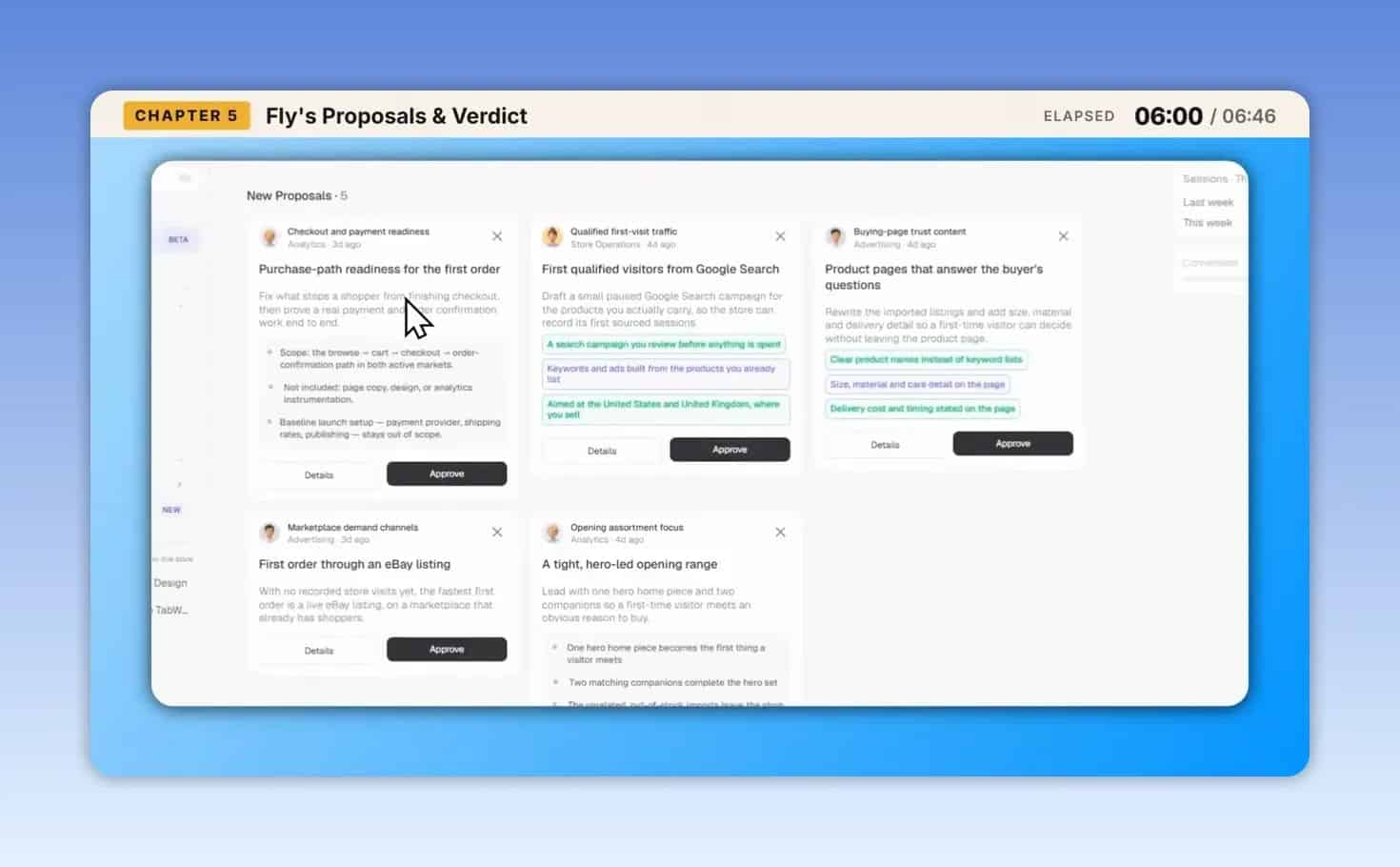
The workflow is proposal-based. Fly identifies potential work, presents a plan, and waits for approval before the agents execute it.
What the initial proposals focused on
The test account included 10 free proposals to review. The suggestions were appropriate for a newly launched store rather than a business with an established customer base. They focused on:
- Purchase readiness: Checking whether the path to buying was ready.
- Initial traffic: Planning how to attract the first qualified visitors.
- Product-page clarity: Helping pages answer questions that could otherwise prevent a purchase.
Each proposal included a plan, with approval triggering execution. That gives the store owner a review point instead of handing over all decisions without oversight.
However, relevant proposals are not evidence of profitable campaigns, improved rankings, or increased sales. The test established that the planning and approval workflow functioned, not that the agents delivered long-term business results.
How to Take a Runner AI Store From Prompt to Launch
The practical process is best understood as two stages: generate the store, then make it ready for customers.
Describe the store and its style. Start with the product niche, visual direction, and business model. For example, a brief could request a home accessories boutique with warm neutral colors, editorial photography, and collections for lighting, textiles, and ceramics.
Review the proposed build plan. Check that the planned categories and pages match the business before allowing the work to proceed.
Inspect the generated catalog. Review suggested products, descriptions, imagery, variants, and prices. Supplier connections and fulfillment details need attention alongside the storefront.
Refine the design. Runner AI provides a design mode for selecting and editing elements directly. You can also request changes through the AI interface.
Publish and connect your domain. The tested publishing process first made the store available on a Runner AI subdomain. Using a custom domain required updating A records with the DNS provider.
Complete payment and shipping setup. In the test, Stripe could not be connected until the site was live. Check that the shipping setup also matches your actual fulfillment model.
Audit the customer experience before promotion. Check navigation, product images, policies, and the purchase path before approving traffic-generation work.
Custom-domain changes took additional waiting time, described as several hours and sometimes a day. For background on why changes are not always visible immediately, Cloudflare’s explanation of how DNS works is a useful reference.
The key distinction is that a fast initial build does not eliminate launch dependencies. Allow time for configuration, propagation, and corrections.
Runner AI’s Limitations and Launch Checks
The test reached a live store, but several rough edges made the setup less hands-off than the initial promise suggests. Some issues were reportedly already being addressed by support, so these are findings from the tested experience rather than a claim that every issue remains unresolved.
Product variants required manual selection
A product with many variations had no select-all option. Each desired variant had to be selected individually, adding repetitive work to catalog setup.
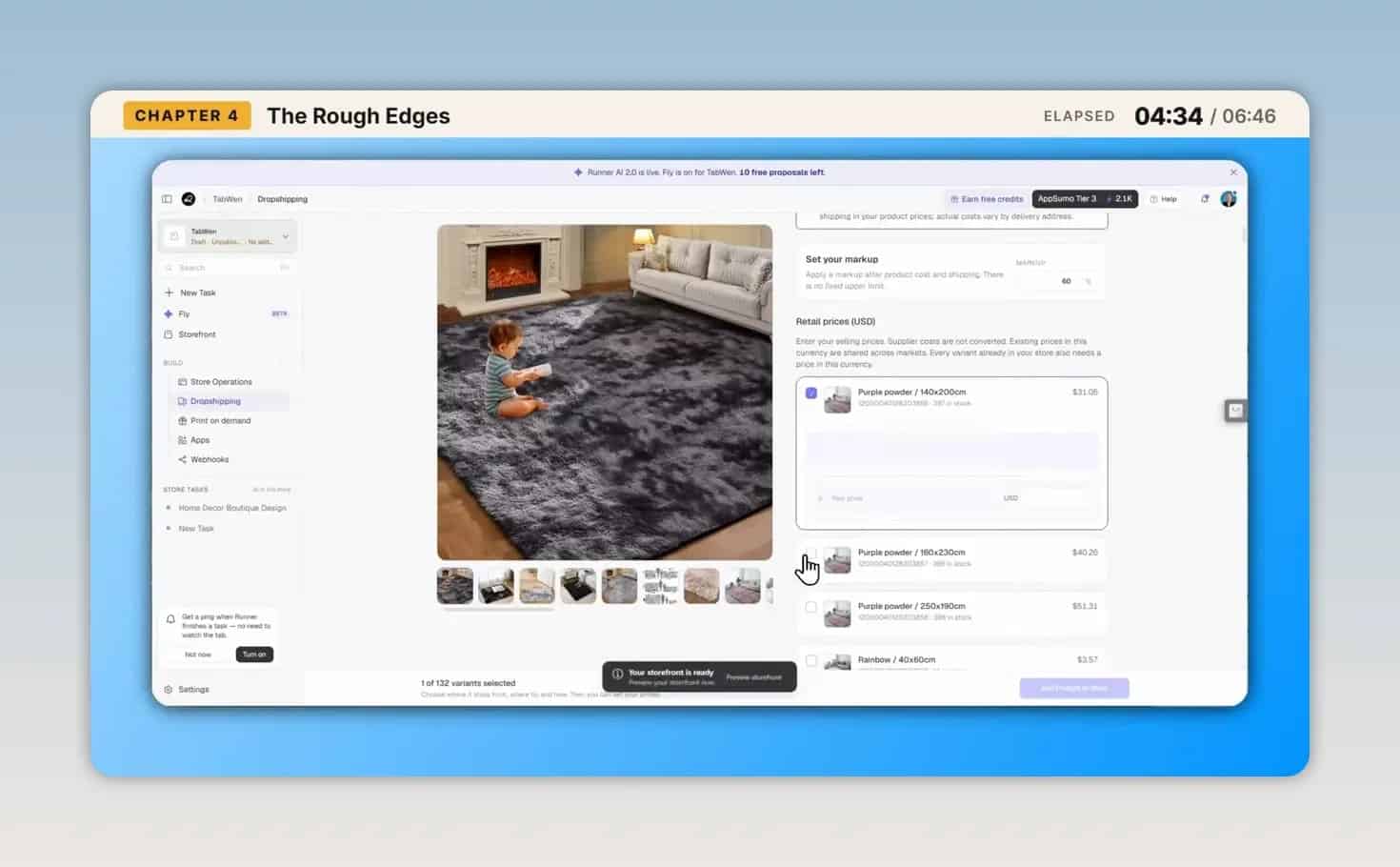
If your planned catalog contains many colors, sizes, or configurations, test this workflow early. A limitation that is minor for a handful of products can become frustrating across a larger catalog.
Generated content needed cleanup
The header retained placeholder text until it was changed. The store also included a testimonial section, which should be checked before publication: only retain statements that genuinely apply to the business and can be substantiated.
The broader lesson is to review every generated section, not just the main headline and product grid.
Privacy and terms pages were missing
No privacy policy or terms page was generated during the test, and there was no obvious manual page-creation route available in the interface.
Before committing to launch, establish how you will create, edit, and link the policy pages your business needs. Do not assume store generation includes all necessary business documentation.
Related-product images did not load
Images were missing from the related-product area beneath a product page. The issue was raised with support.
This is an important reason to inspect complete product pages, including recommendation areas below the main purchase section. A technically successful build can still contain visible gaps.
Shipping setup did not fit dropshipping cleanly
The shipping step assumed the presence of a warehouse, which did not fit the dropshipping setup being tested.
Confirm how the platform expects supplier-fulfilled orders to be configured. Do not enter settings simply to complete a setup screen if they do not reflect how orders will actually be handled.
A practical pre-launch checklist
- Replace all placeholder branding and copy.
- Verify product descriptions, images, prices, and variants.
- Inspect category pages and related-product sections.
- Confirm that policy pages can be created and accessed.
- Check custom-domain resolution.
- Complete Stripe connection and verify the purchase path.
- Make sure shipping settings match your fulfillment model.
- Review agent proposals before authorizing execution.
Runner AI vs. Shopify: Compare the Whole Setup, Not Just the Plan Fee
Runner AI positions itself as an alternative to paying for an ecommerce platform and several separate apps. The potential benefit is both financial and administrative: fewer subscriptions, logins, invoices, and tools to maintain.
The cost illustration used in the evaluation listed Shopify Basic at $39 per month, Grow at $105, and Advanced at $399. It also estimated that three to five additional apps could add $50 to $300 per month.
These are comparison figures, not a quote for your store. Check Shopify’s current pricing and the actual apps you need before calculating potential savings.
Runner AI’s lifetime deal introduces a different purchasing model, but the tested material did not establish the deal’s tier prices or exact allowances. The 271-credit build does not, by itself, reveal the total cost of operating a store.
Before buying, check:
- How many stores the selected tier includes.
- The credit allowance and how it is replenished.
- What ongoing agent work consumes.
- Which supplier connections and features your business needs.
- The deal’s current terms and availability.
You can review the Runner AI AppSumo deal for the available pricing and limits.
Is Runner AI Worth Considering?
Yes, if your priority is getting a new store built quickly with less manual configuration. The home decor test demonstrated a useful combination of coherent storefront generation, catalog expansion, and AI-generated action plans.
It is especially interesting for a solo seller who wants assistance with both setup and the next operational steps. The ability to approve agent plans is more useful than a builder that stops working once the homepage is published.
Proceed more cautiously if you need bulk catalog management, straightforward manual page creation, or a launch process that requires little troubleshooting. Those were precisely the areas where the tested experience needed more attention.
The sensible approach is to validate a small catalog first. Generate the store, check its products and policies, complete domain and payment setup, and only then expand the catalog or approve marketing activity. Runner AI can reduce the work of starting an ecommerce business, but it does not remove the owner’s responsibility to make the store accurate and ready to sell.