Latitude is an AI-powered LinkedIn content tool designed for people who want a more consistent publishing routine without starting every post from a blank page. It combines profile-based strategy recommendations, draft generation, post refinement, scheduling, a content calendar, and account-level analytics in one workspace.
The platform is best suited to solo professionals and businesses managing a personal LinkedIn profile alongside a company page. Its strongest use is as a structured drafting and planning assistant, not as a replacement for subject expertise or editorial judgment.
What is Latitude?
Latitude is a LinkedIn-focused content creation and management platform. During setup, it uses information from a connected LinkedIn profile to build context around the person, business, positioning, and intended audience. A business page can also be connected, allowing content to be prepared for either a personal or company account.
Rather than offering a general-purpose AI chat box alone, Latitude organizes its workflow around a practical LinkedIn publishing process:
- Build a profile and content strategy
- Set tone and content guardrails
- Generate a starter batch of posts
- Edit and improve post drafts
- Schedule posts at a selected frequency
- Manage drafts in a calendar
- Review analytics for managed accounts
This makes it particularly useful for people who know LinkedIn matters for their professional brand but struggle with topic selection, planning, or writing consistently.
How Latitude creates a LinkedIn content strategy
The onboarding process asks for information that helps the AI understand the account’s focus. That context is important because generic instructions tend to create generic LinkedIn posts. The more clearly the business focus, geography, audience, positioning, and content preferences are established, the better the starting point for generated ideas and drafts.
Latitude’s strategy area includes recommendations around posting cadence and suggested posting windows. A user can choose a weekly schedule or publish more frequently, select a start date, and set the account time zone before scheduling content.
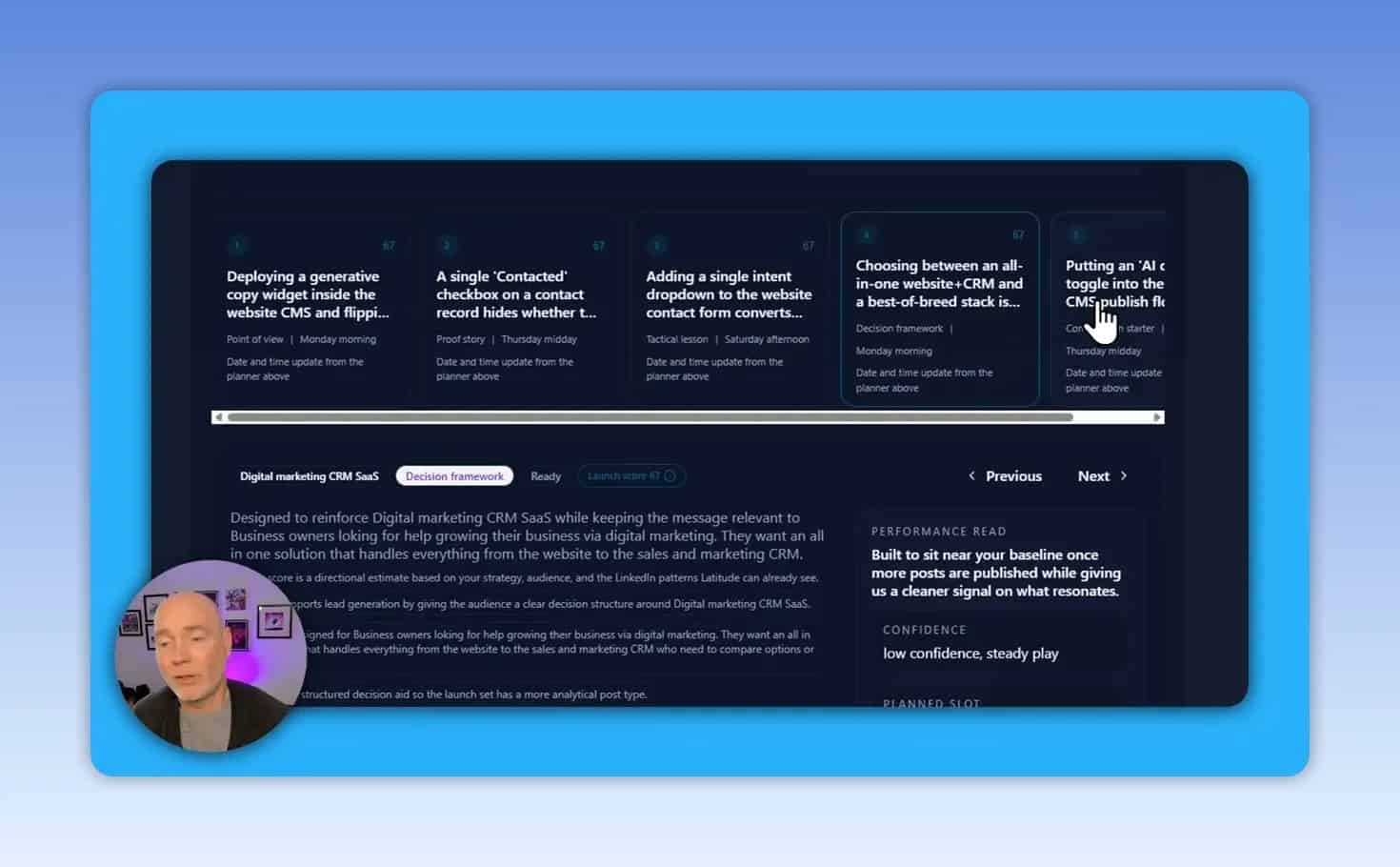
At the launch stage, Latitude can generate five initial post drafts based on the profile strategy. The initial set uses varied content angles:
- Point of view: A clear perspective on an industry issue or business decision.
- Proof story: A story that demonstrates a result, process, or lesson.
- Tactical lesson: A useful method, checklist, or implementation insight.
- Decision framework: A way to help readers evaluate a choice.
- Conversation starter: A prompt intended to generate discussion.
Using multiple post types is valuable because a LinkedIn feed built entirely from one format can quickly become repetitive. A balanced content plan can communicate expertise, show practical experience, and invite relevant conversations.
How to use Latitude for better LinkedIn post ideas
Latitude’s content creator can suggest multiple angles for a connected personal profile or business account. The ideas are a useful prompt for planning, but they should be treated as starting points rather than ready-to-publish concepts.
The best workflow is to select an idea and add first-hand context before requesting an AI draft. Useful context might include:
- A project outcome or client situation that can be shared responsibly
- Specific costs, trade-offs, constraints, or lessons
- A common objection from prospects or colleagues
- A process that changed after something did not work
- A firm opinion and the reasoning behind it
- The audience the post is meant to help
Why a rough draft beats a vague prompt
A short request such as “write a full LinkedIn post” gives an AI tool very little to work with. The result may be broadly formatted but lack a distinctive insight, useful proof, or authentic voice.
A stronger approach is to write a rough version first. It does not need to be polished. Include the actual facts, examples, perspective, and conclusion you want to communicate, then use the tool to improve clarity and structure.
For example, instead of asking for a generic post about reducing website delivery costs, provide the individual cost components, the alternative being considered, the business implication, and a clear stance. The AI then has real material to shape into a sharper post.
Post editing, hook scoring, and formatting
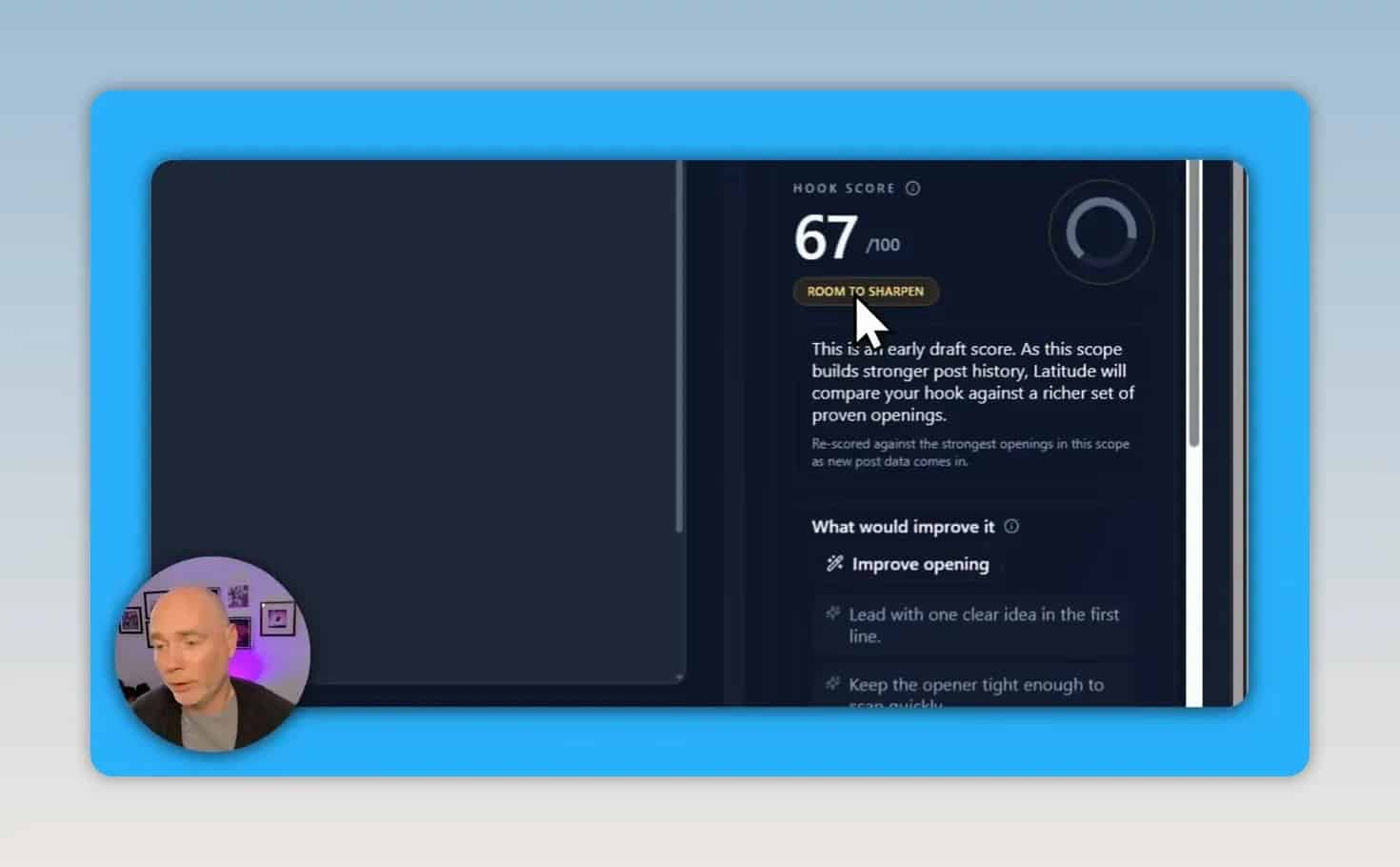
Latitude provides an editor for manually changing a draft and quick options for revising it. Available refinements include requests for a stronger opening, a more credible treatment, or a more tactical version.
The editor also includes a hook score that assesses the opening of a post. This can help identify whether the first lines need more clarity or direction. However, a high score should not become the only goal. A hook that sounds overly dramatic, vague, or unlike the author may earn attention but weaken credibility.
Use hook scoring as an editing signal, then judge the result against three questions:
- Is the opening specific? It should tell the right audience why the topic matters.
- Can the body support the promise? Do not lead with a claim the rest of the post cannot substantiate.
- Does it sound natural? The wording should match the person’s normal voice and professional standards.
Keep the final edit human
AI-generated LinkedIn copy can contain recognizable patterns, including overly polished transitions, generic claims, excessive hashtags, or punctuation that does not fit the account’s usual style. Edit for plain language and remove anything that feels artificial.
Before publishing, check the following:
- Every factual claim is accurate and can be defended.
- The post contains a real insight, not only a motivational conclusion.
- The opening does not overpromise.
- The post does not use unnecessary jargon or stock phrases.
- The formatting is easy to scan without becoming distracting.
- The call to action fits the goal of the post.
Scheduling LinkedIn posts with Latitude
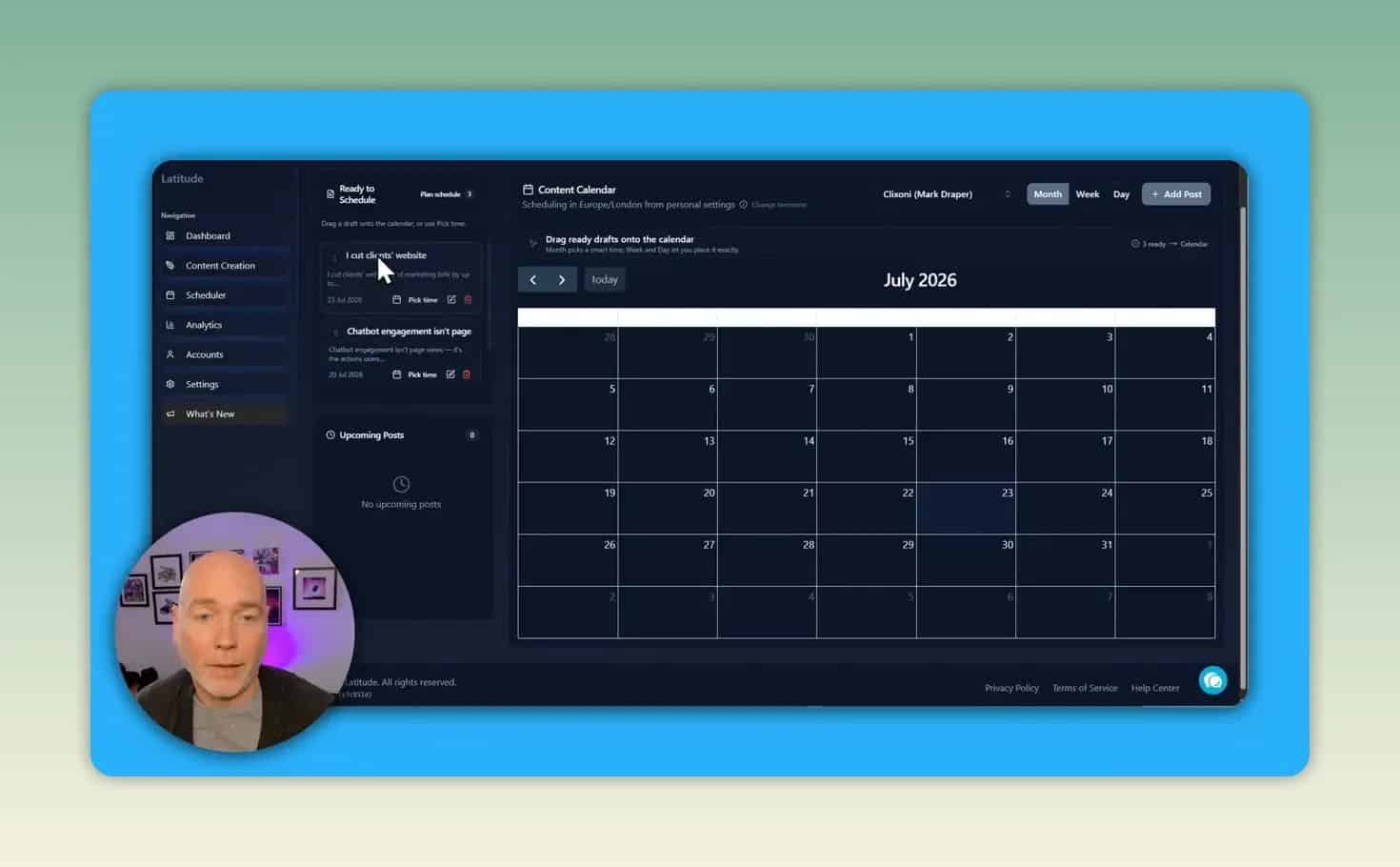
Once drafts are reviewed, Latitude can schedule them automatically according to the selected frequency, start date, and time zone. This can reduce the operational burden of maintaining a regular posting cadence.
Automatic scheduling should come after review, not before it. A batch of drafts may share similar themes, make claims that need checking, or be poorly timed for a business announcement. Review each item individually and make sure the sequence feels varied.
Latitude’s calendar provides day, week, and year views, with the ability to see upcoming content and place saved posts on the schedule. This helps avoid accidental duplicate posts and makes it easier to keep personal and business content organized.
Analytics and account management
Latitude includes a dashboard for managed account activity and analytics. The dashboard tracks metrics such as impressions, engagement rate, and published posts for content created and managed through the platform.
There is an important limitation for established LinkedIn users: the platform does not appear to analyze older posts that were published before using Latitude. That means the dashboard may begin with no useful performance history even if an account already has a substantial archive of LinkedIn content.
For this reason, use the dashboard as a forward-looking measurement tool. It can help monitor the posts produced through Latitude, but it should not be treated as a complete historical audit of an existing LinkedIn profile.
AI settings: tone, instructions, and custom prompts
Latitude includes AI settings that expose the direction used to generate content. These settings allow adjustments to tone and other output preferences. The platform also shows a custom prompt built from the onboarding information.
That custom context can include account focus, target geography, and other guidance provided during setup. Reviewing it matters because it reveals what the AI is being told about the account. If the prompt is incomplete or inaccurate, content recommendations can drift away from the intended audience.
A practical setup checklist includes:
- Confirm the primary audience and the problems they care about.
- State the geographic market if it affects examples, language, or positioning.
- Define the topics that are in scope.
- Identify topics, claims, or styles that should be avoided.
- Choose a tone that reflects the account rather than a generic brand voice.
- Set the correct account time zone before scheduling.
What Latitude does well
Latitude has potential as a focused LinkedIn workflow tool, particularly for users who need structure more than unlimited AI writing options.
- Profile-based onboarding: It uses account context to shape content strategy and starter drafts.
- Content variety: The initial post types encourage more than one style of LinkedIn content.
- Personal and business account support: Content can be created for either connected account type.
- Built-in planning: Scheduling and calendar tools keep drafting and publishing in one workflow.
- Quick revisions: The editor offers practical directions for changing a draft’s angle or opening.
- Visible AI instructions: Custom prompt settings make it easier to inspect and adjust the context guiding output.
Latitude limitations to consider
Latitude is not a fully hands-off LinkedIn growth solution. Several limitations are important when deciding whether it fits a content workflow.
- No previous-post analysis: Existing LinkedIn posts do not appear to be included in the platform’s analytics or strategic analysis.
- No image generation: The editor allows an image to be added, but it does not provide a built-in way to generate one.
- Output quality depends on input: Vague prompts and limited context can lead to weak or generic drafts.
- Drafts still require review: Automated scheduling is useful only after careful editing and fact-checking.
- Hook scores are not a complete quality measure: A numerical score cannot determine whether a post is original, credible, or genuinely useful.
Who should use Latitude?
Latitude may be a good fit for:
- Consultants, founders, and professionals who have expertise but lack a repeatable LinkedIn content process
- Small businesses that publish through both a personal profile and company page
- People who need help turning rough notes into organized post drafts
- Teams that want a simple calendar to coordinate LinkedIn publishing
- Users who prefer a LinkedIn-specific workflow over a broad social media management platform
It may be less suitable for people who primarily need historical LinkedIn analytics, integrated image creation, or a system that can publish without substantial human review.
How to get better results from any AI LinkedIn content tool
The tool is only one part of the process. Use this repeatable framework to produce posts that have a better chance of sounding credible and relevant.
- Start with an experience or observation. Choose something you know first-hand.
- Identify one useful point. Avoid trying to address every aspect of a topic in one post.
- Add concrete context. Include the situation, constraints, numbers where appropriate, and decision made.
- Write an imperfect draft. Get the thinking onto the page before asking AI to improve it.
- Use AI for structure and alternatives. Request a tighter hook, clearer sequence, or more tactical framing.
- Edit for voice and truth. Remove unsupported claims, unnatural phrasing, and filler.
- Schedule intentionally. Spread different post types across the calendar instead of publishing similar ideas consecutively.
- Review performance over time. Look for themes, formats, and topics worth developing further.
Frequently asked questions
Can Latitude post to both a personal LinkedIn profile and a business page?
Yes. The platform supports connected personal and business LinkedIn accounts, allowing a draft to be created for the relevant account.
Does Latitude create LinkedIn post ideas?
Yes. Its content creator can generate suggested post angles. Results are likely to be more useful when the user supplies detailed context, rough notes, examples, or a clear perspective.
Can Latitude schedule LinkedIn posts automatically?
Yes. Posts can be scheduled around a chosen frequency, start date, and time zone. Review generated drafts before enabling automatic scheduling.
Does Latitude generate images for LinkedIn posts?
No built-in image generation was available in the demonstrated workflow. Images can be added, but they need to be created or sourced separately.
Does Latitude analyze old LinkedIn posts?
It does not appear to analyze posts published before the platform is used. Analytics focus on content created and managed through Latitude.
Final takeaway
Latitude is most compelling as a LinkedIn content operating system for planning, drafting, refining, and scheduling posts. Its profile-informed strategy, varied post formats, calendar, and AI settings can help make consistent publishing more manageable.
The essential caveat is that the strongest content still begins with real expertise and specific input. Use Latitude to reduce blank-page friction and organize your publishing process, then apply human judgment to make each post accurate, distinctive, and worth reading.
Check the current Latitude offer if you want to review the available deal and plan options.