Valve has released official CAD files for the Steam Machine’s exterior, giving you the tools to design your own faceplates and accessories. These files are free to download and use under a Creative Commons license, so you can modify, 3D print, or share your own designs without legal issues.
If you own a Steam Machine or just like to build things, this release opens up new options. You can use the 3D CAD file to create custom parts that fit the console’s exact shape and size.
This follows Valve’s earlier release of CAD files for the Steam Controller and Puck, showing a pattern of support for hobbyists and makers. In this post, you will learn what these files include, how to access them, and what you can build with them.
Created using https://3dvizi.com/
Where To Find the Official Files
Valve hosts every official Steam Machine CAD file on its own hardware platform, not on third-party sites. You need to know exactly where to look and what to check before you trust a download.
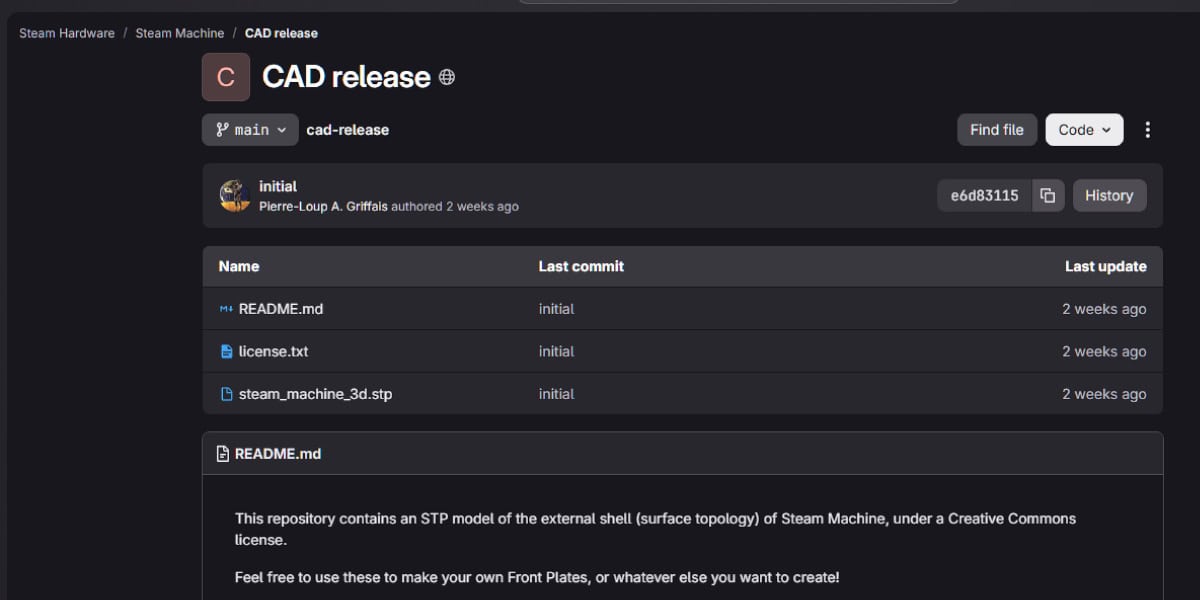
Valve’s Steam Hardware GitLab Repository
Valve publishes its Steam Machine files through its GitLab-hosted hardware repository. This is the same platform Valve used when it released CAD files for the Steam Controller earlier in the year.
You’ll find the Steam Machine’s exterior geometry there in STEP format, a file type built for wide compatibility across CAD programs.
Valve’s readme file inside the repository spells out the license terms. It also warns that opening your Steam Machine’s outer shell may void your warranty, so read this before you start printing.
Check the repository directly instead of relying on mirrored copies. Valve updates it as new hardware or accessory data becomes available.
Available Exterior and E-Ink Faceplate Resources
Two main resources exist right now. The first is the 3D CAD file for the Steam Machine’s outer shell, which lets you design and print custom faceplates or add-ons.
The second is the e-ink faceplate design, released earlier along with matching firmware and software. This one covers more than just shape. It includes the electronics side too, so you can build a working e-ink display panel yourself.
Both releases fall under a Creative Commons Attribution-NonCommercial-ShareAlike 4.0 license. You can copy, remix, and share your builds, but you can’t sell them without contacting Valve first.
If you want to make accessories for profit, Valve says to reach out directly rather than assume the license covers it.
How To Verify an Official Download
Before you print or build anything, confirm the file actually came from Valve. The safest method is going straight to the GitLab repository link rather than a forum post or file-sharing site.
Check these details:
- File format – Official files use STEP format, not proprietary or unusual extensions
- License text – Genuine files include the Creative Commons BY-NC-SA 4.0 notice
- Readme warnings – Valve’s original documents mention warranty risks tied to opening the case
- Source URL – It should point to Valve’s own domain, not a reposted archive
If a file is missing the license language or warranty notice, treat it as unofficial. SteamOS updates and hardware notes from Valve typically confirm new releases too, so cross-checking Valve’s own announcements is a reliable second step.
What the Release Includes
The release covers three main parts: the outer shell design, the e-ink faceplate files, and the software you need to make it all work. Each part gives you what you need to build or customize your own Steam Machine hardware at home.
Exterior Shell Geometry and Reference Measurements
Valve’s CAD release gives you the full 3D model of the Steam Machine’s outer case. This includes the front panel and the complete outer shell as separate files.
You get exact measurements for every part of the case. This means you can design your own faceplates that fit correctly without guesswork.
The files use a Creative Commons Attribution Non-Commercial Share Alike 4.0 license. You can modify and share your designs, but you cannot sell them for profit.
This matches what Valve did earlier with the Steam Controller CAD files, giving you a consistent set of tools across Valve’s hardware lineup.
E-Ink Inkterface Design Files
The release also includes files for the e-ink screen design, sometimes called the Inkterface. Valve published these files a few weeks before the full case release, according to Digital Foundry.
These files let you build a custom faceplate with a working e-ink display. You get the mechanical design needed to fit the screen into your case correctly.
The e-ink files work alongside the exterior shell files. If you want a faceplate with a screen, you need both sets of files to complete the project.
Firmware, Software, and Assembly Documentation
Beyond the physical design files, Valve also released firmware and software needed to run the e-ink display. This lets your custom faceplate actually function once you print it.
The assembly documentation explains what parts you need beyond a 3D printer. This includes a list of components you’ll need to source separately to complete the build.
Valve designed this release for people with some technical skill. You’ll need basic knowledge of 3D printing and simple electronics assembly to use these files successfully.
Designing Custom Faceplates and Accessories
You can use the official 3D CAD file to design faceplates, stands, and other add-ons that fit your Steam Machine exactly. Once you know how the files work and how to prep them, you can print parts that match Valve’s original dimensions.
Compatible 3D Printing Projects
Several ready-made projects already use the official Steam Machine CAD files, so you don’t have to start from scratch.
One popular option is the Steam Machine Faceplate Customizer, which lets you generate your own faceplate design and adjust the magnet holes to fit your hardware. It’s built from Valve’s published dimensions, so the fit should be accurate.
You can also find open-source faceplate files on GitHub, where a contributor modified the official CAD files into printable designs. These files are still being refined, so check the notes before you print.
If you want the e-ink faceplate look, Valve has shared the official 3D print files for that version too.
Stands, Mounts, Handles, and Protective Panels
The CAD files aren’t limited to faceplates. You can use the same dimensions to design stands, wall mounts, and protective panels that match your Steam Machine’s exact shape.
Valve confirmed that the goal of releasing these files was to help you build more than just decorative parts. According to Valve’s own statement, the release was meant to support faceplates, protective cases, stands, and other custom accessories.
If you want a more playful project, some community members have talked about adding a GameCube-style handle to the console. It hasn’t been made yet, but the CAD files give you the exact measurements needed to try.
Preparing CAD Models for Printing and Fitment
Before you print anything, you should check your model against Valve’s official measurements. This helps you avoid warping, poor fitment, or parts that don’t snap into place correctly.
Most creators recommend printing in PETG or ABS/ASA instead of PLA. These materials hold their shape better and resist warping caused by heat inside the console, according to the print recommendations listed with the faceplate customizer file.
You should also double-check magnet hole sizes, faceplate thickness, and edge tolerances before printing. Some early designs, like those shared on GitHub, note that thickness and hole sizes may need small adjustments depending on your printer and material choice.
License Terms, Warranty, and Commercial Use
Before you download or print anything, you need to understand the rules that come with these files. Valve has set clear limits on how you can use the CAD files, when you need to reach out for commercial projects, and what happens to your warranty if you open your Steam Machine.
Creative Commons Attribution-NonCommercial-ShareAlike Terms
Valve released the Steam Machine CAD files under a Creative Commons Attribution-NonCommercial-ShareAlike 4.0 International license. This license lets you download, modify, and share the files for free.
You can create your own faceplates, cases, or accessories and give them away or sell them non-commercially. The catch is the “NonCommercial” part.
You can’t sell products based on these files without permission. The “ShareAlike” clause also means that if you modify the files and share your version, you must use the same license terms. This keeps the designs open for everyone, not locked behind a paywall.
When To Contact Valve for Commercial Accessories
If you want to sell accessories based on the Steam Machine CAD files, you can’t just start production. Valve has stated that anyone interested in producing commercial accessories can contact them directly.
This means you need to reach out to Valve before selling anything based on these designs. The standard Creative Commons license only covers non-commercial use, so commercial sellers need separate permission.
This step protects both you and Valve. It ensures your products meet quality standards and avoids legal issues tied to unauthorized commercial use of Valve’s intellectual property.
Warranty Risks of Opening the Enclosure
Opening your Steam Machine’s outer shell comes with a real risk to your warranty. Valve’s documentation states that opening the outside enclosure will void your warranty.
This rule exists to protect Valve from claims tied to damage you might cause yourself. Once you open the case, Valve can no longer guarantee the internal components are undamaged or unmodified.
Valve engineer Pierre-Loup Griffais has also advised that users should let professionals handle modifications rather than attempting them without experience. If you’re not confident working with electronics, this warning is worth taking seriously before you start any custom project.
E-Ink Faceplate Build Considerations
Building your own Inkterface faceplate takes some planning, basic tools, and a willingness to follow Valve’s documentation closely. Before you start, you’ll want to know what parts you need, how the setup process works, and whether a DIY build fits your skill level and time.
Required Components and Tools
You’ll need a 3D printer to produce the faceplate shell, since Valve released the CAD files for public use. Beyond the printed parts, the build calls for an e-ink display module, a small circuit board, and connecting cables that link the display to your Steam Machine.
You’ll also need basic soldering tools, including a soldering iron and solder, plus small screwdrivers for assembly. A full bill of materials is listed alongside the open-source Inkterface project files, so you can source each part before you begin. Check magnet compatibility for faceplate attachment, since some community-modified CAD files note that magnet holes may need adjustment to fit standard magnets.
Soldering, Firmware Uploading, and Setup
Once you have your parts, you’ll solder the display module to the circuit board following the wiring diagram in Valve’s documentation. This step requires careful attention, since incorrect connections can prevent the display from working.
After soldering, you’ll upload the firmware to the board using the files Valve provides. Valve’s step-by-step video guides walk you through both the physical assembly and the firmware upload process.
The finished board connects to your Steam Machine over Bluetooth, letting you view system stats like CPU and GPU temperatures directly on the faceplate. You’ll want to test the connection before fully closing up the case.
Choosing Between DIY Assembly and Third-Party Options
If soldering and firmware setup feel outside your comfort zone, you have other options. Third-party sellers on platforms like Etsy are expected to offer pre-assembled boards, and accessory maker Jsaux is reportedly preparing a retail version of the e-ink faceplate.
Buying a finished unit costs more but saves you the assembly time and reduces the risk of wiring errors. Building it yourself costs less and gives you full control over the process, but it demands more time, tools, and technical comfort.
Your choice depends on your budget, your skill level, and how much you want to customize the faceplate for your Steam Machine.
Steam Machine Updates Relevant to Modders
Along with the CAD file release, Valve rolled out performance upgrades and shared new details on order timelines. These updates give you a clearer picture of what the Steam Machine can do and when you can expect to get your hands on one.
FSR 4.1 Through Proton Experimental
Valve added FSR 4.1 support to the Steam Machine through Proton Experimental, giving you access to AMD’s upscaling technology on your device.
This update improves how games render at lower resolutions, which can boost frame rates without a major hit to visual quality. Early testing shows this is a significant upgrade for the Steam Machine’s overall performance.
If you’re modding or customizing your device, this update matters because it affects how well your hardware runs demanding games. You don’t need to do anything special to get it—Proton Experimental handles the update automatically once you opt in.
SteamOS Compatibility and Community Development
The CAD files you can now download work directly with the Steam Machine’s SteamOS-based design, so any faceplates or accessories you create will match the actual hardware dimensions.
Valve released the files under a Creative Commons Attribution-NonCommercial-Sharealike 4.0 International license. This means you can share and adapt the designs, but you can’t sell what you make without contacting Valve first.
Keep in mind that opening the outer shell of your Steam Machine will void your warranty. If you’re planning to build custom parts, factor this into your decision before you start.
Availability and Steam Machine Orders
If you’re still waiting for your Steam Machine, Valve says everyone currently in the reservation queue should be able to purchase a unit before the end of 2026.
Valve has confirmed that Steam Machine orders are being processed daily, though wait times vary by region and product type. Each queue moves at its own pace based on local demand.
You may notice a shift in how the ordering process works too. If you move from the waitlist straight to being able to buy without an in-between step, Valve now sends an extra email to confirm you’ve reached that stage.
Frequently Asked Questions
You have several options when it comes to finding, downloading, and using Steam Machine CAD files, depending on what part you want to build or modify. Below are answers to common questions about file sources, formats, licensing, and related hardware like the Steam Controller.
Where can I download a Steam Machine CAD file?
You can download official Steam Machine CAD files directly from Valve’s GitLab repository. This source includes the exterior design files that Valve released for hobbyists who want to create their own faceplates or accessories.
You’ll also find community-uploaded models on sites like GrabCAD’s Steam Machine collection. These files vary in quality and completeness, so check the details before you use them for your project.
Are free Steam Machine CAD files available for download?
Yes, Valve released its official CAD files under a Creative Commons Attribution Non Commercial Share Alike license, which means you can download and use them at no cost. This license lets you modify the files for personal projects, but it restricts commercial use.
You can also find free steam engine and mechanical CAD blocks on sites like Libreria CAD’s steam engine collection, though these files relate to general steam engines rather than Valve’s gaming console.
Which file formats are commonly used for Steam Machine CAD models?
Most Steam Machine CAD files use standard 3D modeling formats that work with common design software. DWG files are widely available, as seen in collections like Bibliocad’s steam machine library, which include detailed part breakdowns.
You’ll also encounter STL files, which are the standard format for 3D printing. Sites like STLFinder’s steam machine models offer files specifically prepared for 3D printers and CNC machines.
Can I find CAD files for the Steam Machine frame or enclosure?
Yes, Valve released the exterior CAD file for the Steam Machine’s outer shell, which you can access through Valve’s official CAD release page. This file lets you produce your own faceplates and custom exterior parts using a 3D printer.
According to reporting from Digital Foundry’s coverage of the CAD release, this release followed earlier files for the e-ink faceplate and Steam Controller. This pattern suggests Valve plans to continue releasing hardware files for other components.
Are Steam Controller CAD files available for 3D modeling or modification?
Yes, Valve released CAD files for the Steam Controller in March, according to Digital Foundry’s report on the exterior CAD file. This release came before the Steam Machine exterior files and followed the same open licensing approach.
These files let you modify or redesign controller components for personal use. You’ll need compatible CAD software to open and edit them, since Valve’s format matches the same standards used for their other hardware releases.
What licensing restrictions apply to Steam Machine CAD files?
Valve’s official Steam Machine CAD files use a Creative Commons Attribution Non Commercial Share Alike license. This means you must give credit to Valve, avoid commercial use, and share any derivative works under the same license terms.
The e-ink screen files follow a different approach. According to Groundy’s coverage of the e-ink screen release, Valve open-sourced this component under an MIT license, which is more permissive and allows broader use, including commercial applications. You should check the specific license attached to each file before you use it, since Valve applies different terms to different components.