Removing the background from photos is very useful for all sorts of reasons, as a YouTuber it helps me create thumbnails, as a blogger it helps me make images for my posts. For those who sell physical products suchs tools let you put your products onto a beautful colour background, making them stand out from the crowd.
Clickmajic is a background removal tool that produces results better than tools such as Photoshop and Crellom giving you a clean image free of any background.
As someone who get’s frustrated when having to spend time removing photo backgrounds I was very keen to try this service out, and the results surprised me.
Clickmajic Video Review
The offer I refer to in the video is available via: httpss://appsumo.8odi.net/3PZery
Clickmajic vs PhotoShop vs Crello
To put the service to the test I gathered a selection of images, some product, some people. As hair is especially challenging to these tools I grabbed some stock photography of models with hair in motion.
The test was simple, I’d open each image into each service and, in the case of Crello and Photoshop, press the ‘remove background’ button. Clickmajic doesn’t require a button push, you just upload your image.
Let’s take a look at the results compared to the original photo.
Removing background behind model
These photos were chosen specifically due to the models hair, which I thought would pose a problem when attempting to remove the backgroun.

Crello clearly fails this one, I’d called it a draw for Clickmajic and Photoshop.

A second test and Crello decides to give our model a haircut! As the hair covered the models arm Crello also trimmed some arm off as well. Another draw for Clickmajic and Photoshop
Removing product photo background
In the next test I used my own photos of products I’ve reviewed. These are items I’d want to remove the background to create a thumbnail, so in some respects this is the more important test for me.

The pattern continues, Crello doesn’t get it 100% correct, cutting out some of the blue band, but Clickmajic and Photoshop both do a good job.

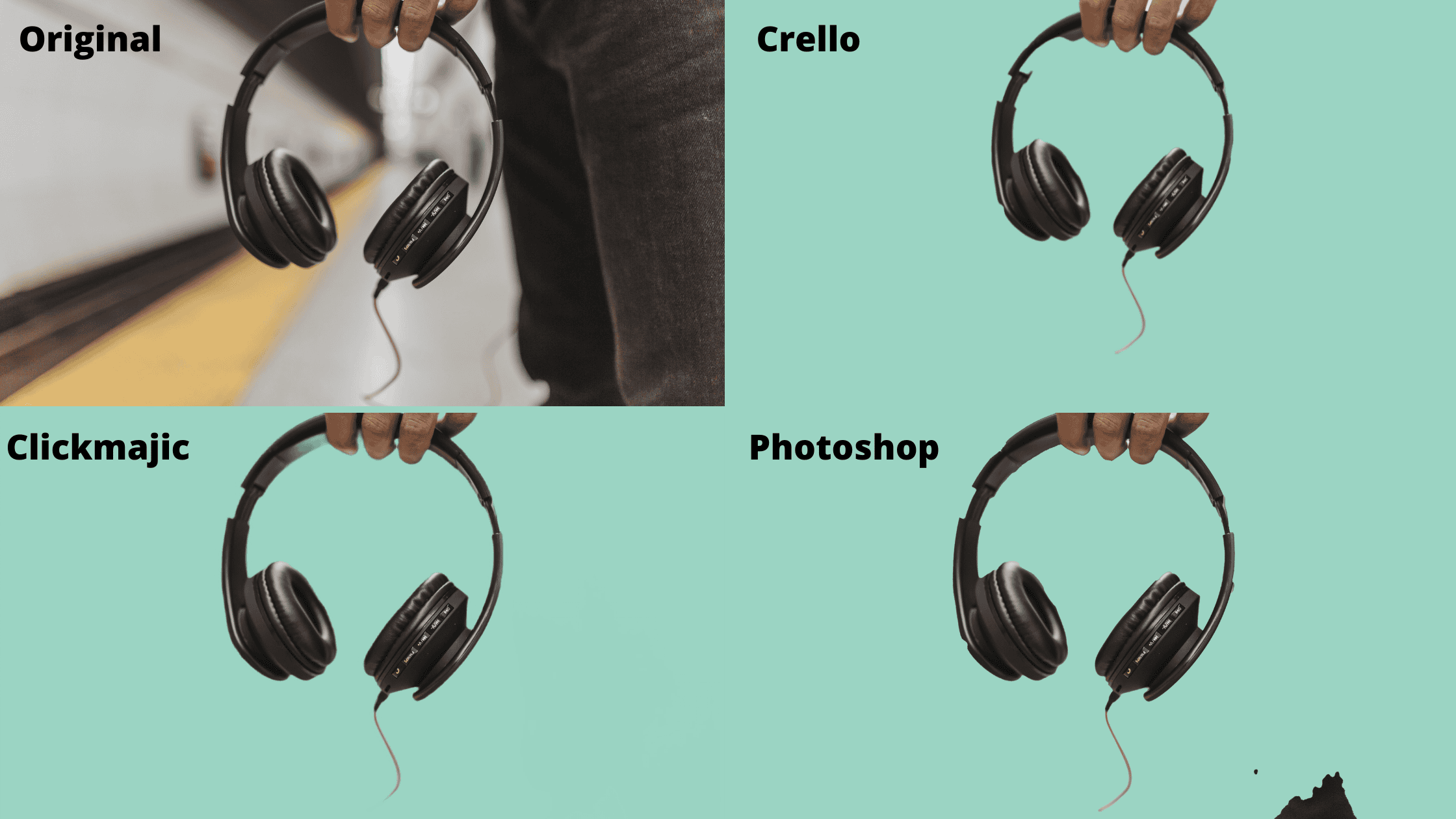
No things are getting interesting, for the first time Photoshop makes a mistake and doesn’t fully remove the background. Crello goes too far and removed some of the headphones. Clickmajic takes this one.

Final one and for the first time Crello get’s it 100% correct. Interestingly Photoshop fails, cutting out parts of the product.
Can Tubebuddy’s Chrome extension be used for background removal like the mentioned tool?
Yes, Tubebuddy’s Chrome translation feature can be a great tool for background removal. With its powerful features, you can easily edit and enhance your videos without needing a separate tool. Tubebuddy’s chrome translation feature definitely offers a convenient solution for seamless background removal.
Clickmajic is better than Photoshop
So based on these quick tests Clickmajic performed the best, outperforming both Crello and Photoshop.
If you want to grab this brilliant background removal tool it’s currently available on a lifetime deal, a one off payment get’s you 30, 60 or 90 removals per month.
There are also some additional features, you can add in backgrounds in the app, meaning you don’t need to do additional editing once the background has been removed.
The developers also have mobile and desktop apps, as well as a Photoshop plugin, on the roadmap. They’re also looking into background removal in videos, so now’s a good time to invest in something that could become even more useful in the future.