Did you know that over 250 million people use Discord every month to connect and communicate with gamers worldwide? If you’re one of them, you know how important it is to have a gaming headset that provides crystal clear communication and immersive sound.
Whether you’re strategizing with your team or immersing yourself in the virtual world, having the right headset can make all the difference.
In this article, we will explore the three best gaming headsets for Discord that offer exceptional audio quality and seamless communication. Stick around to find out which headsets made the cut and take your gaming experience to the next level.
Key Takeaways
- Sound quality options, such as virtual 7.1 surround sound and deep bass, can enhance the gaming experience on Discord.
- Having a high-quality microphone that is compatible with Discord is important for clear and effective communication.
- Multi-platform compatibility is necessary to ensure versatility and the ability to use the headset with different gaming devices.
- Comfort and ergonomics, including adjustable headbands, memory foam ear pads, and lightweight designs, are crucial for a comfortable gaming experience.
Logitech G335 Wired Gaming Headset (Black)
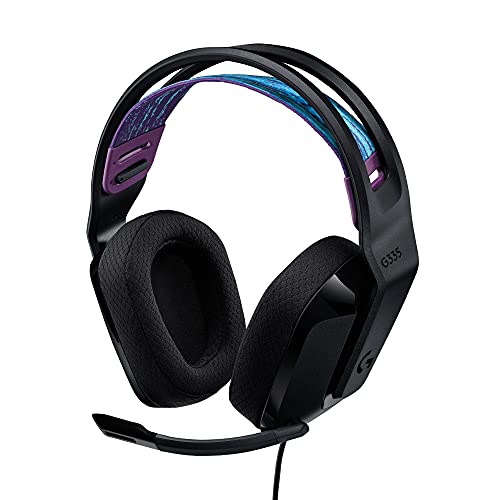

If you’re looking for a lightweight gaming headset that offers crystal-clear communication on Discord, the Logitech G335 Wired Gaming Headset (Black) is an excellent choice. With its suspension headband and customizable fit, this headset ensures optimal weight distribution and comfort during long gaming sessions. The soft memory foam ear pads and sports mesh material provide all-day comfort, allowing you to focus on your game without distractions.
The headset is compatible with PC, PlayStation, Xbox, and Nintendo Switch, making it versatile for different gaming platforms. With a 3.5mm audio jack, you can easily plug and play without any hassle. The volume control on the ear cup and flip to mute microphone add convenience to your gaming experience.
The Logitech G335 Wired Gaming Headset delivers impressive sound quality with its 40mm neodymium drivers, immersing you in the game.
Best For: Gamers who prioritize comfort and crystal-clear communication on Discord.
Pros:
- Lightweight design with suspension headband for customized fit and weight distribution.
- Soft memory foam ear pads and sports mesh material for all-day comfort.
- Compatible with multiple gaming platforms and devices.
Cons:
- Some users mention a lack of bass in the sound.
ASUS TUF Gaming H1 Wired Headset (Black)

The ASUS TUF Gaming H1 Wired Headset (Black) is an excellent choice for gamers looking for a lightweight design and crystal-clear audio on Discord. With its 7.1 surround sound and 40mm drivers, you can immerse yourself in the game and hear every detail with precision.
The headset also features instant mic and volume control, allowing you to adjust settings on the fly without interrupting your gameplay. It’s compatible with multiple platforms, ensuring that you can use it with ease across different devices.
Users have praised the deep bass and crystal-clear audio, making the gaming experience more immersive. The headset is designed to be lightweight, making it comfortable for extended gaming sessions. The intuitive control buttons make it easy to adjust settings, and the headset is known for its overall comfort.
While there have been some negative reviews about mic echoing, cable durability, and headband breaking, the majority of users have had positive experiences with the sound quality, comfort, and functionality of the ASUS TUF Gaming H1 Wired Headset.
Best For: Gamers looking for a lightweight headset with crystal-clear audio and easy control options.
Pros:
- 7.1 surround sound for immersive gaming experience
- Lightweight design for extended gaming sessions
- Instant mic and volume control for easy adjustments
Cons:
- Some users have reported issues with mic echoing
ASUS TUF Gaming H1 Wireless Headset (Black)

For gamers seeking a wireless gaming headset with exceptional audio quality and versatile compatibility, the ASUS TUF Gaming H1 Wireless Headset (Black) is an ideal choice.
This headset features 2.4 GHz wireless technology and a dual-antenna design, ensuring low latency and better stability during gameplay. The USB-C dongle further improves the connection, providing a seamless gaming experience.
With extensive coverage of up to 25 meters, you can enjoy gaming without being restricted by cords. The airtight chambers and 40 mm ASUS Essence drivers deliver clear audio with deep bass, enhancing your immersion in the game. The virtual 7.1 surround sound technology further enhances audio precision, allowing you to pinpoint the direction of in-game sounds.
Additionally, the certified clear microphone ensures crystal clear communication with your teammates. The lightweight design and long-lasting battery of up to 15 hours make this headset comfortable for extended gaming sessions. With intuitive control buttons on the ear cup, you can easily adjust the volume, mute the microphone, and power the headset.
The ASUS TUF Gaming H1 Wireless Headset (Black) is compatible with PCs, Macs, PlayStation, Xbox, Nintendo Switch, smartphones, and tablets, providing cross-platform support.
Best For: Gamers looking for a wireless gaming headset with exceptional audio quality and versatile compatibility.
Pros:
- Lightweight
- L&R audio
- Solid construction
Cons:
- Virtual 7.1 surround sound isn’t noticeable
Factors to Consider When Choosing Gaming Headsets for Discord
When choosing a gaming headset for Discord, there are several important factors to consider.
First, think about the sound quality options available, as clear and immersive audio can greatly enhance your gaming experience.
Additionally, consider the mic compatibility choices, ensuring that the headset has a high-quality microphone that’s compatible with Discord.
Lastly, pay attention to the comfort and ergonomics of the headset, as you’ll likely be wearing it for extended periods of time.
Sound Quality Options
Consider sound quality options when choosing gaming headsets for Discord to enhance your audio precision and immersive gaming experiences.
Look for headsets that offer virtual 7.1 surround sound technology, which provides enhanced audio precision and a more immersive gaming experience. This feature allows you to pinpoint the direction of in-game sounds, giving you a competitive edge.
Additionally, deep bass response is crucial for a more immersive audio experience, as it adds depth and richness to the sound. Look for headsets with 40mm neodymium drivers or ASUS Essence drivers, as these deliver clear audio with deep bass.
However, keep in mind that some users may have varying preferences for sound quality and bass performance, so it’s important to find a balance that suits your personal preferences.
Mic Compatibility Choices
Ensure your gaming headset for Discord is compatible with your preferred gaming platforms and offers features like multi-platform compatibility and Discord certification.
Consider the gaming platforms you use and check if the headset supports their audio connections, such as 3.5mm jacks for consoles or USB dongles for wireless connections.
Look for headsets with multi-platform compatibility to ensure they work with various devices like PC, Mac, consoles, and mobile devices.
It’s important to check for Discord certification and TeamSpeak compatibility as well, as this ensures the microphone meets specific standards for voice chat.
If you prefer wireless options, consider headsets with low latency 2.4 GHz wireless technology and long-lasting battery life for uninterrupted gaming sessions.
Lastly, pay attention to control options like volume adjustments and microphone muting, and make sure they’re conveniently placed for ease of use during gameplay.
Comfort and Ergonomics
To ensure a comfortable gaming experience during your Discord sessions, prioritize the comfort and ergonomics of your gaming headset. Look for features like adjustable headbands, memory foam ear pads, and lightweight design to maximize comfort during long hours of use.
The materials used in the construction of the headset, such as soft memory foam and sports mesh, can enhance comfort and breathability. Ergonomic design elements, like intuitive control buttons and adjustable headbands, contribute to a personalized and comfortable gaming experience.
Remember to consider user reviews and feedback on comfort and long-term wearability, as individual comfort preferences can vary.
Wireless or Wired?
When choosing gaming headsets for Discord, it’s important to weigh the pros and cons of wireless and wired options.
Wired headsets offer a more stable and consistent connection, ensuring uninterrupted communication during your gaming sessions. They also don’t require charging, making them more convenient for longer gameplay.
On the other hand, wireless headsets provide greater freedom of movement, eliminating the need for tangled cables and allowing you to move around more freely. However, wireless headsets may be prone to interference and latency issues, which can impact audio quality and communication.
Wired headsets typically have lower latency, ensuring minimal delay in audio transmission for a more immersive gaming experience.
Consider these factors when deciding between wireless and wired options for your gaming needs.
Multi-Platform Support
Consider the versatility and convenience that multi-platform support offers when choosing gaming headsets for Discord.
With multi-platform support, you can enjoy seamless transition between different gaming platforms without needing multiple headsets. It ensures compatibility with popular gaming platforms such as PlayStation, Xbox, Nintendo Switch, and PC, making it suitable for a wide range of gamers.
You can easily switch between different gaming systems while using the same headset, offering convenience and flexibility. Additionally, headsets with multi-platform support often come with different connection options, such as 3.5mm audio jacks or USB-C dongles, catering to the varied connectivity needs of different gaming devices.
Frequently Asked Questions
What Is the Price of the Logitech G335 Wired Gaming Headset (Black)?
The price of the Logitech G335 wired gaming headset (black) is $69.99.
Does the ASUS TUF Gaming H1 Wireless Headset (Black) Require Any Additional Software for Setup?
No, the Asus TUF Gaming H1 wireless headset (black) doesn’t require any additional software for setup. It’s a plug-and-play device, so you can start using it right away without any hassle.
Are the ASUS TUF Gaming H1 Wired and Wireless Headsets Compatible With Consoles Such as Playstation or Xbox?
Yes, the ASUS TUF Gaming H1 wired and wireless headsets are compatible with consoles like PlayStation and Xbox. Just plug them in or connect wirelessly and enjoy immersive sound and crystal clear communication.
Can the Logitech G335 Wired Gaming Headset (Black) Be Used for Purposes Other Than Gaming, Such as Listening to Music or Watching Movies?
Yes, the Logitech G335 wired gaming headset (black) can be used for purposes other than gaming. You can enjoy listening to music or watching movies with its immersive sound and comfortable design.
Are There Any Specific Features or Technologies That Set the ASUS TUF Gaming H1 Wired Headset (Black) Apart From Other Gaming Headsets on the Market?
The Asus TUF Gaming H1 wired headset (black) stands out from other gaming headsets with its unique features and technologies. These include superior sound quality, comfort, and durability, making it a top choice for gamers.
Conclusion
So there you have it, the three best gaming headsets for Discord with crystal clear communication and immersive sound.
Whether you prefer a wired or wireless option, Logitech and ASUS have got you covered.
Make sure to consider factors like comfort, audio quality, and compatibility when choosing your gaming headset for the best Discord experience.
Get ready to level up your gaming and communication skills with these top-notch headsets.