RobinReach is a social media management platform for businesses, creators, and agencies that want to publish, repurpose, and organize content across multiple channels from one workspace. Its core tools include a visual content calendar, multi-platform post composer, AI writing and image features, automated repurposing, RSS monitoring, integrations, and reporting.
The platform is particularly relevant if publishing the same core idea across Facebook, Instagram, LinkedIn, Pinterest, TikTok, X, Threads, WordPress, and other channels has become too manual. Rather than creating every post from scratch, RobinReach can help turn existing material into reusable social content, while keeping a human review step where it matters.
What Is RobinReach?
RobinReach combines social media scheduling with content repurposing automation. It is designed around a simple workflow:
- Connect social profiles and organize them by brand.
- Create or import source content, such as a post, article, RSS item, or supported source-platform update.
- Generate or adapt content for selected social channels.
- Review, edit, schedule, or publish from a central calendar.
That makes it useful for solo marketers who need a more consistent publishing routine, as well as agencies managing several client brands and team members.
Supported Social Networks and Publishing Destinations
RobinReach supports connections to a broad mix of social and publishing destinations. Available options shown in the platform include Facebook, Instagram, LinkedIn, Pinterest, TikTok, X, Threads, and WordPress.
The available account allowance depends on the plan or tier selected. Before committing to a plan, confirm that it supports the number of profiles, brands, storage capacity, team seats, and AI image credits your workflow needs.
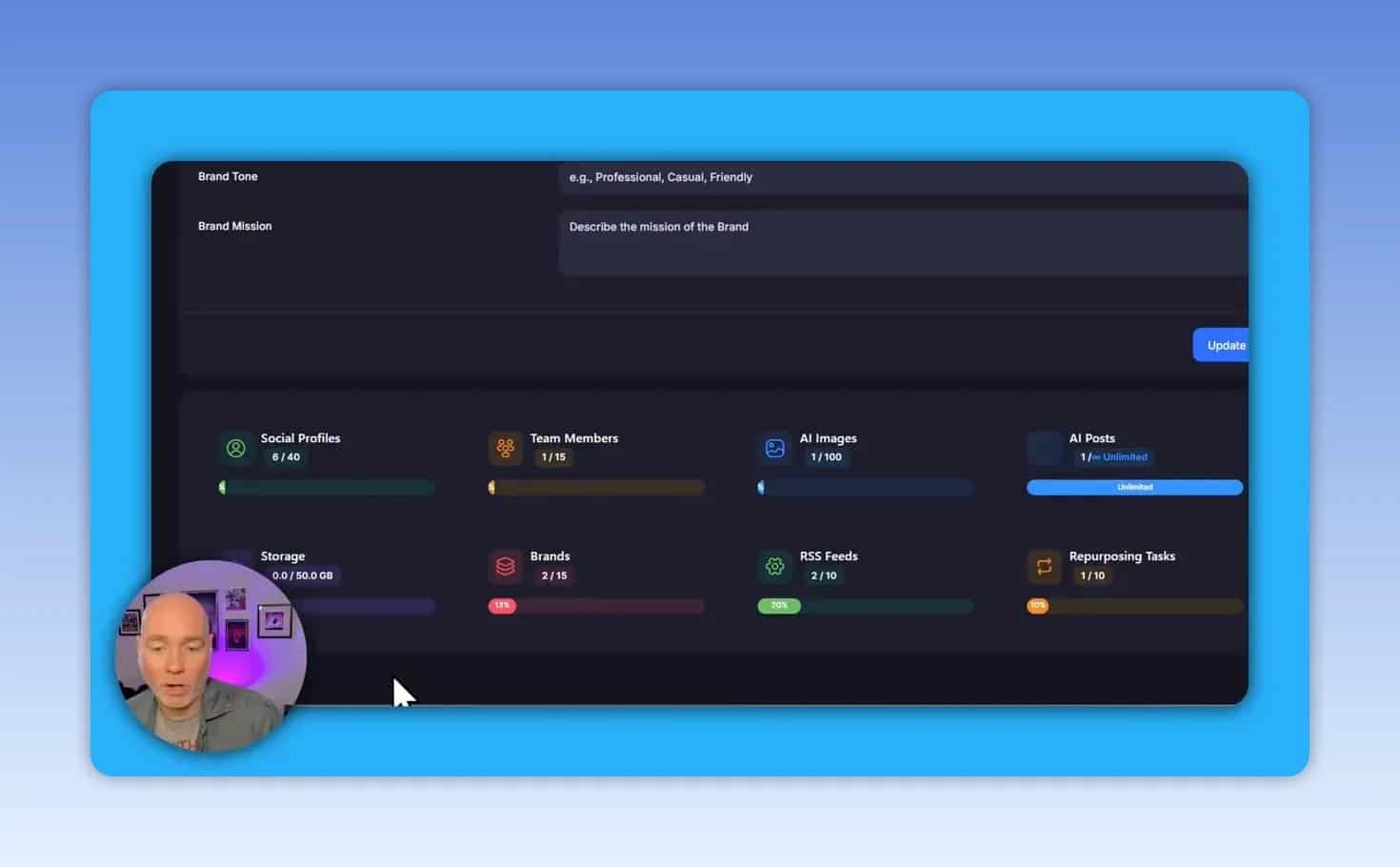
Who benefits most from multi-brand management?
- Freelancers and consultants who publish under a personal brand and client brands.
- Agencies that need separate workspaces and reporting for multiple clients.
- Small businesses that post on several networks but do not have time to upload each post manually.
- Content-led brands that regularly turn articles, newsletters, or social updates into additional formats.
How the RobinReach Content Calendar Works
The content calendar is the main planning view. It provides a consolidated look at upcoming content across connected profiles, so it is easier to spot publishing gaps and avoid scheduling several posts at the same time.
Posts can be created from the calendar and repositioned by dragging them to a new date. This is useful when an announcement, promotion, or timely topic needs to move without rebuilding the post.
A practical weekly workflow is to draft several posts, assign each to the appropriate profiles, schedule them across the week, then use the calendar to make final timing adjustments. Keep in mind that the calendar should be checked carefully for empty dates and clustered posts before confirming a schedule.
Creating Posts With AI Assistance
RobinReach includes a post composer for writing and preparing content for one or more social accounts. A post can include written copy, uploaded media, labels, and saved hashtag groups.
Its AI tools can help expand a basic idea into more polished social copy, add relevant hashtags, and create an AI-generated image. Generated and uploaded media can be retained for reuse in future posts and on other networks.
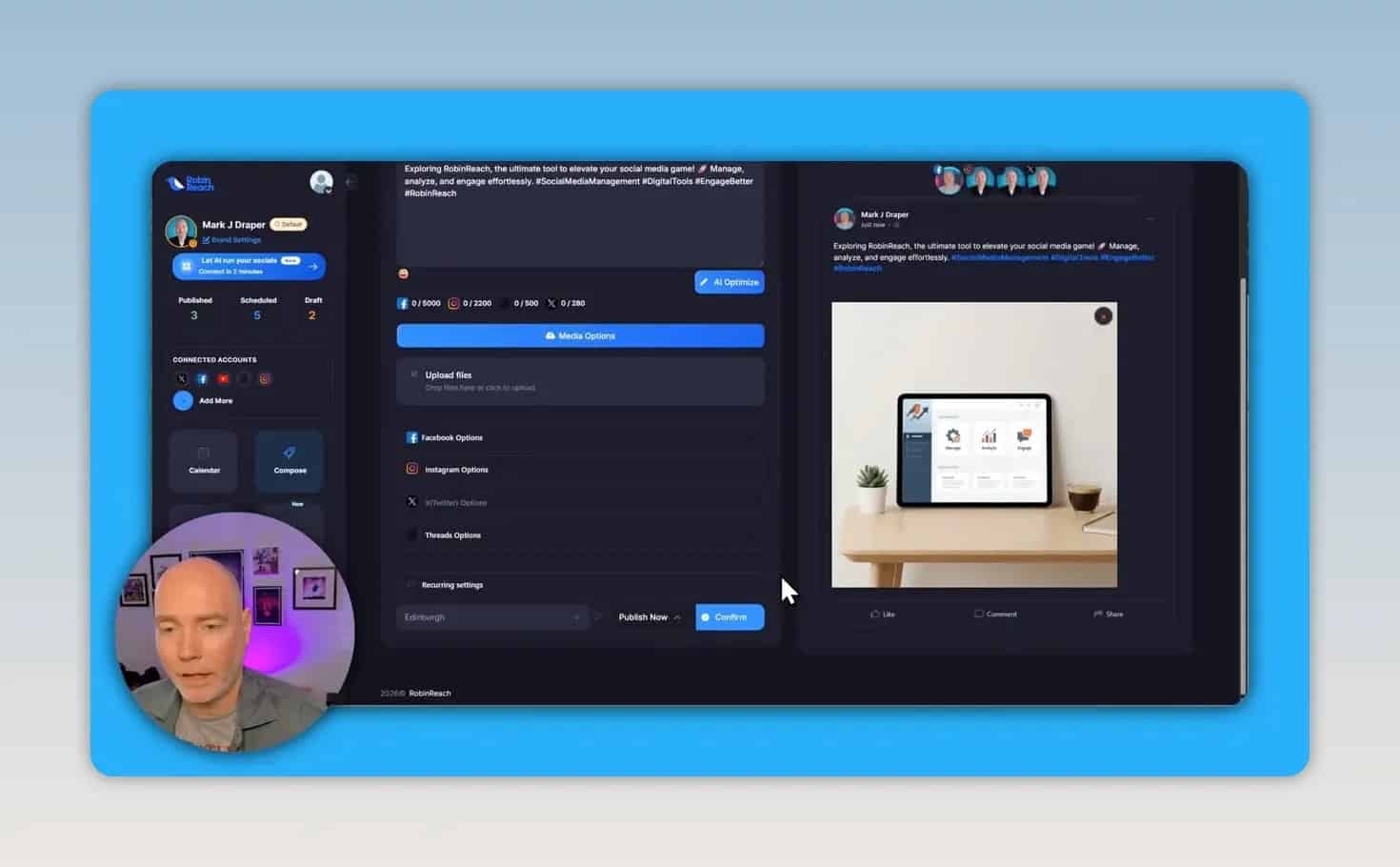
A practical post creation process
- Write a concise draft that states the core message clearly.
- Add existing media or use an AI-generated image where appropriate.
- Apply a saved label or hashtag group if it fits the campaign.
- Use AI optimization as a starting point, not a final approval step.
- Select the destination profiles.
- Review each network version, then save as a draft, schedule it, or publish it.
Important: Cross-posting does not mean identical copy is always the best choice. A concise post for X may need a different length, format, call to action, or link treatment than a LinkedIn or Facebook version.
Repurpose Existing Content Into Social Posts
Content repurposing is one of RobinReach’s most useful capabilities. Instead of treating each platform as a completely separate content project, the platform can transform source material into new social assets.
Turn an X post into an image card
RobinReach can take the URL of an X post and create a shareable image card from it. This can be useful when a post has performed well or when an existing social message would work better as a visual asset on Facebook, LinkedIn, or another network.
The resulting card can be saved into a folder for reuse. This creates a simple content library for repurposed posts and generated images.
Convert articles into social-ready posts
RobinReach can also process an article and produce a chosen number of posts for selected platforms. For example, an article can be turned into several X posts or a thread, with optional hashtags and calls to action.
Article conversion is a time saver, but it should not be treated as hands-free publishing. The generated text and selected images need review before scheduling.
Review source images before posting
When content is imported from an article, images from the source can be pulled into the generated posts. Those images may not be suitable for every social platform or campaign. RobinReach allows the media to be edited, removed, replaced with an upload, or replaced with an AI image.
Automate Content Distribution From Source Channels and RSS
RobinReach can monitor certain source profiles and RSS feeds, then prepare social posts from new content. This enables a source-first strategy: publish original work in one place, then use automation to distribute adapted versions elsewhere.
Supported source-profile choices shown in the platform include Facebook, YouTube, and Instagram. For YouTube, the demonstrated automation is focused on Shorts rather than long-form uploads.
Example: Repurpose Facebook posts to other networks
A business could publish a primary update on Facebook, then configure RobinReach to monitor that profile and prepare versions for channels such as Instagram, Threads, or X. The automation settings can include:
- Source profile selection
- Destination profile selection
- Hashtags to exclude
- AI optimization
- Image inclusion
- Auto-publishing preferences
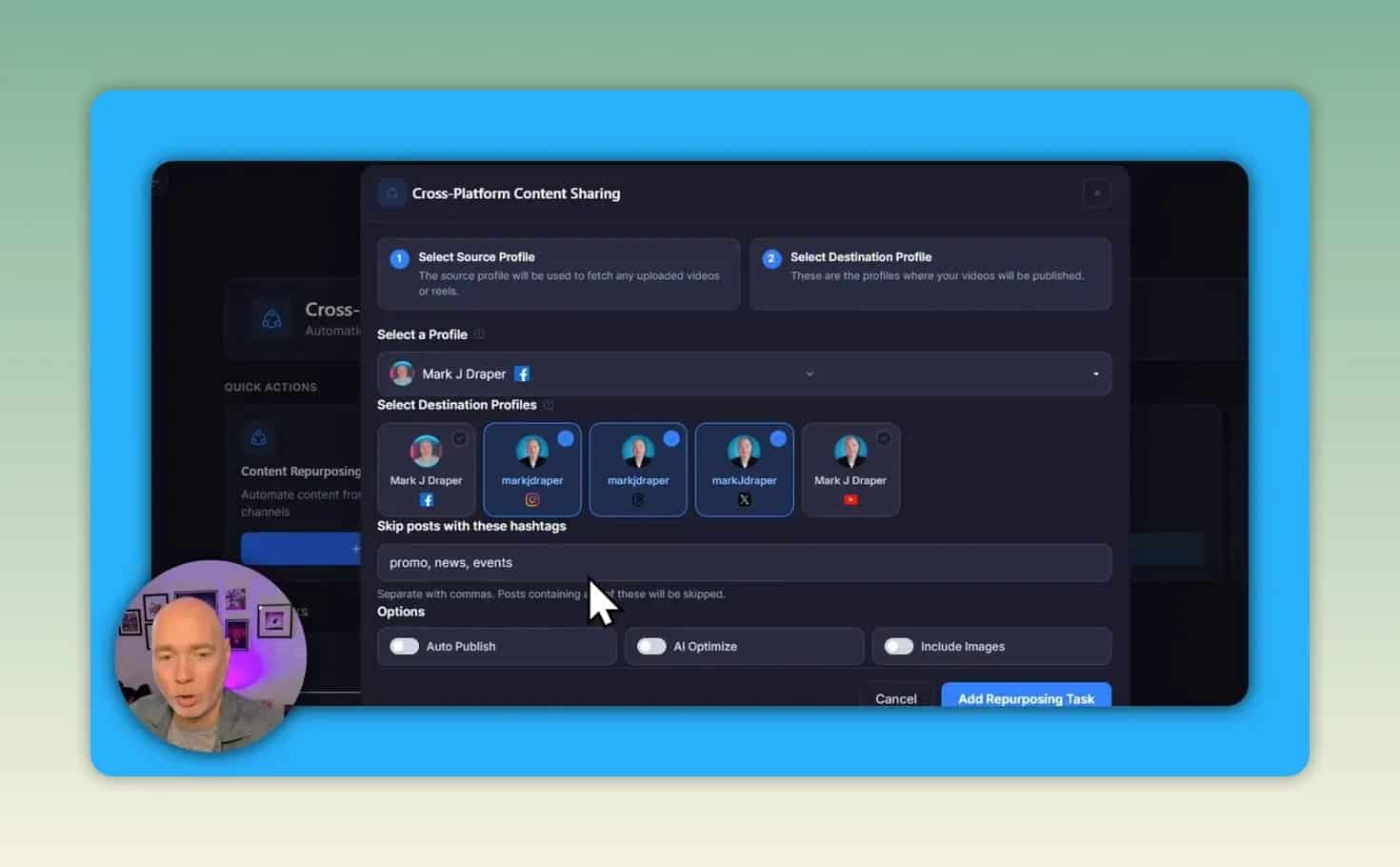
Start with approval, not auto-publishing
For a new automation, it is safer to leave auto-publishing disabled initially. Review several generated posts first to ensure the wording, visuals, profile mapping, and timing match the brand’s standards. Once the output is consistently reliable, auto-publishing can be considered for lower-risk recurring content.
RSS automation follows a similar approach. A blog or Substack feed can be monitored, with new articles converted into social media drafts for review and scheduling.
AI Workflow and Automation Integrations
RobinReach includes integration guidance for AI and workflow tools. Options presented in the platform include Claude, Codex, Gemini, n8n, Make, and Zapier.
These integrations are most relevant for teams that already have a content system and want to connect social publishing with AI ideation, editorial workflows, databases, or other automations. Each integration area provides instructions intended to help connect the platform to an existing workflow.
For example, an automation could begin with a finished article or approved content idea, send it through an AI-assisted workflow for post variations, and deliver the resulting drafts into the social publishing process for editorial approval.
Analytics and Client Reporting
RobinReach includes a reporting area for connected accounts. It can surface indicators such as follower growth, views, and overall performance trends. Reports can also be exported as PDFs, which is helpful for agencies and consultants who need to share a clear update with clients.
Use these reports to guide practical decisions:
- Identify whether audience growth is moving up or down.
- Compare visibility trends across connected channels.
- Review which content types are worth repurposing.
- Create a client-ready summary without assembling every metric manually.
Analytics are most valuable when paired with a regular review routine. A monthly report can reveal trends, but it will not replace checking whether the message, creative, and platform choices align with the actual business goal.
RobinGen AI Content Templates
RobinReach also includes RobinGen AI, a collection of content-generation templates. The tools share a straightforward structure: choose the relevant channel, provide the necessary details, generate content, then prepare it for the publishing plan.
Examples of available content tasks include:
- Holiday posts
- Social captions
- Announcements
Templates can reduce the friction of starting a post, especially for routine communications. They work best when supplied with specific inputs such as the audience, offer, tone, key message, and desired call to action.
RobinReach Limitations and Things to Check Before Publishing
RobinReach is positioned as an early-access tool, so careful review is essential. Automation can accelerate production, but it can also spread errors across multiple profiles if it is left unchecked.
1. Check platform-specific character and link rules
Generated text may not always comply perfectly with a platform’s requirements. In one example, an X post needed manual editing because the inclusion of a URL pushed the post beyond the allowed character limit. Always verify character counts, links, hashtags, mentions, formatting, and preview appearance for each selected network.
2. Do not assume every generated image is appropriate
AI-generated and imported images should be checked for relevance, visual quality, brand suitability, and fit with the accompanying copy. Replace any image that does not support the message.
3. Validate automated repurposing before enabling it broadly
Content from a source profile or RSS feed can benefit from adaptation, but direct reuse may sound repetitive or lack necessary context on the destination platform. Review a batch of drafts before turning on automatic publication.
4. Plan around current source limitations
The demonstrated YouTube automation is intended for Shorts and does not handle long-form videos. If long-form video is the primary source format, RSS, articles, or social updates may be more useful source material for the platform’s current workflow.
5. Confirm plan limits and current availability
Team members, brands, AI images, storage, connected accounts, and other allowances can differ by plan. Deal terms and pricing can also change, especially for early-access offers. Review the current plan details before purchasing.
Is RobinReach Worth Using?
RobinReach is a strong fit for people who already create useful content but struggle to distribute it consistently across several channels. Its combination of a calendar, composer, media reuse, article conversion, social post repurposing, RSS monitoring, workflow integrations, and reporting supports a more efficient content operation.
It is not a replacement for editorial judgment. The best results will come from using AI and automation to create drafts faster, then checking every message for accuracy, platform fit, brand voice, and visual quality.
RobinReach Setup Checklist
- Choose the plan that matches the required number of brands, profiles, and team members.
- Connect only the social accounts that are actively maintained.
- Create folders, labels, and hashtag groups for repeatable campaigns.
- Schedule a small set of manually reviewed posts first.
- Test article or X post repurposing with one piece of high-quality source content.
- Set up one RSS or source-profile automation with auto-publishing turned off.
- Review generated drafts and correct platform-specific issues.
- Use reporting to identify what should be repurposed again.
- Enable more automation only after the output meets the required standard.
Next Steps
If the priority is reducing manual social media work while retaining approval control, start by using RobinReach as a scheduling and repurposing workspace. Build a reliable review process first, then layer in RSS monitoring, source-profile automation, and AI workflow integrations as needed.
Check the current RobinReach deal details to compare available tiers, limits, and current terms.