TopicalMaps.ai is an SEO content planning tool built to help site owners map out topic coverage, identify content gaps, cluster keywords, and turn research into briefs or draft articles. If you are trying to build topical authority without guessing what to publish next, it offers a structured way to plan a blog or niche site.
Its biggest strength is simple: it helps connect site structure, keyword coverage, and content production in one workflow. That is especially useful for publishers who already have content and want to avoid duplication, as well as for anyone launching a new site from scratch.
What TopicalMaps.ai does
At its core, TopicalMaps.ai creates an SEO map for a topic or niche. That map groups subtopics and micro topics into a content roadmap so you can see:
- What topics belong on the site
- Which areas are already covered
- Where the content gaps are
- What to prioritize next
- How to turn research into briefs and articles
This makes it more than a keyword list generator. It is trying to solve a broader SEO problem: how to build complete topical coverage without creating random, overlapping content.
Who this tool is best for
TopicalMaps.ai is a strong fit for:
- Blog owners who want a clearer editorial roadmap
- Niche site builders planning category and article coverage
- SEO consultants creating content plans for clients
- Agencies that need exportable reports and branded deliverables
- AI-assisted publishers who want to send organized topic data into other writing tools
It is particularly useful if you already have a live website and need to know what is missing. The sitemap import feature makes that workflow much more practical.
Why topical maps matter for SEO
Topical maps help organize a site around a main subject and its supporting subtopics. Instead of publishing isolated articles, you create related content that signals broader expertise and relevance.
Done well, this can help with:
- Better internal linking opportunities
- Clearer site architecture
- More complete content coverage
- Fewer content gaps
- Less accidental keyword cannibalization
Search engines do not reward volume alone. They reward relevance, clarity, and useful coverage. A topical mapping tool helps plan for that systematically.
Key features that stand out
1. SEO map generation
You can generate a map by entering a niche or topic, adding optional targeting details, and choosing a model to produce the output. The setup includes fields such as industry, audience, primary goal, language, country, and the breadth of coverage you want.
That extra context matters. A topic map for a beginner audience in health and wellness should not look the same as one for a technical B2B site.

2. Sitemap import for existing websites
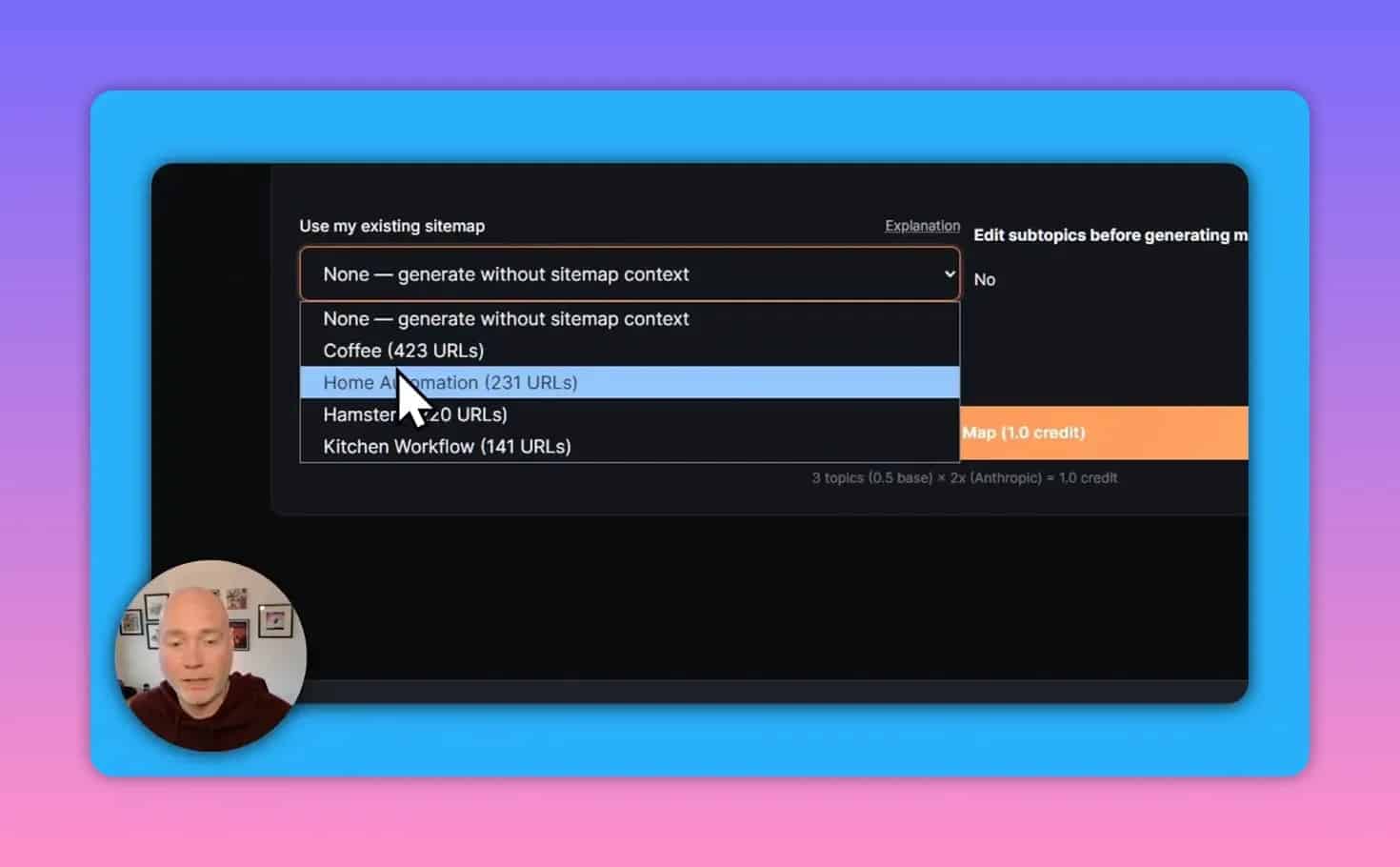
This is one of the most useful features in the platform. By importing an existing sitemap, the tool can scan current URLs and compare them to the generated topic map.
That allows it to separate topics into groups such as:
- Already covered
- Partially covered
- Missing or gap topics
For an established site, this is a major advantage. It reduces the risk of publishing duplicate articles on subjects you already address and helps prevent keyword cannibalization.
3. Quick wins and keyword-level insights
Once a map is generated, TopicalMaps.ai surfaces priority opportunities. The dashboard includes a quick wins view along with metrics like keyword overview, estimated search volume, traffic value, and difficulty breakdown.
That makes it easier to decide what to publish first instead of treating all suggested topics equally.

4. Export options for different workflows
The platform includes multiple ways to move your research into your content process. Export formats include:
- CSV
- Excel
- White-labeled branded PDF
- Micro-topic copy options
- Exports designed for AI tool workflows
The white-labeled PDF option is especially helpful for agencies that need client-friendly deliverables.
There is also a separate export flow for AI tools and workspace setups, including options aimed at custom GPT or Notion-style workflows. That is useful if your planning happens in one tool and your content production happens elsewhere.

5. Batch map creation
If you already know which topics you want to map, you can use a template and generate multiple maps in sequence. For teams planning content at scale, this can save time compared with creating one map at a time.
6. Content brief generation
TopicalMaps.ai does not stop at ideation. It can generate a content brief for selected topics, including:
- Suggested title
- Meta description
- Unique content angle
- Article outline
- Internal link suggestions
- FAQ ideas
- Additional notes around content gaps and SEO considerations
This is a practical bridge between keyword research and actual writing. Instead of handing a writer a vague keyword, you can give them a usable brief with structure and direction.

7. Built-in AI article generation
The platform also includes a native content generation tool. You can select a topic and have it produce a draft article inside the platform.
This will appeal to users who want an all-in-one workflow rather than jumping between separate planning and writing tools.
There is, however, an important limitation: the generated article workflow currently does not include richer publishing elements such as images or embedded media. That means the output may still need manual cleanup before publishing.

8. WordPress publishing
There is a WordPress publisher feature that allows content to be pushed to a connected WordPress site. That can speed up publishing, though it is best treated as a final step after checking formatting and adding missing visual elements.
How to use TopicalMaps.ai effectively
The best way to use this tool depends on whether your site is new or established.
For a new site
- Enter your main niche or seed topic.
- Define the audience, industry, and goal.
- Generate a broad topic map.
- Review the suggested clusters and micro topics.
- Export the map or create briefs for the highest-priority topics.
- Build category pages, hub content, and supporting articles from the map.
For a brand-new project, this creates a ready-made content structure instead of forcing you to plan everything manually.
For an existing site
- Import your sitemap.
- Generate a map for your main niche.
- Filter results by covered, partially covered, and missing topics.
- Identify true gaps before assigning new content.
- Create briefs only for missing or underdeveloped topics.
- Use internal link suggestions to strengthen topical connections.
This is where the tool is most valuable. It can show what your site is missing without encouraging unnecessary overlap.
Best use cases
Building topical authority
If your site has depth in some areas but obvious blind spots in others, TopicalMaps.ai can help fill those gaps in a logical order.
Preventing duplicate content planning
Sitemap-based mapping is useful for avoiding accidental duplication, especially on larger sites with older content libraries.
Creating client roadmaps
Agencies can use exports and branded PDFs to present a clean content strategy with clear priorities.
Feeding other AI writing systems
If you already use external AI writing platforms or custom workflows, the export features make it easier to move structured research into those tools.
How the credit system affects usage
The platform uses a credit-based system, and different AI models have different credit multipliers. That means the best model may not always be the most efficient one for high-volume use.
In practical terms:
- Use higher-cost models when accuracy and planning quality matter most
- Use lower-cost options when testing multiple topic ideas
- Reserve brief and article generation for high-value opportunities
If you are evaluating the tool, keep an eye on how many maps, briefs, and content drafts your workflow will realistically require each month.
Where TopicalMaps.ai is strongest
- It organizes content planning clearly.
- The sitemap import adds real strategic value.
- It helps prioritize topics instead of creating a chaotic list.
- It supports both manual workflows and AI-assisted ones.
- It includes publishing-adjacent tools like briefs and WordPress export.
Many SEO tools stop at keyword research. This one extends further into planning and execution.
Limitations and things to watch out for
No SEO tool is complete on its own. Here are the main caveats to keep in mind.
1. AI-generated content still needs editing
The built-in writer can save time, but the output may need polishing before it is ready to publish. Formatting, accuracy review, brand voice, and visual enhancement are still important.
2. Media support is limited in the article generation workflow
If you want featured images, embedded media, or richer post formatting, expect to add those separately after generation.
3. Sitemap access may not always work perfectly
Some hosts can interfere with external access to sitemap files. A manual upload option was planned to address that issue, which is important for sites where automatic retrieval fails.
4. Topic maps are not a substitute for editorial judgment
A tool can suggest what belongs in a niche, but you still need to decide:
- Which topics fit your site’s business goals
- Which articles deserve the most depth
- How to differentiate your content from competing pages
Common mistakes when using topical mapping tools
Publishing every suggested topic
Not every micro topic deserves its own article. Some belong inside broader pages. Others may not fit your audience or site goals.
Ignoring existing content
If you skip sitemap comparison on an established site, you increase the chance of duplicate coverage.
Confusing topic breadth with content quality
Covering more keywords does not automatically create authority. Thin content across many topics is still weak content.
Using generated briefs without customization
A strong brief should be a starting point, not a final instruction set. Add your own examples, expertise, product context, and editorial standards.
TopicalMaps.ai for agencies and teams
For agencies, this tool is not just about research. It can support client delivery in a few practical ways:
- Branded roadmap exports
- Topic gap analysis against an existing site
- Internal linking suggestions for content plans
- Brief creation for writers or freelancers
- Flexible exports into other production systems
That makes it a reasonable fit for teams that want to standardize content strategy before production begins.
How it compares to a basic keyword clustering workflow
A standard keyword clustering tool typically groups keywords by similarity or search intent. TopicalMaps.ai goes further by tying those clusters into a broader site map and content roadmap.
The difference is important:
- Keyword clustering helps you group terms.
- Topical mapping helps you plan site coverage.
If your main challenge is deciding how all content pieces should fit together, a topical mapping tool is more useful than a simple cluster list.
Questions readers often ask
Is TopicalMaps.ai useful for beginners?
Yes. The value is not limited to experienced SEOs. Beginners can use it to avoid publishing random content and build a more logical site structure from day one.
Can it help avoid keyword cannibalization?
Yes, especially when you use sitemap import. Seeing what is already covered makes it easier to avoid producing overlapping articles.
Does it replace a full SEO suite?
No. It is best seen as a planning and content workflow tool, not a complete replacement for every SEO platform.
Can you publish directly to WordPress?
Yes, there is a WordPress publishing feature, but you may still need to finalize formatting and add images manually.
Is it only for AI content users?
No. It works for manual writers, agencies, and mixed workflows as well. The content briefs and exports are useful even if you do not use AI writing tools.
Useful supporting resources
If you want more background on concepts related to this workflow, these references can help:
- Google’s guidance on creating helpful, people-first content
- WordPress for publishing workflows
- Current TopicalMaps.ai deal details if you are checking pricing or platform availability
Final verdict
TopicalMaps.ai is a practical tool for planning content around topical authority. Its most valuable feature is the ability to generate an SEO map and compare it against an existing sitemap, making it easier to spot real content gaps and avoid duplication.
The export flexibility, brief generator, AI writing options, and WordPress publishing add convenience, but the strongest reason to use it is still the planning layer. It helps answer the question many site owners struggle with: what should this site cover, and what should be published next?
If you are building a new content site, it can give you structure. If you are managing an established one, it can help clean up your roadmap and uncover missed opportunities.