LemSubs is a subscription management tool built to help you organize recurring payments, monitor renewal dates, and spot waste across personal, household, and business spending. If you are juggling SaaS tools, utilities, streaming services, domain renewals, or even lifetime deals, it aims to put everything in one place.
That makes it relevant for a common problem: subscription fatigue. It is easy to sign up for software, media services, or annual contracts and then lose track of what renews when, what still gets used, and what is quietly draining your budget.
This review covers what LemSubs does well, who it is best for, how its workspace system works, how subscriptions can be added, and what to watch for before committing.
What is LemSubs?
LemSubs is a subscription tracker designed to help manage:
- Monthly subscriptions
- Annual contracts
- Household bills
- Business software spend
- Domain renewals
- Lifetime deals
At a glance, the platform focuses on three main jobs:
- Tracking what you pay
- Alerting you before renewals
- Helping you decide what to keep, renegotiate, or cancel
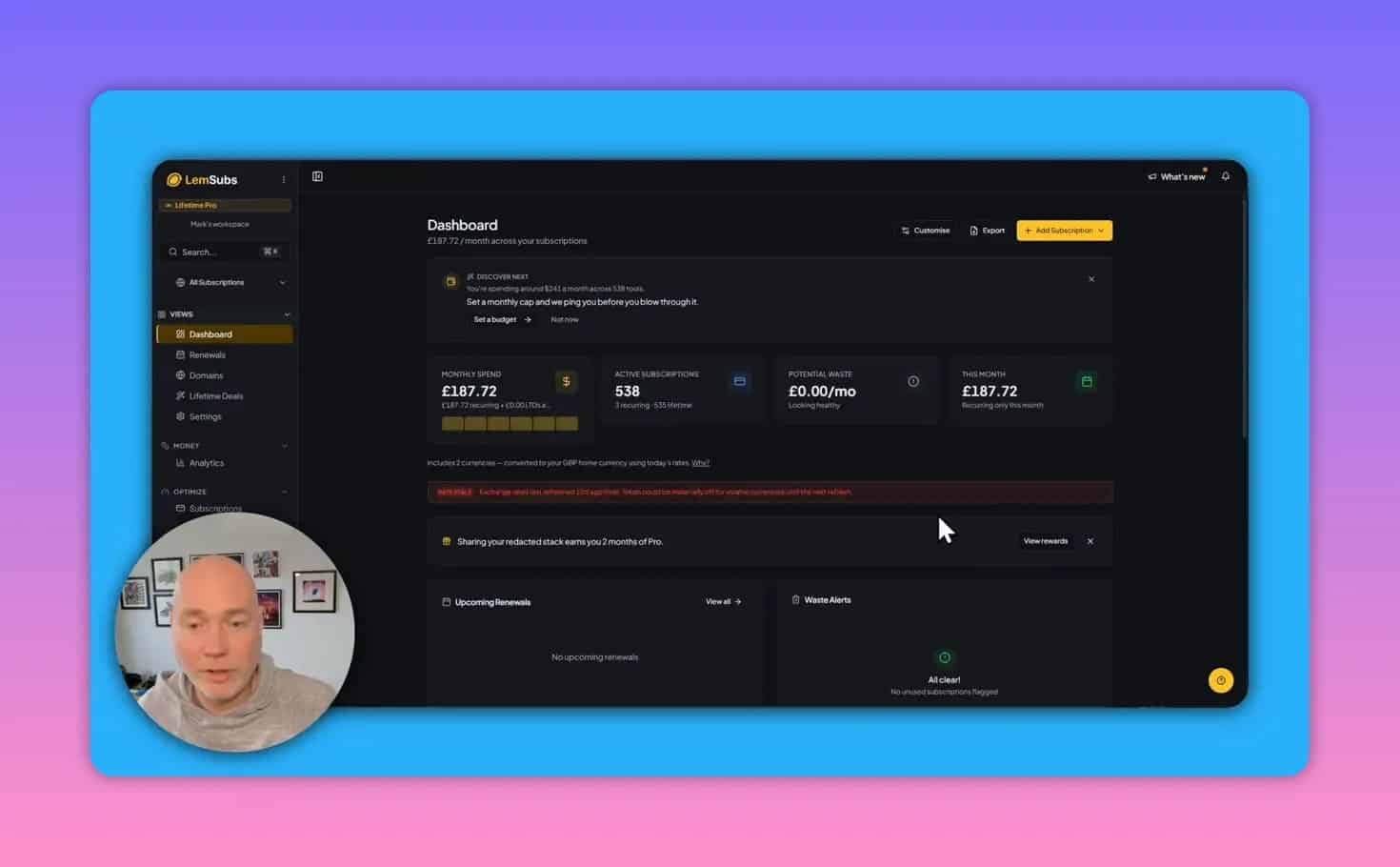
Its interface is clean and easy to understand, which matters for a tool that may end up storing dozens or even hundreds of recurring payments.
Who LemSubs is best for
LemSubs is especially useful if any of these apply to you:
- You pay for a growing list of SaaS tools
- You regularly miss renewal windows
- You want separate tracking for personal, business, and family expenses
- You help manage subscriptions for parents or relatives
- You buy lifetime software deals and want them logged alongside recurring subscriptions
- You want a clearer picture of potential waste
For someone with only a handful of recurring payments, a spreadsheet may still be enough. But once subscriptions start spanning multiple parts of life, a dedicated system becomes more valuable.
Why the workspace feature matters more than it first appears
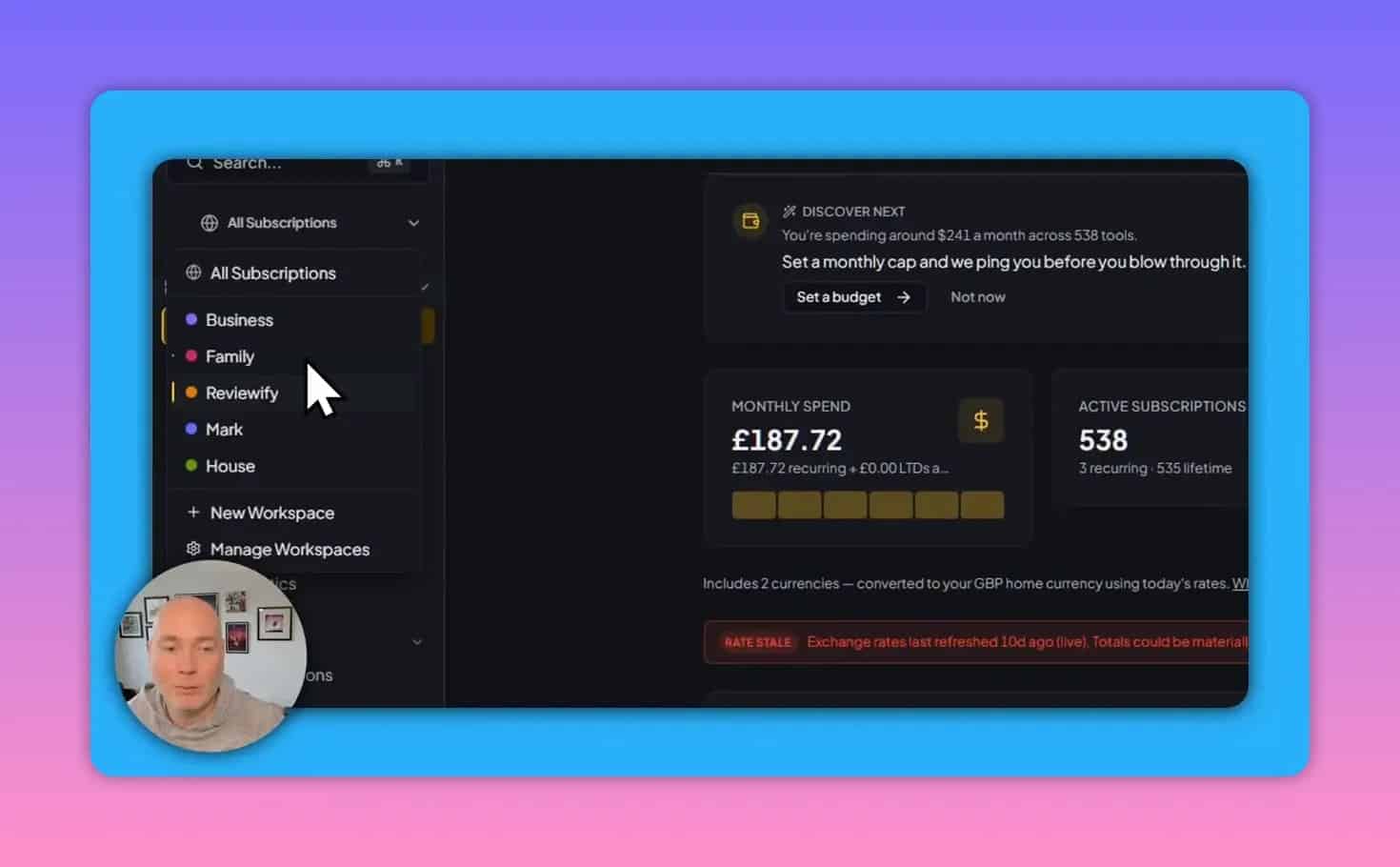
One of the more important parts of LemSubs is its workspace structure. This is not just a cosmetic way to group items. It can determine how manageable the platform feels over time.
A single user might want separate spaces for:
- Personal subscriptions such as phone plans or individual software
- Household bills such as gas, electricity, water, and insurance
- Business tools such as design, marketing, and productivity software
- Family or relative accounts that need help with renewals and contract dates
If everything is mixed into one workspace, the dashboard can become harder to interpret. Renewal reminders may also lose context, especially when you are tracking expenses for more than one person or use case.
If you expect to organize subscriptions across several areas, workspace limits matter. If you only need one central list, tags may be enough.
When tags can work instead of multiple workspaces
LemSubs also supports tags. That means a lower plan with fewer workspaces may still be workable if you are disciplined about labeling entries.
For example, inside one workspace you could tag subscriptions by:
- Personal
- Family
- Business
- Client
- Household
That can help if you want a simpler setup, but for many people true separation through workspaces will be easier to maintain.
How LemSubs helps reduce wasted spending
The biggest benefit is not just tracking what exists. It is making spending decisions easier.
LemSubs includes features that support this in practical ways:
- Usage tracking so you can monitor whether a subscription is still being used
- Worth-it ratings to judge whether a service continues to justify its cost
- Renewal alerts to avoid accidental rollovers
- Potential waste indicators surfaced in the dashboard and analytics
- Cost-sharing fields for subscriptions that are split across people or teams
This is particularly useful for services that are easy to keep paying for out of habit, such as streaming services, design tools, or software bundles that no longer get used every week.
Adding subscriptions to LemSubs
LemSubs supports several ways to build your subscription database. That matters because setup is usually the hardest part of any financial tracking tool.
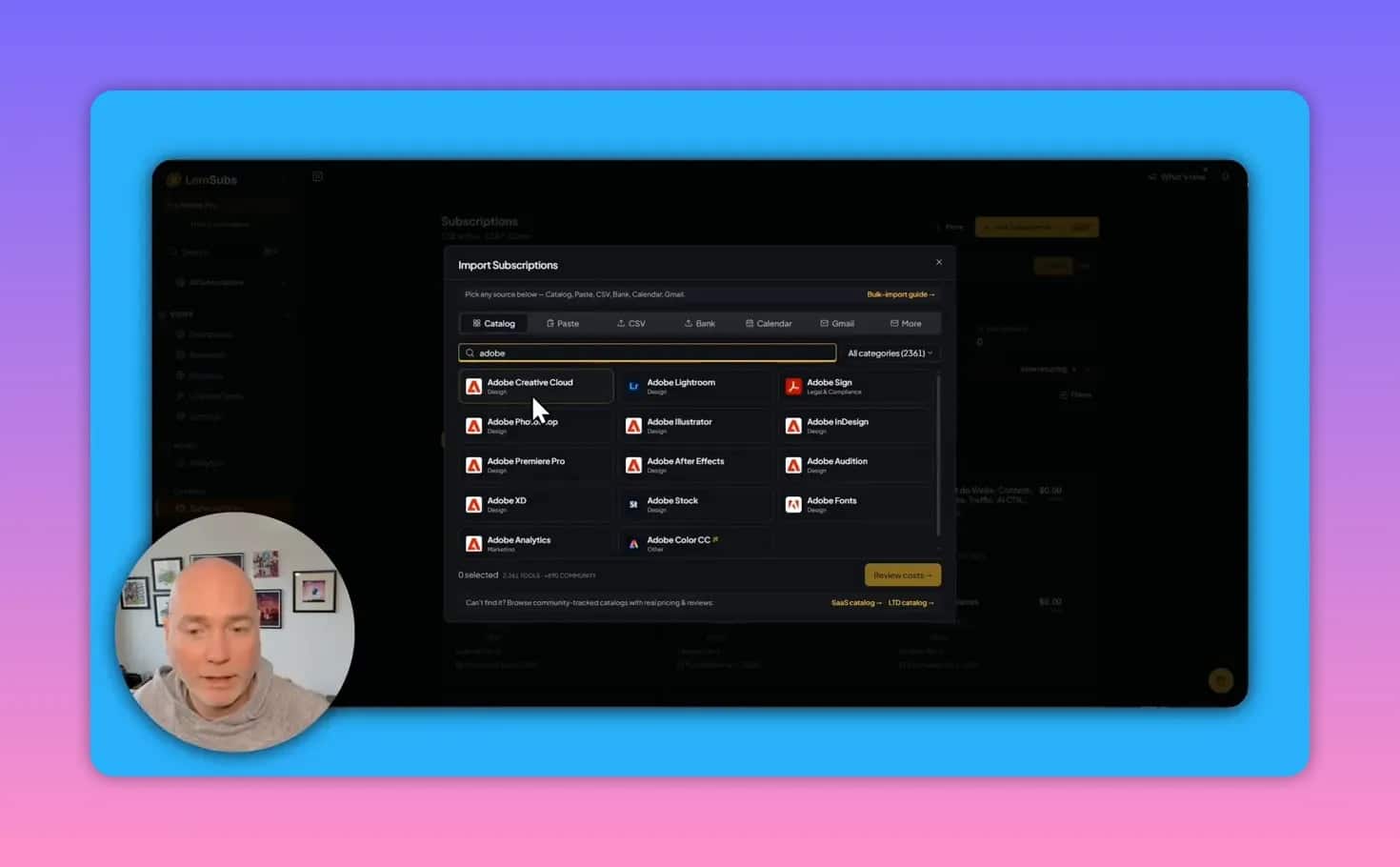
1. Add from the catalog
The simplest method is choosing a service from the built-in catalog. When you do that, the platform can prefill useful details such as the service name, website, and logo.
This is the easiest option for popular tools and major subscription brands.
2. Add subscriptions manually
If a service is not in the catalog, you can create it manually. This gives you flexibility, but it also means entering more details yourself, such as:
- Name
- URL
- Price
- Billing frequency
- Workspace
- Category
- Logo or icon
Manual entry is useful for local services, niche software, and household payments that may not exist in a global catalog.
3. Bulk import with CSV
If you already maintain a spreadsheet, bulk import is one of the most practical features.
LemSubs lets you upload a CSV and map headers before importing. That can save a huge amount of time if you are bringing in a long list of subscriptions at once.
After import, you can edit any entries that need refining, such as categories, logos, or URLs.
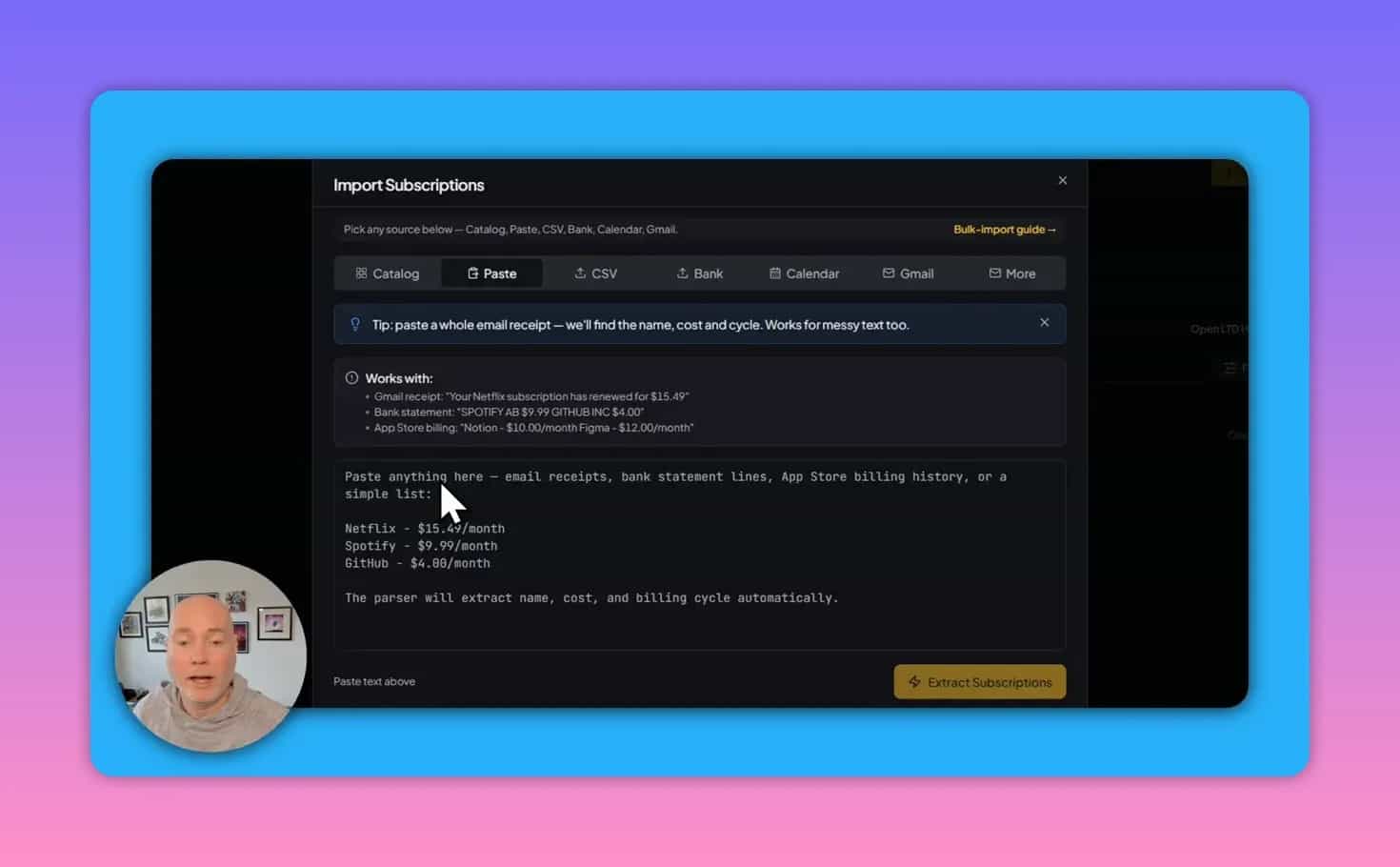
4. Gmail import and receipt forwarding
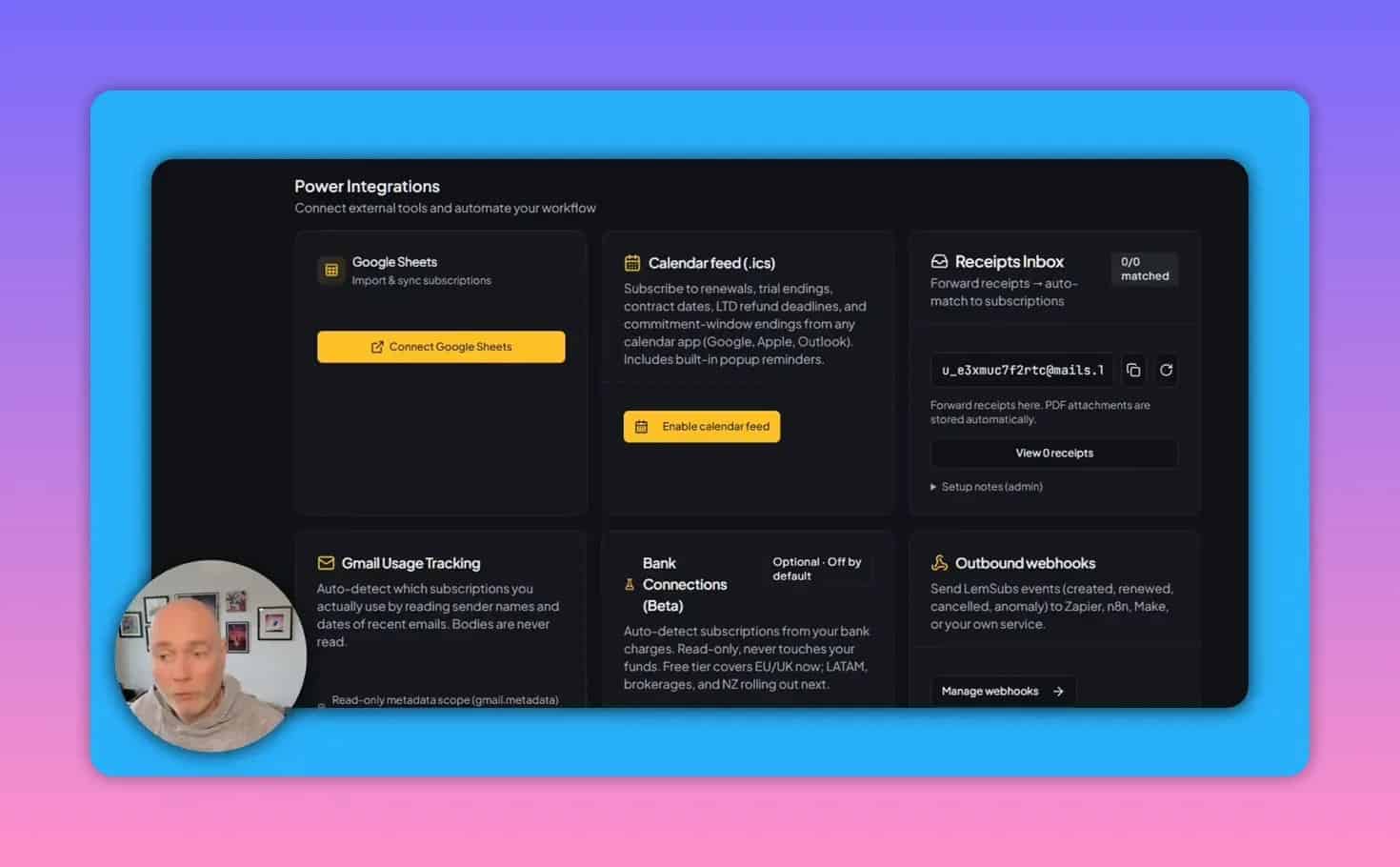
LemSubs can connect with Gmail and can also use forwarded receipts to help detect and match subscriptions automatically. This can be useful for building a more complete record over time, especially if you tend to archive billing emails rather than log purchases manually.
For users who want more automation, this can reduce upkeep after the initial setup.
5. Banking connection
There is also an option to connect banking data so LemSubs can auto-detect recurring payments. That may be convenient, though some users will prefer not to grant that level of financial access.
Whether this is a benefit or a downside depends on your privacy preferences and how much automation you want.
Can LemSubs track lifetime deals?
Yes. LemSubs is not limited to monthly and annual subscriptions. It can also track lifetime deals, which makes it more interesting for software buyers who want one record for both recurring tools and one-time purchases.
There is an important caveat though: imported lifetime deal data may not always include full pricing details automatically. If the source data only includes names, plans, and purchase dates, costs may need to be filled in later.
That means LemSubs can track lifetime deals, but some records may require extra manual cleanup before your spending totals become fully accurate.
Renewal alerts and negotiation support
One of the strongest use cases for LemSubs is avoiding missed deadlines. A forgotten renewal can turn a discount period into a full-price contract very quickly.
LemSubs supports:
- Upcoming renewal tracking
- Renewal reminders
- Calendar sync
- Email notification support
That combination gives you more than one chance to act before a subscription rolls over.
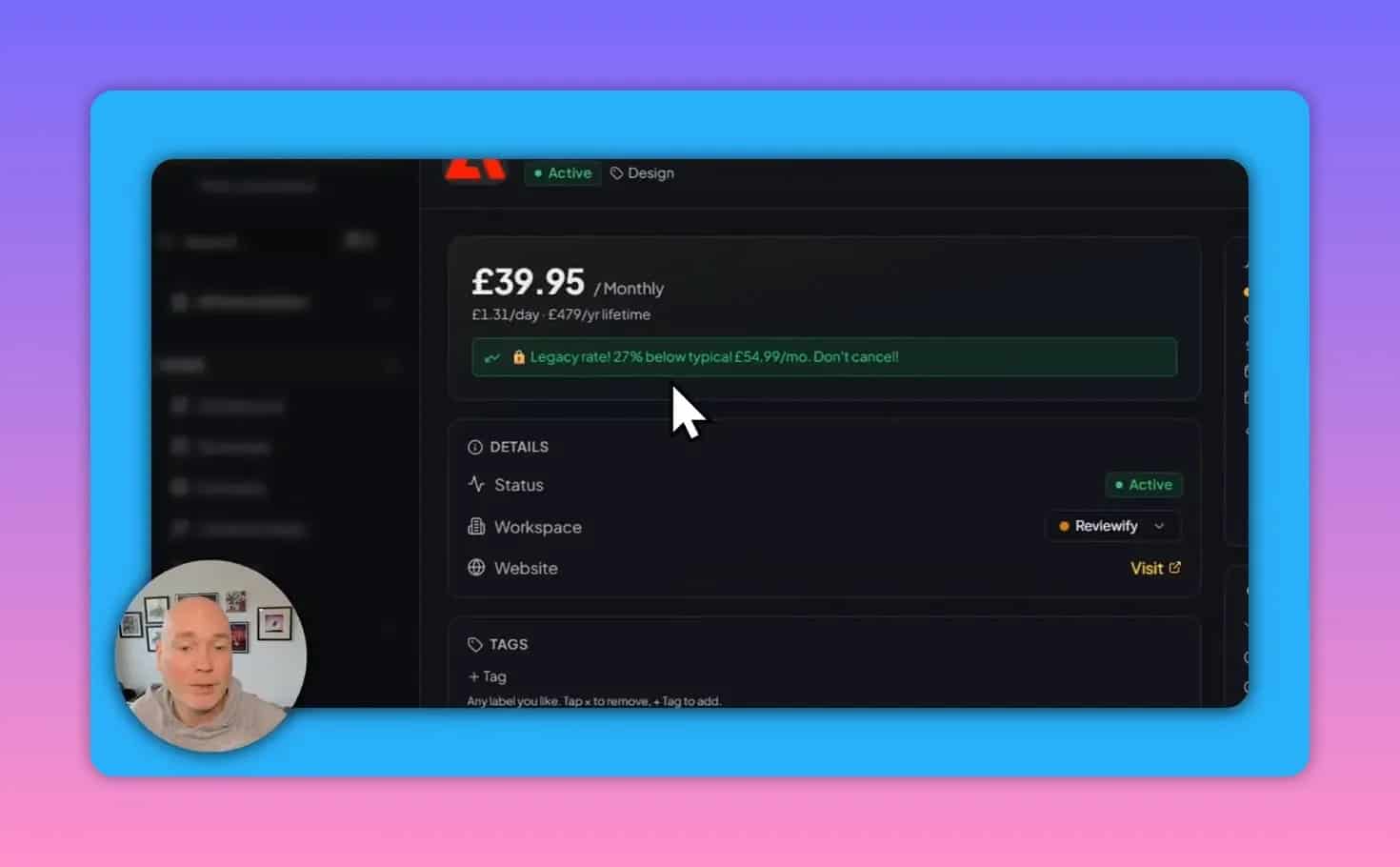
The platform also includes built-in negotiation tips for some services. In practice, this can help answer questions like:
- Is my current rate below the normal price?
- Should I keep this plan or cancel?
- What is the best way to ask for a better deal?
- Is there a known discount path such as chat support or cancellation flow?
This is useful because many people know they should negotiate but do not know where to start or when they still have a favorable legacy price.
Usage tracking and “is it worth it?” decisions
A subscription tracker is much more useful when it goes beyond billing dates.
LemSubs lets you record whether a service is being used and whether it still feels worth keeping. Over time, that builds a clearer picture of which subscriptions earn their place and which ones have become background waste.
That is helpful for categories like:
- Streaming services
- Creative software
- Team tools with overlapping features
- Products purchased during a trial period but forgotten later
If a tool is rarely used and a renewal is approaching, the cancel decision becomes much easier.
Dashboard analytics and what they reveal
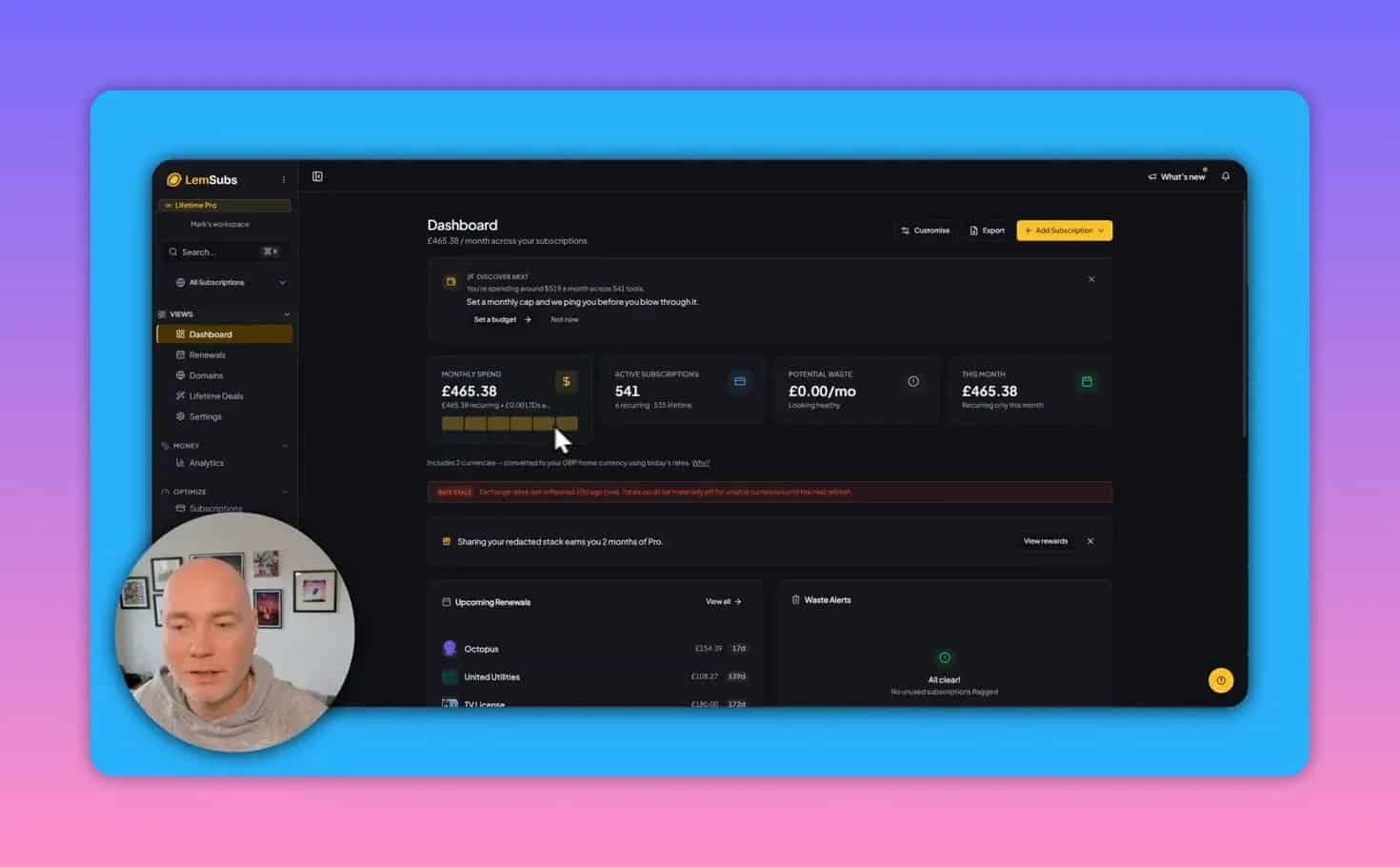
As you add more data, LemSubs starts to build a broader financial picture. The dashboard and analytics can show:
- Monthly spend
- Yearly spending trends
- Upcoming renewals
- Potential waste
- Benchmarking and spending insights
The quality of these insights depends on how complete your data is. If you only add a few subscriptions, the dashboard will be useful but limited. Once household bills, business tools, and contract renewals are added together, the platform becomes far more informative.
Other integrations and advanced features
LemSubs includes several extra integrations that may matter for power users:
- Google Sheets sync for imported or maintained subscription records
- Calendar synchronization for renewal dates
- Forwarded receipt matching
- Gmail usage tracking
- Outbound webhooks
- Domain tracking
- MCP server support for AI-assisted analysis workflows
- Chrome extension listed as coming soon
Not every user will need these, but they show that LemSubs is trying to be more than a simple reminder app.
Where LemSubs may need improvement
LemSubs appears promising, but there are a few practical limitations to keep in mind.
1. Initial setup can take time
If you want a complete picture, you will need to add a lot of information at the start. That includes prices, billing cycles, categories, and renewal dates. The payoff comes later, but the onboarding effort is real.
2. Imported data may need cleanup
Catalog matching and CSV imports can save time, but they are not perfect. Some services may be misidentified or assigned an incorrect logo or URL, especially if the name resembles a different company in the system.
3. Some details may not import automatically
Lifetime deal imports may lack price data depending on the source. In those cases, manual edits are required if you want accurate reporting.
4. Currency behavior may need checking
If you use a non-default currency, confirm that imported or catalog-based subscriptions are reflecting the correct settings. It is worth reviewing costs after entry rather than assuming everything is configured perfectly.
5. Some features may still be maturing
Because the product is positioned as an early bird offering, some rough edges are possible. The good news is that support responsiveness appears to be active, which matters when a product is still evolving.
Common mistakes to avoid when using a subscription manager
Whether you use LemSubs or another tool, these are the most common setup mistakes:
- Only tracking software and ignoring utilities, insurance, domains, and shared household expenses
- Skipping renewal dates, which makes reminders much less useful
- Ignoring workspaces or tags, leading to a cluttered database later
- Failing to review imported data for incorrect matches or prices
- Never rating usage, which defeats the point of finding waste
- Setting it up once and forgetting it instead of checking it before renewal periods
A simple LemSubs setup plan
If you want to get value quickly, this is a practical order of operations:
- Create your structure first
Decide whether you need separate workspaces for personal, family, household, and business spending. - Import what you already have
Use CSV import or connected sources to avoid entering everything manually. - Add your highest-cost subscriptions next
Start with software, utilities, and annual contracts where missed renewals are expensive. - Set renewal alerts immediately
Do this before perfecting every category or logo. - Review catalog matches
Correct wrong URLs, categories, or logos after import. - Use tags for extra filtering
This is especially useful if you have limited workspaces. - Track usage weekly or monthly
That is how the “worth it” side of the platform becomes useful.
Is LemSubs worth it?
LemSubs looks most valuable for people who have outgrown a basic spreadsheet and want a dedicated system for managing recurring spend. Its strongest points are:
- Clean interface
- Flexible organization through workspaces and tags
- Multiple import methods
- Renewal tracking and calendar sync
- Usage and waste visibility
- Built-in negotiation guidance for some services
- Support for both recurring subscriptions and lifetime deals
Its biggest drawback is that the initial setup and cleanup can take effort, especially if you want complete and accurate data from day one.
If your main pain point is forgotten renewals, hidden software spend, or too many subscriptions spread across different parts of life, LemSubs addresses those problems directly.
Should you choose LemSubs over a spreadsheet?
A spreadsheet is fine if you have a short list and do not need automation. LemSubs becomes more appealing when you want:
- Automatic or semi-automatic discovery
- Renewal reminders
- Calendar sync
- Usage tracking
- Separate workspaces
- Negotiation guidance
- Analytics beyond a manual ledger
For a single list of five or six subscriptions, a spreadsheet is cheaper and simpler. For a growing stack of software, household services, and shared accounts, a purpose-built subscription manager is easier to maintain.
Final takeaway
LemSubs is best described as a practical subscription operating system rather than a simple bill reminder. It helps centralize recurring expenses, identify waste, and reduce the chance of missing renewal windows.
Its real value comes from structure. If you organize workspaces carefully, review imported records, and actually use the renewal and usage features, it can become a useful layer between your finances and the dozens of services competing for your budget.
If you want to explore the current offer, the LemSubs lifetime deal is available through Earlybird.
For additional context on subscription billing and recurring payment management, resources from the Consumer Financial Protection Bureau and general budgeting guidance from the NerdWallet budgeting guide can also help when evaluating whether your recurring expenses are still justified.