Glee combines a link-in-bio page builder with short links, QR codes, appointment bookings and digital business cards. Built by the EarlyBird team, it is aimed at creators and businesses that want to manage more of their online presence in one place.
Its main appeal is consolidation. Instead of using separate tools for a profile page, campaign links and networking contacts, you can handle those tasks within Glee. However, that does not mean every external service disappears: email delivery requires a connected provider, and paid bookings use an external booking page.
The EarlyBird Black Friday lifetime offer was advertised from $39. Because promotional pricing and availability can change, treat that as an offer reference rather than a guaranteed current price.
What Is Glee, and Who Is It For?
Glee is more than a page containing a list of links. Its bio pages work as small, customizable websites, while its other tools support marketing, scheduling and contact sharing.
- Creators: Bring social profiles, important links and automatically updated YouTube uploads together.
- Consultants and service businesses: Combine service information, contact capture and appointment booking.
- Marketers: Create short URLs with tracking, retargeting and sharing-preview controls.
- People attending networking events: Share a digital business card through a contact card or NFC tag.
- Teams managing several identities: Separate pages and assets into workspaces, subject to plan limits.
The important structural detail is that each workspace gets one bio page. If you need distinct pages for multiple clients, brands or people, the workspace allowance matters more than the number of short links you can create.
Glee Lifetime Deal: What the Plan Limits Mean
The advertised entry-level lifetime deal starts at $39 for Tier 1, with one workspace and one bio page. It also includes unlimited bookings, short links, QR codes and digital business cards.
Higher tiers increase allowances for:
- Workspaces and bio pages
- Team members
- Custom domains
- Monthly clicks
At the top end, Tier 4 was described as including 20 workspaces, 20 bio pages, 20 team members, 20 custom domains and unlimited clicks.
Unlimited asset creation is not the same as unlimited traffic. A plan can allow unlimited short links while still limiting monthly clicks. Check both the creation allowances and the traffic allowance before choosing a tier.
A solo creator needing one public profile has a different requirement from someone managing ten client pages. Count the separate bio pages you need first, then check domains, collaborators and expected traffic.
You can check the Glee offer details for current availability, prices and limits. This is an affiliate link.
Can Glee Replace Linktree, Bitly and Calendly?
Glee overlaps with several product categories, but the right comparison is your actual workflow, not simply the number of features listed.
- As a Linktree alternative: It offers a customizable bio page with links, content blocks, templates and custom-domain support.
- As a Bitly or Switchy alternative: It provides short-link management, QR codes, tracking, retargeting pixels, routing and sharing-preview settings.
- For scheduling: It includes native free bookings and connections to Cal.com or Calendly. Paid bookings use an external booking page.
- For email: It includes an email composition and sending interface, but delivery depends on a connected email service.
That makes Glee worth considering if your needs span several of these categories. It does not establish complete feature parity with every specialist platform. Before cancelling an existing subscription, test the specific settings and integrations your business depends on.
Build a Branded Bio Page That Stays Useful
Glee’s page builder uses blocks, so a profile can serve as a compact microsite rather than just a directory of buttons. Available blocks include links, section headings, text, maps, contact forms, contact-saving options, bookings and countdowns.
For example, a consultant could combine a short introduction, service links and a booking option. A creator could prioritize social profiles and recent YouTube uploads.
Templates and design controls
Templates provide different layouts, colors and profile-image treatments. Some use a centered image; others include a banner. You can also adjust the design directly through color schemes, fonts and softer, pill-shaped or square interface styles.
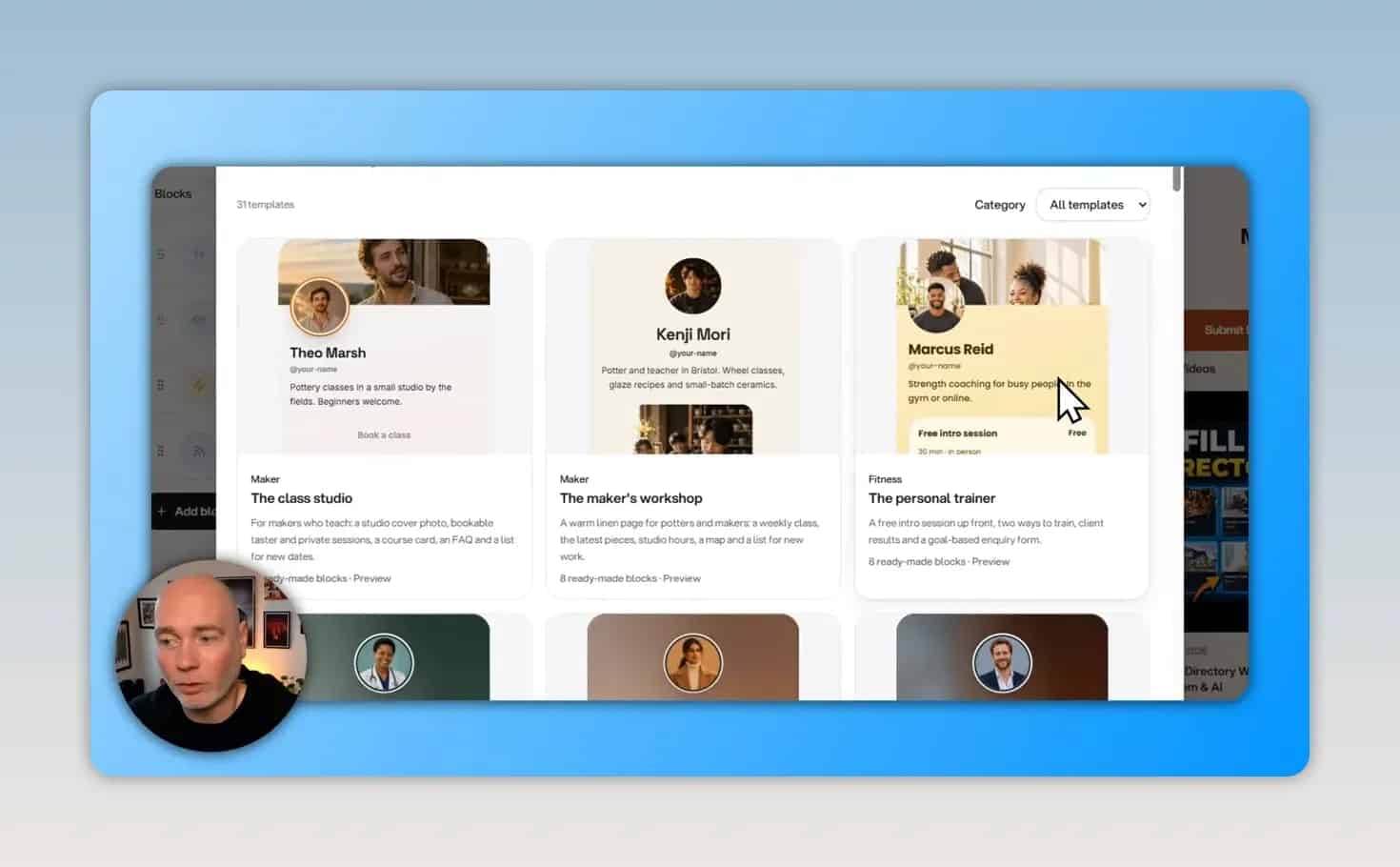
A practical approach is to choose a layout first, then refine the colors and typography. That keeps the initial setup focused on the page’s purpose rather than small design decisions.
Automatically update recent YouTube uploads
A YouTube RSS feed can populate the page with recent uploads and refresh when new content is published. This is useful if the main purpose of your bio page is to help visitors find your latest work without manually replacing links each time.
Use a Glee address or your own domain
You can publish on Glee’s own glee.link domain or connect a custom domain. A personal-name or business domain can therefore point to the microsite used in your social profiles.
Custom-domain support also appears in short-link management. Check your tier’s domain allowance if you plan to use different domains for multiple brands.
A practical first-page setup
- Choose the workspace: Use the identity or brand that the page represents.
- Add profile details: Enter a name, profile image and relevant social links.
- Choose the main action: Decide whether visitors should explore content, contact you or book an appointment.
- Add supporting blocks: Include only the information needed for that action.
- Apply a template: Adjust the layout, colors, fonts and button style.
- Set the page address: Use a Glee URL or connect an available custom domain.
- Test the page: Check links, forms and booking options before sharing it publicly.
Use Short Links and QR Codes Beyond Your Bio Page
Glee’s short-link tools work independently of the bio page. You can create links for marketing campaigns without adding them to your public profile.
The basic process is to paste a destination URL and choose a domain. Glee then generates a short link and an associated QR code. Additional options cover:
- Custom-domain connections
- Sharing previews
- Pixels and retargeting
- Tracking
- Routing
For example, a Facebook advertising campaign could use a Glee short link while your bio page remains focused on your general profile. These are separate uses of the same platform.
There is also a dedicated QR code generator. Enter a URL, then choose from the available visual styles.
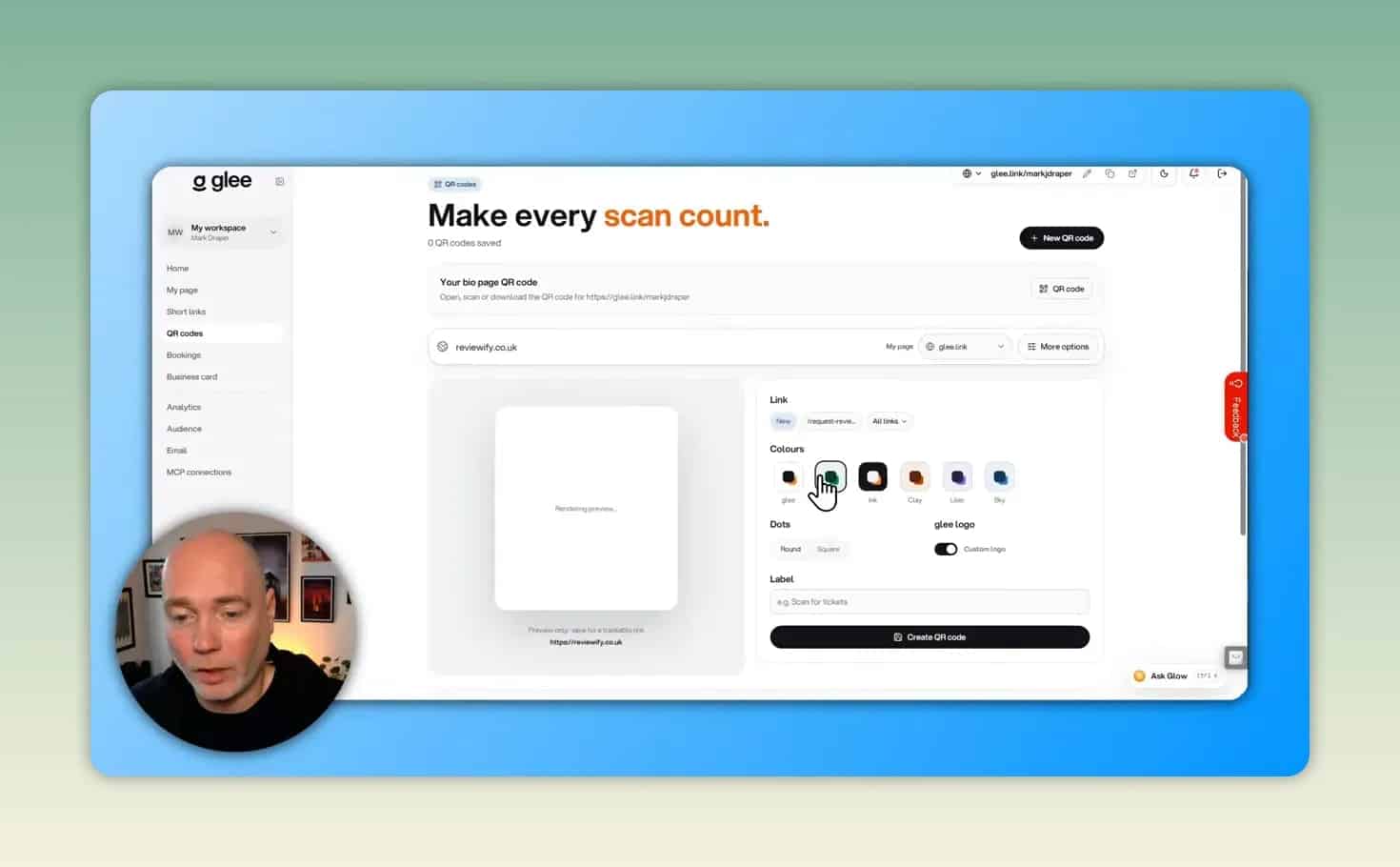
Practical check: Test the finished short URL and scan the QR code before placing either in a campaign or on printed material.
Turn Interest Into Bookings and Contacts
Appointment scheduling
Glee’s booking feature lets you create an event type with a name, description and duration. Meeting-location options include in-person appointments, phone calls, Google Meet and Zoom.
You can also add questions for the person booking, choose whether to add them to an audience and require approval for the meeting.
The key distinction is payment: free appointments can use Glee’s native booking option, while paid appointments use an external booking page. Connections to Cal.com and Calendly are available, so scheduling may remain partly dependent on another platform.
Digital business cards and NFC sharing
Digital business cards provide a separate way to share contact details at conferences, trade shows and networking events. You can customize a card’s basic appearance and share details that recipients can save to their contacts.
Glee also offers an NFC-tag writing option on mobile. With a suitable phone and tag, you can write the card details to an NFC business card, key ring or similar item. Someone scanning the tag can then open your digital card and save your information.
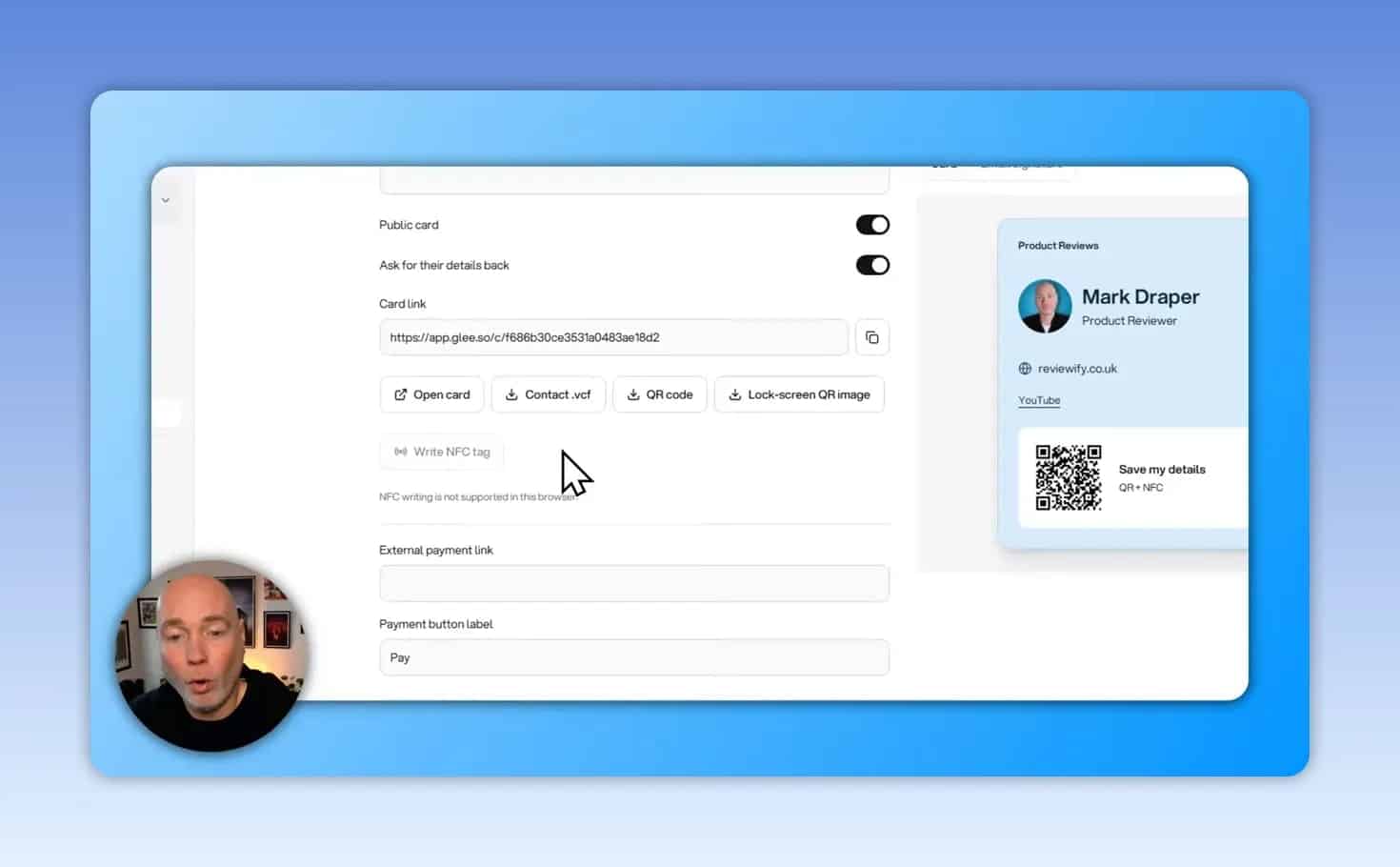
An event-specific card is one practical use: create a version for a particular conference and choose the information relevant to those contacts. Test the NFC-sharing process with your intended phone and tag before relying on it at an event.
Analytics, Lead Management and Email Integrations
Built-in analytics show page activity, clicks and visitor locations. This provides a way to review engagement without connecting a separate analytics service for those basic insights.
Captured leads appear in an audience area. Integrations with Zapier, Make and Pabbly Connect can help transfer contact information to an existing CRM, Google Sheet or other contact database.
Email delivery requires a provider
Although Glee includes an email tool, it does not deliver messages on its own. Supported connection options include:
- Custom SMTP
- Resend
- Brevo
- SendGrid
- Mailgun
That distinction matters when estimating costs. Consolidating the interface does not necessarily remove the need for an email provider or its associated charges.
AI Assistant and MCP Support
Glee includes an onboard AI assistant and MCP server connection instructions. Its AI-related capabilities cover areas such as bio pages, analytics and short links.
MCP, short for Model Context Protocol, provides a way for compatible AI applications to connect with tools and data. The official MCP documentation offers background on how that connection model works.
A compatible assistant such as Claude is another possible way to interact with Glee through its MCP connection. However, do not assume AI usage is included without additional requirements. Lifetime users may need to supply their own API key for the onboard assistant, so confirm the applicable terms and any separate AI costs.
What to Check Before Switching to Glee
- Count bio pages, not just links: One workspace supports one bio page.
- Check monthly clicks: Unlimited short links do not automatically mean unlimited traffic.
- Verify paid-booking requirements: Paid appointments depend on an external booking page.
- Budget for connected services: Email delivery and AI usage may involve separate accounts or costs.
- Test integrations: Confirm that leads reach the CRM, spreadsheet or database you actually use.
- Check custom-domain allowances: These matter when managing several brands.
- Confirm promotional terms: A Black Friday lifetime offer should not be treated as permanent pricing.
Verdict: Is Glee Worth Considering?
Glee is a compelling Linktree alternative when you also need campaign links, QR codes, bookings or digital business cards. Its value comes from bringing those related tasks into one workspace-based platform.
The strongest fit is a creator, consultant or small business that can use several of these features together. If you only need a basic list of links, much of the platform may be unnecessary. If you manage multiple client pages, workspace and traffic limits deserve close attention.
The best next step is to test one complete workflow: build a bio page, connect a booking option, capture a contact and review the resulting analytics. That will tell you more about whether Glee can replace your existing tools than the lifetime price alone.